IBM Interconnect 2017 Conference
Lab 2334 – Watson IoT Platform Risk and Security Management
Abstract
This lab will explore the new Risk and Security Management capability in Watson Internet of Things platform. You will get hands on experience on connecting devices, configuring client and server certificates, managing connection policies and tracking compliance to the configured security policies. You will also review the Risk and Security Management user experience and provide your feedback on the usability of the design.
Adopting IBM Design Thinking for Solution Development
This blog share some of our latest experiences from the Product Line Engineering (PLE) delivery team in adopting these processes and the way we started applying IBM design thinking to our solution development supporting businesses that include embedded software development.
Last year, AmyS blogged on the progress defining our internal Continuous Delivery process. To follow up on those concepts, I would like to share some of our latest experiences from the Product Line Engineering (PLE) delivery team in adopting these processes and the way we started applying IBM design thinking to our solution development supporting businesses that include embedded software development.
Design is good business!
IBM recognizes that good design is good business. And there is a long tradition to back up that statement. Lately, IBM Design Thinking has gathered design practices to identify and ideate on the aspects that makes a solution desirable to its users; the Who, the What and the Wow! These aspects become the mission for release(s) and the business requirements for the solution. Amy identifies these as the business planning artifacts at the top of the planning taxonomy. We call these Release Hills.
Figure 1. Cross-Solution Planning Taxonomy.
The use of Hills to capture the WOW’s
For delivery of improved capabilities for product line engineering, the team has focused on three Hills to drive innovation, to drive our work, and to organize and track our activities. Our first Hill ‘Work in configurations with artifacts and links’ focuses on core capabilities introduced in our solution on configuration management, with streams and baselines of engineering artifacts. The second Hill ‘Create and use product definitions’ extends the value of the first Hill with more targeted support for advanced product line engineering practices and use-cases. Our third Hill ‘Track and report on configurations of engineering artifacts’ is orthogonal to the first two and adds complementary capabilities to the solution with dashboards, queries and reports. To refine our mission to a focused and executable level we have also defined sub-hills that narrow-in scope and prioritize sets of features.
Organizing our solution artifacts by Hills
At the next level in the planning taxonomy we use the Hills as our primary organizational item for solution artifacts. At this level we use Rational Team Concert work items to capture our Epics and Features. And we use Categories to represent the Hills. This makes the process of classifying new capabilities simple by just using the Filed Against field when assigning Epics and Features to a Hill. We refine Hills into Epics to represent our sub hills. Features then become children under their parent Epics to further refine the capabilities into work that we can execute on within a single release cycle.
Our solution features are to be delivered by the impacted products, e.g. Rational Team Concert, Rational Quality Manager, Rational Doors Next Generation and Rhapsody Design Manager product development teams. Any enhancements to products are planned using Plan Items and Stories in each impacted product backlog respectively. To manage relations between solution features and application plan items we use cross-project Tracks links. This linking provides transparency to commitment and plan of delivery. It also provides transparency to progress on work and in-context collaboration.
Figure 2. Artifacts used for solution and product planning.
Using scenarios and playbacks to explore and validating our design
Scenarios are a key concept in our design thinking. They ensure that we can deliver our features in a coherent, usable and desirable solution. Scenarios also support our activities on innovation, exploration and validation. Much like a movie script we let our personas act out in the scenes using scripted steps. Hence, each scenario Act is decomposed into Scenes where the scenario personas act through Steps interacting with the tools and collaborating in context of a configuration of engineering artifacts. As indicated in Figure 2 above, our scenarios are linked to the features used in each scene using an Implements relation. Using these links in figure 2 we can report on important delivery metrics. As a few examples, lately we have been using the Rational Engineering Lifecycle Manager (RELM) product and the Lifecycle Query Engine (LQE) to index our solution artifacts and provide traceability reports that outline the dependencies and coverage of Plan Items to Features, Epics, Scenes and Hills. This creates a great overview of the design artifacts. On our delivery dashboard we use the artifacts to present key design metrics like; ‘Scenarios with no features’, ‘Features with no scenarios’, ‘Features with no Tracks’.
For our PLE scenario we use a storyline on ‘Fixing a defect in a product variant’. This scenario is exploring in the first act how the scenario personas will initially ‘reproduce the defect’ using the engineering artifacts in the released baseline configuration. In the second act the team will ‘create a new delivery configuration’ with updated engineering artifacts resolving the defect. In the third act the team explores the opportunities for reusing the fix when ‘delivering and baselining a fix to the product line’. Our personas acting in the scenario are the Product Line Manager, the Project manager responsible for product line delivery, the Development lead responsible for platform component delivery, the Configuration lead, a Systems engineer, a Embedded SW Developer and a Tester. To show progress on the solution delivery we conduct frequent playbacks of the scenarios using initially low fidelity mockups and prototypes. Over time we converge to more stabile high fidelity wireframes and working code by milestone.
Exploring design options and usability
Lately we have been using playbacks to explore design options and usability aspects on how the scenario personas are interacting with the configuration management application when creating streams and baselines of configurations. Using a scenario and playback design approach helps us in clarifying implications to usability and consistency across the solution.
Download article
View article on IBM DeveloperWorks
Learn more about IBM Design and IBM Design Thinking on ibm.com/design
IoT Security Heartbeat iPad Application demonstrates how existing IBM products in the IoT and Security portfolios are providing better insights and responses to security threats using a Operational Dashboard
In 2017 I delivered the design for an IoT Security Heartbeat iPad Application demonstrating how existing IBM products in the IoT and Security portfolios are providing better insights and responses to security threats.
IoT Security Heartbeat Scenario
The IoT Security Heartbeat demo is designed around a business case scenario
Business Context
ACME Inc is a company producing multiple product lines of IoT white goods devices to two kinds of customer.
Unmanaged: Sell product for B2C with limited support. Firmware upgrades provided
Managed: Sell products B2B. Monitored, managed and upgradeable over the network. Compliance level SLA.
Personas
The CISO, or CSO, is directly responsible for risk, compliance, securing and protecting the assets of the business—including employees, data, IT infrastructure and information, plants and customers B2C and B2B managed and unmanaged IoT devices
Operational Dashboard and Security KPIs
CISO views the Operational Dashboard to confirm the IoT security state
High-level domains description:
Overall Enterprise Security
Connected Plant
Customer Endpoints
Business Alerts
Intelligence
Risk Forecast
Examples of Overall Enterprise Security KPIs
Endpoints Security Score – Fixed and Mobile devices
Application Endpoints Security Score
External Service Security Score
Identity Management
Network Connectivity
Geographies Alert Level
Governance Maturity Score
The Geographies Alert Level is Low based on current state of threats from IBM X Force Exchange
Scene 1 – Production plant IoT security issue
There has been a fire that caused damage to the manufacturing facility at Globex Inc. The fire centered around an exit door. Upon further investigation, it was clear that the source of the fire was an electric motor used to automate the security shutters on the door. Fortunately, nobody was harmed and the fire was contained, but the consequences could have been grave.
There are serious safety concerns in relation to risk to human life, as well as the potential negative impact to the reputation of, Globex Inc;, the manufacturing facility and the reputation of the brand for Oscorp Inc, the OEM company, supplying the faulty electric motor.
The Intelligence domain and Current News KPI becomes Amber indicating a warning on security risks with Supplier Risks Alarm on Oscorp Inc
Scene 2 – FW Version Update Status
The Intelligence domain and Suppliers Software Updates KPI becomes Amber indicating a warning that some of our devices needs to be updated (FW).
Devices need to be updated because we have a new firmware available from the OEM
Our current understanding of the FW update content upgrade => NOT CRITICAL
Upgrade postpone until next standard planned maintenance
Scene 3 – High level of Attacks/Threats on our Oscorp devices
The Connected Plant domain and Incident Management / Attempts KPI exceeds its threshold and becomes Red (Alert) because we are facing massive attack tentative on Oscorp Inc devices.
The debugging code left in the device opened up a security hole allowing the possibility of remote commands to be sent to the device outside of safe operating ranges. The IP addresses had been detected in relation to unauthorized access to other critical computing resources. In some instances devices were ‘cloned’ and malicious connections were attempted from those cloned devices to skew IoT data readings.
Scene 4 – Business Impact Alert on Production
The Business Impact domain and Incident in Production Floor becomes amber because of current attacks on Oscorp. Devices may have a huge impact on our production planning.
Scene 5 Watson Alert / Prescription / Recommended Actions
Watson raises an alert with Production at Risk, Compromised security and High level Physical Safety issue.
Prescription: Upgrade as soon as possible Oscorp Inc. devices with last Firmware update
Show how to enforce near real-time Firmware Upgrade
Show how to “isolate” those devices
Show how to plan countermeasures
Start a business process/workflow
Options are provided for resolving the risk with a Security optimised route, or a Cost Optimised route.
ACME is choosing the Cost Optimisation route and schedules device FW updates based on a need scheduled update cycle. It minimises the impact win business and any demands for production downtime. By choosing this route, relevant people in the ACME organization are notified of the conditions and plan.
Scene 6 – Intelligence and Sentiments Analysis on Social Media
The Operational Dashboard provides intelligence and insights into customer satisfaction related to product security. ACME provides B2C smart products to end consumers and managed products under SLAs for B2B clients.
The Intelligence domain and News Awareness becomes amber because clients satisfaction is dropping and Sentiment Analysis in Social Media is indicating product, security or vulnerability issues. These early indicators may not yet show in corporate support channels.
Scene 7 – Business Alerts
The Business Alerts and Variation in Client Support Requests becomes amber because because the increase in client support requests on product malfunctions. This is impacting the ACME operational cost but also indicating a risk to client operations.
Scene 8 – Customer Endpoints The Customer Endpoints and Policy Compliance Score becomes amber because the Enterprise Assets KPI is dropping. Drilling into the data source of Device Security Policies in the Watson IoT Platform we see that a significant number of devices are failing to authenticate. This suggests that there is an issue.
Scene 8 Watson Alert / Prescription / Recommended Actions
Watson issues an Alert on the condition.
To the left, notifications on Compliance, Customer, and Social Media KPIs. To the right, prescriptions from Watson on the root cause and suggestions on further actions
This concludes the IoT Security Heartbeat demo.
“Ninety-four percent of CxOs believe it is probable their companies will experience a significant cybersecurity incident in the next two years.”
“An effective tactic to combat cybercrime is transparency and collaboration, sharing incident information internally and externally. Improve awareness and drive a more risk-aware culture across the entire organization.”
“The trust on comfort on cybersecurity strategy of their enterprise is well established is widely different. 76% of The trust on comfort on cybersecurity strategy of their enterprise is well established is widely different. 76% of the CIO’s agree – 51% of CEO’s agree .”
The IBM solution for Continuous Engineering delivers rich capabilities for impact analysis. And we are seeking ways to make use of these capabilities easier by removing tool boundaries, enabling collaboration in the I/A process, simplifying the building and using tabular and diagram report views, and simplifying the building and using visual views. This session discusses the need for Impact Analysis.
k validity is a status on a link between artifacts to indicate whether the contents of two artifacts meet the intended meaning of their link. This session introduces the Validity concept and the user experience design.
The PLE solution is impacting the user experience in all participating CE tools. The PLE design is not just the look, but also the same behavior across the solution. This session discusses the consistent items and their ranking in the product plan.
The scenario is a key artifact in our design. It ties together the personas and their objectives with their workflows and pain points. It forms the basis we derive solution requirements, like release hills. And the way we validate our design using playbacks.
There is a large variability in how I have used scenarios across Green Threads, GDD, CLM, SLM, PLE, and IoT projects. A few examples are given below. All scenarios use a visual representation of the scenario flow as Acts and Scenes.
Scenarios always benefit from a context or a story. It builds on the personas and provides an organizational context to the individuals. For example, in the scenario for Global Development and Delivery (GDD) we tell the story of a global organization sourcing work to near-shore and off-shore teams.
In the Story below I describe the personas, their objectives, and hint at their geographical distribution.
Then, on the Solution, I discuss more their responsibilities and activities. And I indicate the application artifacts and tools each of the personas is interacting with. The relation between the personas and the artifacts is key in the Application Lifecycle Management (ALM) scenarios. Note that colors also give hints on their geographical distribution and artifact ownership.
I find it valuable to have a single page outlining the overview of the scenario. It becomes a great image to present the high-level objective and flow of a scenario and its personas. Two examples below from initial GDD scenarios. And later scenarios for ALM.
I use scenarios to report on solution gaps and user pain points as we declare state our as-is and to-be products. Two examples below from capturing tool gaps and user pain points.
A final example from the design of First-day productivity for the Systems and Software Engineering solution. The scenario outlines the discover-try-buy scenario, the personas, and their interactions in exploring and adopting the solution in a project.
Learn more about IBM Design and IBM Design Thinking on ibm.com/design
The Watson IoT Platform team is using an agile way of working to design, develop and deliver new capabilities for the IoT Platform service in Bluemix. Such new major capabilities are identified as market or customer need, specified as requirements using Rational Doors NG, and managed as a ranked backlog. The team is delivering the backlog using an agile 3-week sprint heartbeat.
The sprint objectives and the outcome is varying depending on the phase in the design – develop – deliver lifecycle for a new capability. The initial phase defines the concepts and scope of the design. Later phases harden the UX design and deliver front-end and back-end implementations of the design.
A key success factor is the teaming across the disciplines across offering management, design, and development. And the right-sizing and right-staffing of the sprint teams. The concern and issues addressed by this practice is to ensure that the teams are engaged, right-staffed, and committed to the delivery. It avoided a situation where design is executed in a planning vacuum with major trash and rework as the development teams get engaged.
Let’s start and explore the expectations, inputs, and outcomes of each sprint type and the team personas participating. The phases, roles, dependencies, and outcomes in figure 1 below are discussed.
The first stage is a Concept and Plan sprint focusing on the product definition. A sprint team is formed by the design lead(s), Architect(s,) and Offering Manager(s).
The concept and plan sprint requires strong offering management and design lead participation. To ground the concept in the existing solution architecture there is a requirement of lead architect participation. A core team is formed that is responsible for defining and delivering the concept and the delivery sprint plan. The playback of the outcome is a driver and a forcing function by schedule to get early agreement on the concept scope and objective. The core team stays as a governance body for the later phases to manage and approve changes to the concept and plan.
For this concept and plan stage the inputs are:
High-level market and product requirements on the new capability
Design Thinking user research artifacts, e.g. stakeholders, and stakeholder needs
Existing Hills where the new capability may be a new sub-hill
The outcome of this concept and plan stage is:
An approved set of requirements capturing the Minimal Viable Product, MVP.
Hills defines the user value through statements of Who, What, and WOW.
The Epics that will deliver the hills. The hill is complete when the epics are delivered.
The Stories that deliver the Epics. A story is delivered in one sprint.
An end-to-end high-level scenario that can be played back as a statement of the hills
UX and APIs
The second stage is focusing on exploring the User Experience and the APIs for the new capability. The objective is to harden the MVP by validating the concept in the context of the IoT Platform.
For this stage, a sprint team is formed with UX Designer(s) and Architect(s). UX playbacks are demonstrating the capability experience. Any updates and additions required to the solution architecture are identified. The stories in the plan and broken down into actionable tasks.
The outcome of this state is:
Validation that requirements can be met
Elaboration of the Stories and breakdown into actionable RTC work items or GitHub issues.
UX designs (LoFi) for the scenarios
UX, Front-End, and Back-End development
The following stages are focused on delivering one or more stories in each sprint. UX design is leading and handed off to front-end and back-end development. The sprint teams are formed with UX and Visual designer(s), Front-End and Back-End developer(s).
The outcome of this sprint is:
Completed work items or issues
Completed UX designs (HiFi)
Playbacks of UX designs or running code
Summary and Conclusions
The Watson IoT Platform team is using an agile way of working to design, develop and deliver new capabilities for the IoT Platform service in Bluemix. The benefits are:
Embedding design thinking practices into the agile development process
Cross-discipline teaming
Right-timing, Right-sizing, and Right-staffing the agile sprint teams
Early delivery and hardening of design concepts
The workflow has been successfully established and used for the design of new Watson IoT Platform capabilities, like design and delivery of Risk and Security Management and Information Management.
Learn more about IBM Design and IBM Design Thinking on ibm.com/design
Working with a group of users is an effective way to make progress on conceptual and detailed design. Such workshops run from 2h to 6h using the Stakeholder Map, Empathy Map, Prioritisation, and Experience Map tools. Workshops quickly bring together teams and team members in a creative environment.
Design Studios
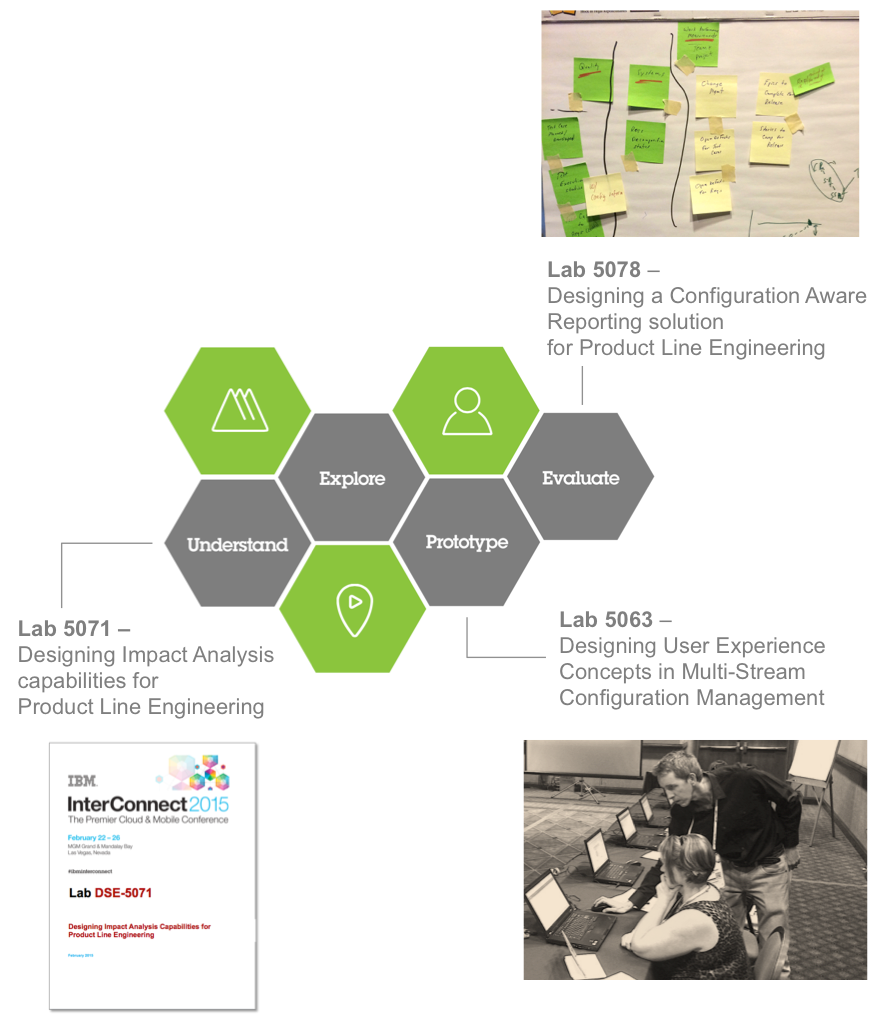
At IBM conferences like Innovate, Interconnect, and Insight we often get the opportunity to run design labs. These labs can support the design lifecycle we use both at early phases of Understanding, as well as later phases where we Prototype or Evaluate. The example below is from the three design studio labs in 2014 where we researched the PLE solution.
Sitting down with a client in a 1-1 interview will generate essential research information. Shadowing a user is another way to observe the as-is workflows and pain points.
I favor a style of dialog using a whiteboard to capture workflows and artifacts. This benefits my graphical way of thinking and engages the client. The sketches can easily be an overview where pain points can be identified. What works really well (tagged green), and what does not work that well (tagged orange/red).
Stakeholder Maps
Stakeholder maps are a great way to get started with a new group of clients, or a client team. It makes attendees start standing, ideating, talking, and telling. It generates a holistic view of the solution space and its stakeholders. It provides a mechanism to discuss and establish priorities and scope.
Empathy Maps
I use Empathy maps to capture the details of Stakeholders and transform them into Personas. An Empathy map is a great tool to capture how clients interact with a solution and their expectations as it captures what a persona Says, Thinks, Feels, and Does.
Personas
Empathy maps become the source for persona definitions. I often come across stakeholder that becomes variants of our more general personas. In such cases, I document this using “Also know as…”. It’s an act of balance in capturing important differences in personas and keeping a generalized level to make personas applicable across the solution and across industries.
Personas documented in the Requirement Management solution.
Sometimes we want to generate a bit of external nterest for personas. This is a cool set of trading cards we created for the Innovate conference using the Product Line Engineering (PLE) personas. These giveaways generate interest and conversations.
Experience Maps
Experience maps are a tool to outline a scenario. It captures the major and minor steps as the personas interact with the solution to achieve an objective. The example below is an experience map from PLE design on the steps to create a global configuration baseline. The experience map was created by the InnerCircle members across multiple industries at the IBM Innovate conference.
Example of Experience Maps for an Operator persona managing maintenance of assets in the Natural Resource industry.
Learn more about IBM Design and IBM Design Thinking on ibm.com/design


 “Ninety-four percent of CxOs believe it is probable their companies will experience a significant cybersecurity incident in the next two years.”


 Contact me via email