Design Portfolio







Automated Meter Reader Scenario
The AMR Scenario
The Automated Meter Reader scenario, used in Product Line Engineering design, uses a fictitious company JK Meters Corp, aspiring leaders of Smarter Flow Products for Utilities.
About JK Meters Corp
The Metering Division at JK Meters Corp has a range of Automated Meter Reader products in its product line. The innovative flow detection solutions combine flow sensors, digital monitors integrated with network communication features that are installed both above and below ground, units for gas and water pipe and pump attached flow control, along with meter reader equipment to commission and extract metering information, increasingly using wireless technologies. The Metering division also develops applications that provide industry partners and consumers with analytics on consumption, diagnostic, and status and solutions for customer billing and service management.
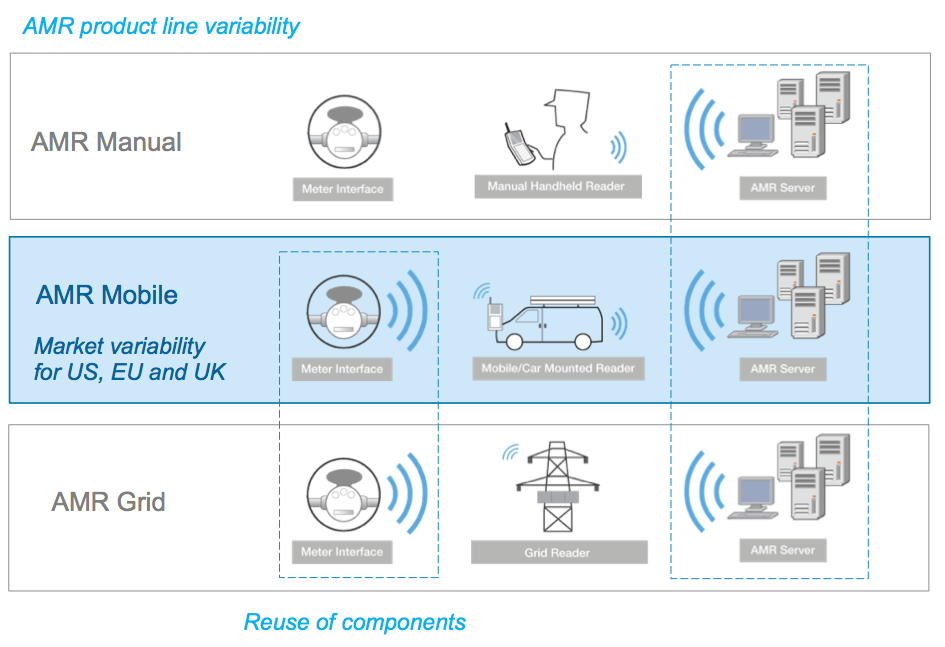
The most successful product is the Automated Meter Reader for Water Flow (see figure below). The product consists of meter interface units mounted on water pipes. The meter interface unit measures flow and delivers data to handheld or car-mounted meter readers. The registered meter readings are uploaded from the handheld devices to the AMR server data management system manually. Uploading of data is performed continuously by the mobile meter readers using a mobile network connection, or manually when returning to the office at the end of the day when using the manual meter reader product.
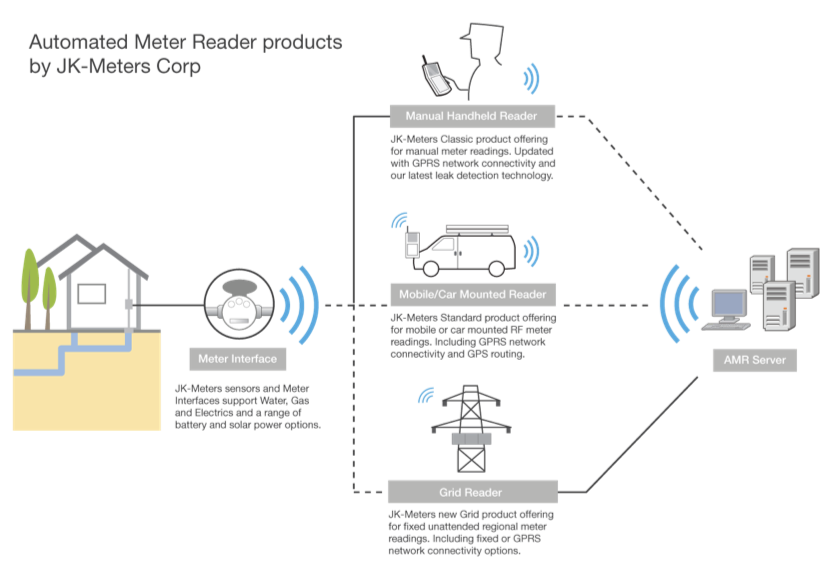
The Automated Meter Reader products are delivered to utility customers worldwide and the products are developed with variants for each regional market. The variants are configured for regional requirements on power voltage, dimensions on pipe mounting, regional units of flow and volume, language configuration for the handheld meter readers, and regional city maps for GPS routing.
The Metering Division is currently investing in improved features in the product lines and new AMR products. An innovative new AMR Grid product reduces the operational cost of utility services by providing fixed grid meter readers that continuously read a wireless grid of residential or industrial meter interface units and uploads data over a fixed network connection.
About the Organization in the Metering Division
Under the direction of Product Management and Sales, the Metering Division organizes Development, Product quality, Operations with production and maintenance in North America, Europe, India, and China. Development is organized around Enterprise systems for IT, business, and analytics applications and products, and on Sensor systems with integration of sensor technologies and devices. 3rd party suppliers are used for some sub-system development and delivery (not emphasized within the current scenario). The Metering Division teams are distributed and rely on a common product and systems development lifecycle infrastructure for development collaboration and product delivery.
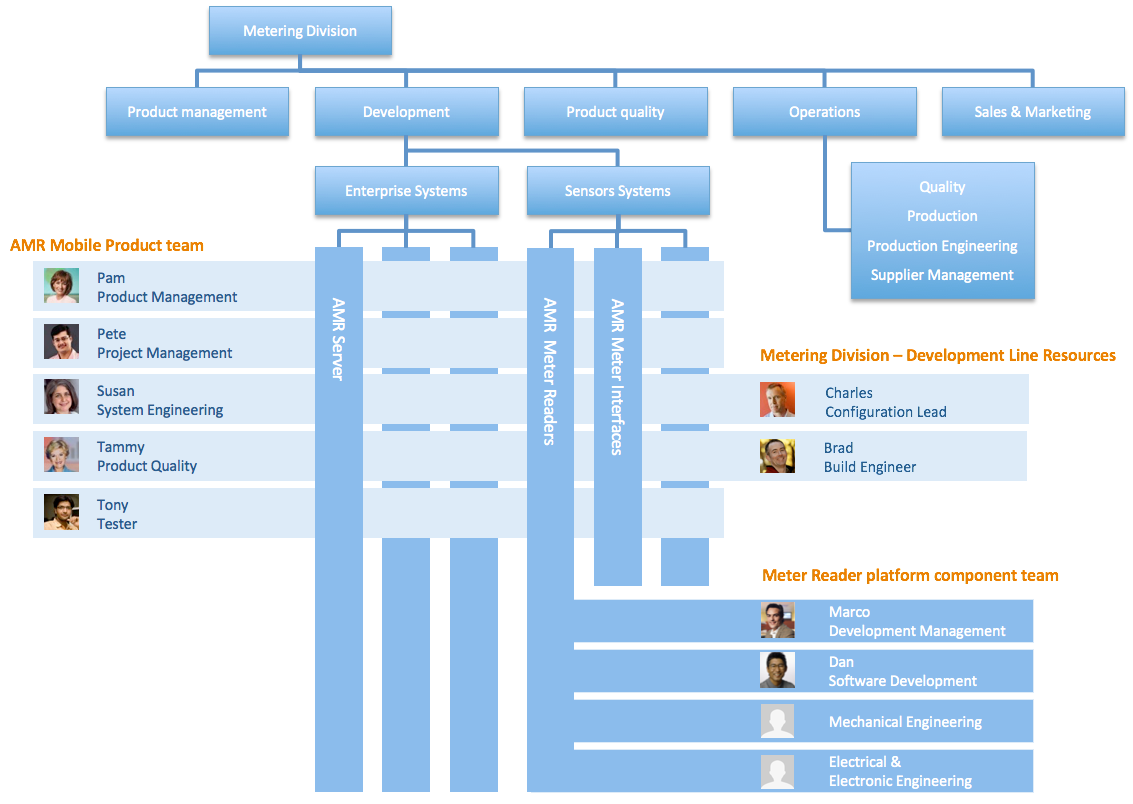
The Metering Division organizes its Development in a matrix of projects and disciplines. The disciplines, managed by discipline managers, are responsible for the definition and continuous improvements of practices and contributor skills. Team members from the discipline are assigned to the project organization and work in the product development team under the leadership of a project manager.
The success factors for the Metering Division Development is to achieve better use of development resources by improving the reuse of parts through product configurations, improvement in product quality, and productivity improvements through collaborative design of hardware and software sub-systems. JK Meters Corp has the initiative to improve the performance of its development and delivery activities for the Metering division. The AMR product development team has deployed IBM Rational’s Systems and Software Engineering solution are currently using change management (CM), requirements management (RM), model-driven systems engineering (MDSE), and quality management (QM) capabilities.
About the AMR Product Line
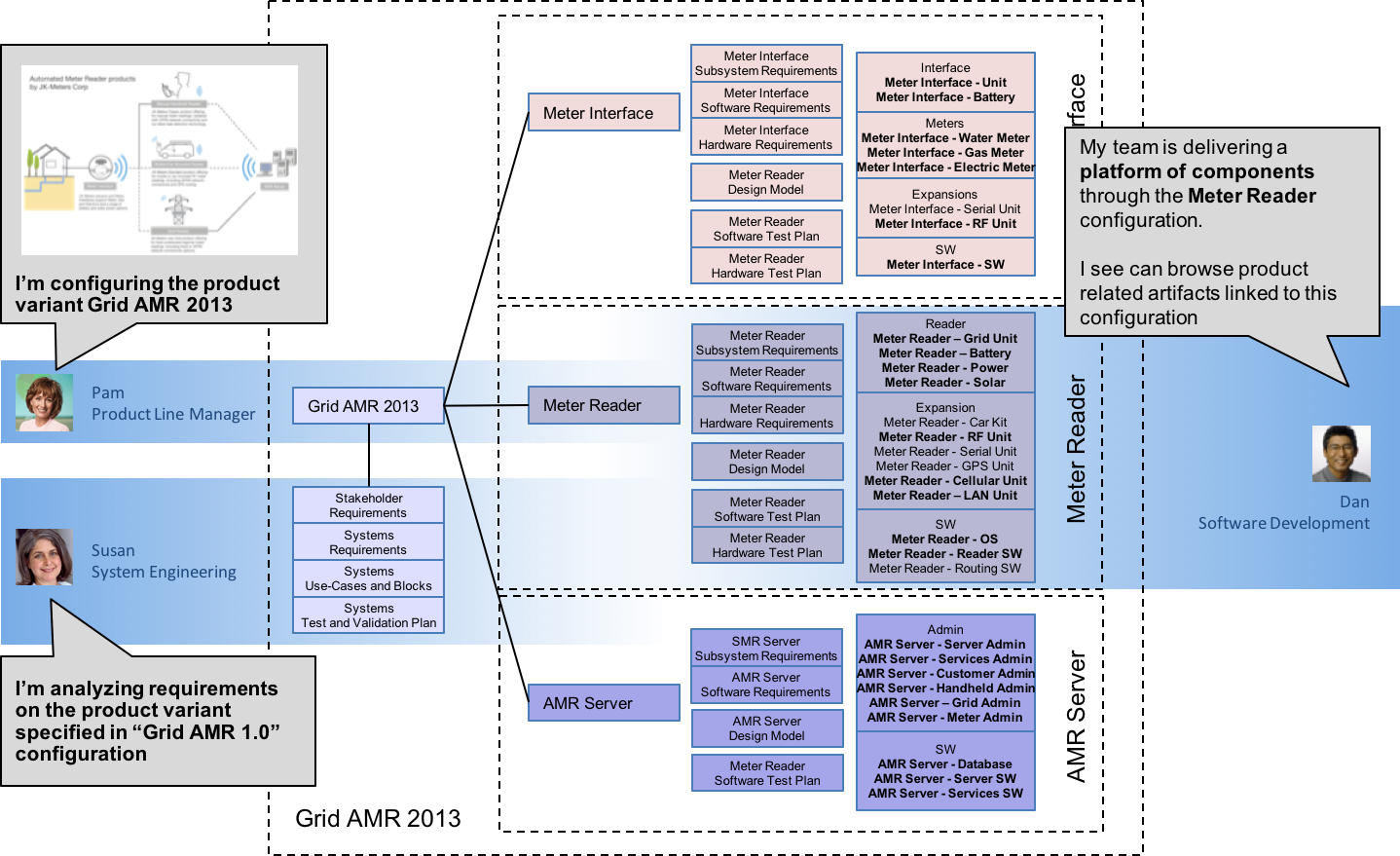
The Automated Meter Reader products are configured from reusable components. These component subsystems are developed and delivered by the Meter Reader, Meter Interface, and AMR Server platform teams.
The AMR Manual product is configured from a Wired Meter Interface unit, a Manual Handheld Reader, and a generic AMR Server that is reused across the product line. The AMR Mobile and AMR Grid reuses the Wireless Meter Interface unit but differs in using a Mobile reader vs Grid Reader.
The Automated Meter Reader products have been delivered to utility customers in the US. JK Meters Corp is growing its market share by developing variants for other regional markets. The variants are configured with regional requirements on power voltage, dimensions on pipe mounting, regional units of flow and volume, language configuration for the handheld meter readers, and regional city maps for GPS routing. Meter Interfaces, Mobile Readers, and AMR Servers are adapted and regional variants are created for each market in the US, EU, and the UK.
Meter Interface
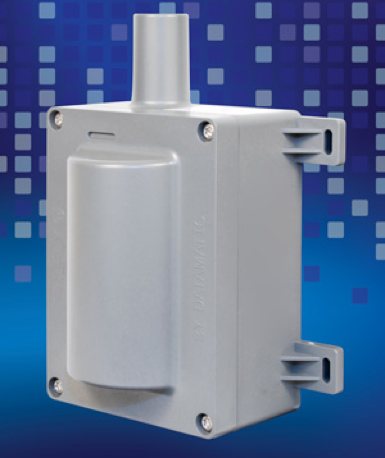
The AMR Meter Interface is an electro-mechanical unit that connects to water pipes, gas pipes, or electrical cords and measures flow consumption and triggers alarms based on events and analytics. The unit is based on a standard microcontroller that connects to a sensor and runs the AMR Meter Interface embedded software and additional drivers for the sensor type. Backup power and communication components are attached to the controller.
AMR Meter Interface Parts
- Microcontroller board
- AMR Meter Interface SW
- AMR Water Sensor + Water Sensor Driver
- AMR Gas Sensor + Gas Sensor Driver
- AMR Electric Sensor + Electric Sensor Driver
- AMR RF unit + RF antenna + RF Driver
- AMR Meter Reader connector unit
- Rechargeable Lithium-ion Battery Pack
Handheld Reader
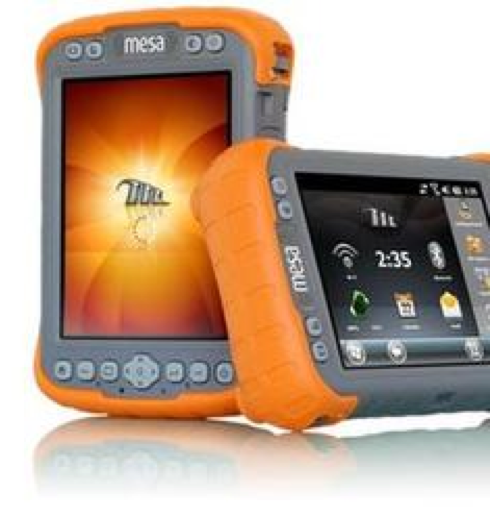
The Handheld AMR Meter Reader is a rugged handheld Microsoft® Windows Mobile® tablet that connects over wire or RF to Meter Interface units for reading and uploading water, gas, or electrical flow consumption data and alarms. The unit provides GPS routing and Cellular GSM (EU) or CDMA (US) connectivity to AMR servers.
The unit is based on a standard tablet and runs the AMR Meter Interface Windows Mobile software. It integrates with Windows Mobile applications for messaging, map management, and routing. The unit may be ordered with a car mount kit that charges the unit and connects to the car audio system over Bluetooth.
Handheld AMR Meter Reader Parts
- Windows Mobile tablet
- Windows® Embedded Handheld 6.5 operating system
- AMR RF expansion unit + AMR RF unit drivers
- GPS expansion unit + GPS unit drivers
- Cellular GSM and CDMA expansion units + Cellular unit drivers
- AMR Meter Reader Windows Mobile Application
- Windows Mobile Routing Application
- Car mount kit
- Rechargeable Lithium-ion Battery Pack

Grid Reader
The AMR Grid Reader is a fixed meter reader that connects over RF to Meter Interface units for uploading water, gas, or electrical and reads flow consumption
data and alarms. The unit provides fixed internet or Cellular GSM (EU) or CDMA (US) connectivity to AMR servers. The unit is based on a standard ARM processor board and runs the AMR Grid Meter Reader Linux embedded software. The unit is equipped with an RF antenna, solar panel power, and a backup battery unit. GSM/CDMA or Ethernet cards are attached directly to the board.
AMR Grid Meter Reader Parts.
- ARM processor board w/ SD disk
- Linux distribution
- AMR Grid Meter Reader Linux Application
- AMR RF communication card + RF antenna + drivers
- Cellular GSM and CDMA USB modem + drivers
- 110/220V Power unit
- 5V Solar panel (optional)
- Rechargeable Lithium-ion Battery Pack
AMR Server
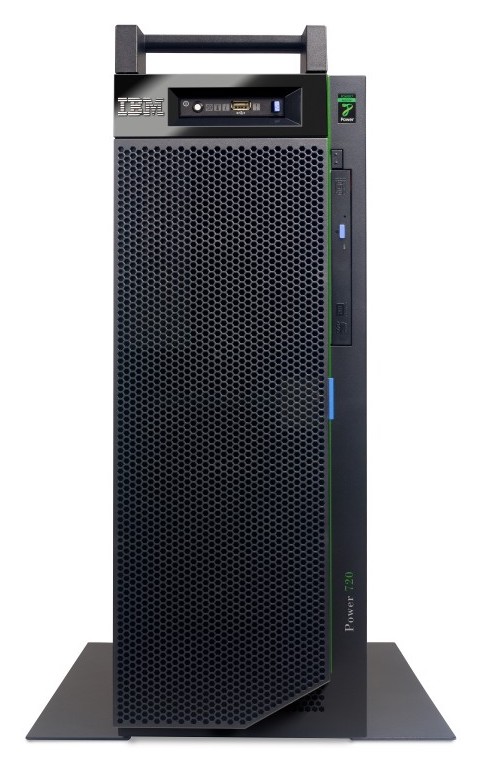
The AMR Server is provided with our IBM partner using the PureData Systems solutions and runs the ARM Server data storage and services applications. JK Meters and IBM offers on-premise, hosted, or cloud configurations.
The AMR Server delivers the AMR data store, the AMR analytics engine, and system administration applications for a customer, infrastructure, operations, and system management. The system also delivers AMR services like billing, reporting, reading, alarms, forecasts and flow analysis, and infrastructure planning.
AMR Server Software Parts
- AMR Administration
- Server administration
- Services administration
- Customer administrations
- Device administration
- GRID administration
- Handheld administration
- Meter administration
Reusable Platform Components and Variant Product Line Configurations
The Automated Meter Reader products are configured from reusable components. These component subsystems are developed and delivered by the Meter Reader, Meter Interface, and AMR Server platform teams. The platform teams deliver the component subsystems with feature variability for the product line. For example, the Meter Interface team delivers wired and wireless variants of the component for the Manual and Mobile products. The Meter Reader team delivers variant components for Manual, Mobile, and Grid products.
Components and Configurations
The Product Line Engineering capabilities in the IBM IoT Continuous Engineering solution is providing support to manage variants of components.
What is a Component?
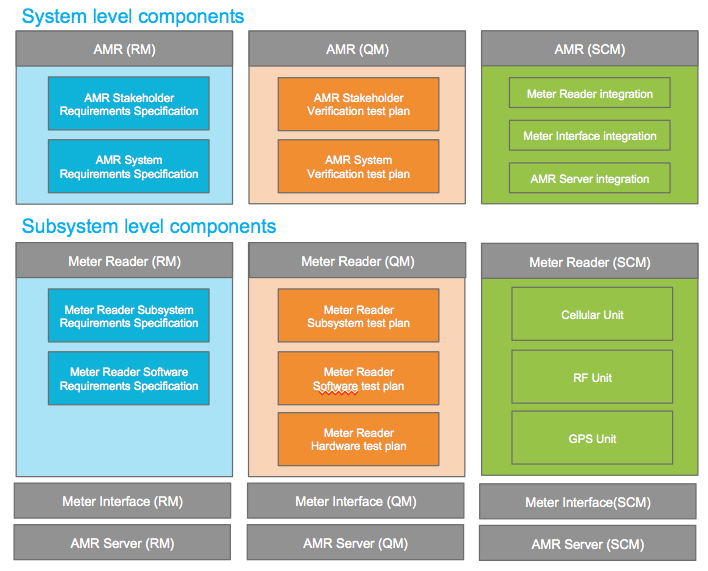
A component is a unit of organization consisting of a reusable set of artifacts such as requirements, tests, designs, and source code. The Automated Meter Reader (AMR) teams are using components to organize the lifecycle artifacts under development. The teams have defined components both at the system/product level and at each subsystem level. Separate components are used to manage requirements, tests, designs, and source code at each level.
What are Configurations, Streams, and Baselines?
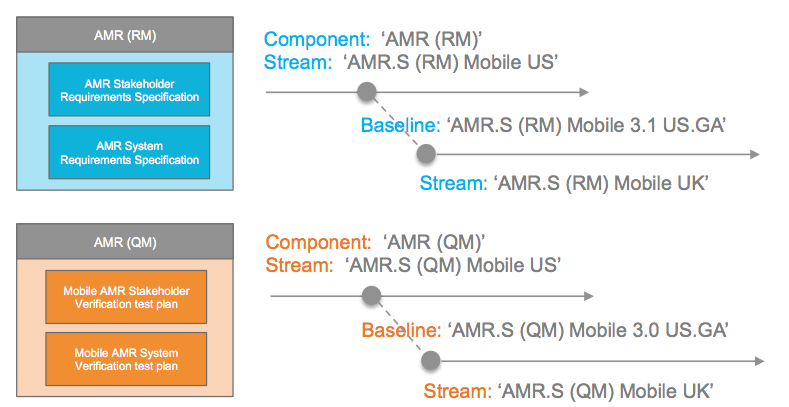
A configuration is a set of specific artifacts versions of a component. A configuration evolves as changes are made to the artifacts in the configuration. At different times it might contain different sets of artifact versions. Such a configuration is also called a stream. A stream can contain changes and is mutable. Snapshots of configurations (streams) at a certain time are called a baseline. Their role is to record a configuration state for either a comparison or simply later reuse. Baselines, can’t be changed, they are immutable.
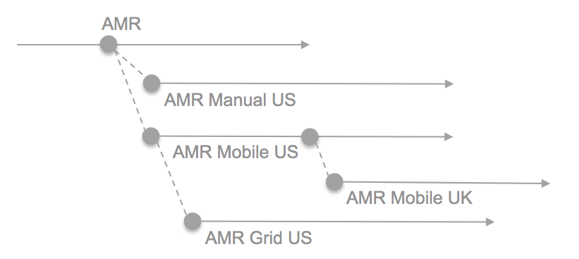
As a configuration is a set of specific artifacts versions of a component, the use of two configurations for AMR system requirements will greatly help in managing the variability of artifacts across the US and UK markets. In two such configurations, common requirements will have the same artifact version but a specific requirement for the UK configuration will have a different version as compared to the US configuration.
The AMR teams are using several streams to manage variability across the product line. Streams are branched for the Manual, Mobile, and Grid products. Streams are also used to manage variability across regional market US and UK products. The stream diagram below shows a conceptual view of the configuration dependencies.
The AMR teams create baselines consistently across all artifact types for each milestone and release. The baselines are used to branch new streams for changes going into the next product release.
What is a global configuration?
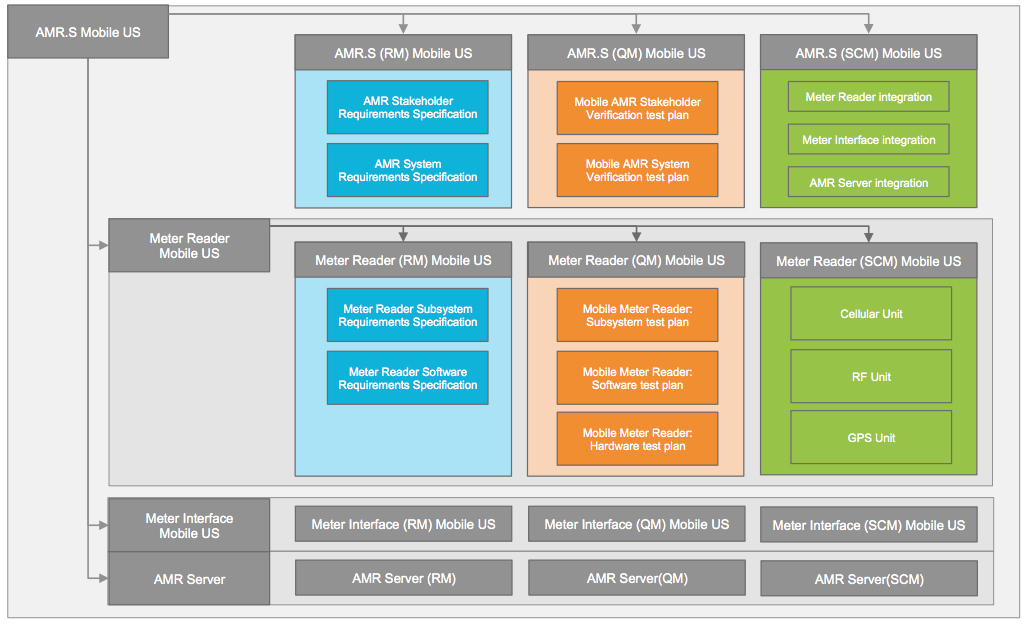
The AMR teams are using global configurations to organize the components for the system level. This enables the system requirements, design models, tests and source code to be managed as a single global configuration. You will use the IBM Rational Configuration Management application to create an AMR Mobile UK global configuration that assembles the requirements and test streams for Mobile UK you created in the previous part. The Automated Meter Reader (AMR) platform teams are using individual global configurations to develop and deliver the Meter Reader, Meter Interface, and AMR Server subsystems.

Product Line Engineering Personas
Project Line, Systems and Software Engineering Personas
In 2014 I researched the additional aspects of Project Line Engineering for the Systems and Software Engineering personas.

Personas

Charles, Configuration Lead. Charles is in the engineering organization. He is supporting the team(s) by administrating and creating stream and baseline configurations. He has a good product line overview and makes decisions on the best options for component versions.

Susan, Systems Engineer. Performs requirements analysis, modeling, and simulation to manage complexity. She collaborates with lead engineers from various hardware and software disciplines to design the system to meet stakeholders’ needs.

Pete, Project manager. Pete is managing the schedule and scope of the Mobile AMR 2013 UK project. He creates and assigns tasks across the team. He makes sure reviews are made and approvals are given. He makes sure the state of artifacts is kept by initiating that baselines are taken. He tracks project measures and makes sure artifacts progress to completion.

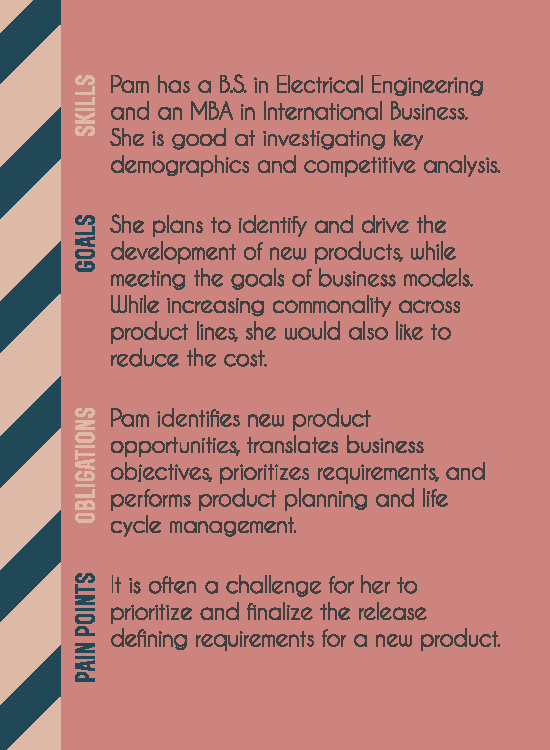
Pam, Product Manager. Pam is in the marketing organization. She works closely with customers to understand market needs and opportunities, and defines and manages products and variants to meet customer needs

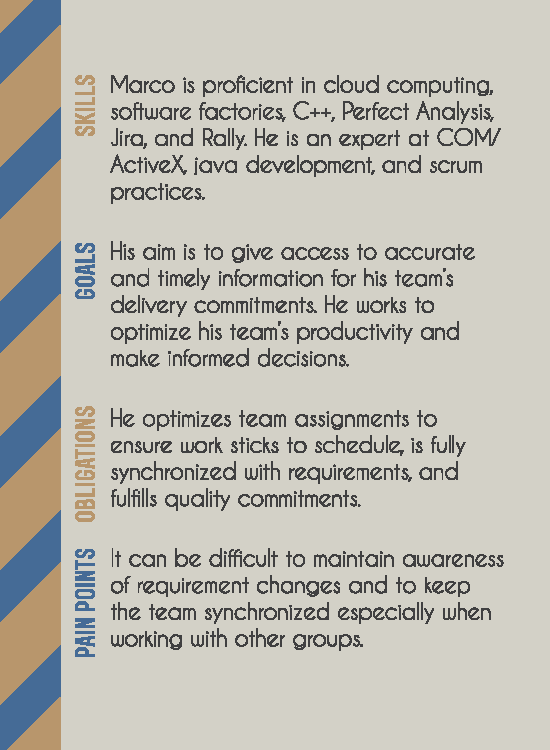
Marco, Development team lead. Leads the Meter Reader platform, development team. His agile team delivers feature components to the AMR product line.

Tony, Systems Tester. Performs automated and manual testing to validate hardware and system requirements.

Dan, Embedded Software Developer. Creates the software design model and implements the System Engineering model. Designs, implements, and unit test the software model using Model-Driven Development.

Allison, Tools Administrator. Installs, Configures and Maintains tools in production. Maintains project templates and creates tool repositories using templates.
AMR Product Teams

AMR Mobile Product team
The personas appear in two types of development teams.
- The AMR Product teams deliver product variants for multiple markets
- The AMR Platform team delivers reusable components for the product teams
the Platform team
The AMR Mobile Product team is responsible for delivering the mobile product variants to the US, EU, and UK markets. The team reuses and refines components delivered by the platform component teams. The AMR Meter Reader platform component team is responsible for delivering reusable components for the AMR project line. The teams share resources for stared tasks, e.g Configuration management, Build, and Tool Administration. Separating the responsibilities of Project and Platform teams is significant and captures patterns of organizing teams and practices around effectively developing product lines.
AMR Mobile Product team
The personas appear in two types of development teams.
- The AMR Product teams deliver product variants for multiple markets
- The AMR Platform team delivers reusable components for the product teams
the Platform team
The AMR Mobile Product team is responsible for delivering the mobile product variants to the US, EU, and UK markets. The team reuses and refines components delivered by the platform component teams. The AMR Meter Reader platform component team is responsible for delivering reusable components for the AMR project line. The teams share resources for stared tasks, e.g Configuration management, Build, and Tool Administration.
Separating the responsibilities of Project and Platform teams is significant and captures patterns of organizing teams and practices around effectively developing product lines.
Susan, the System Engineer
Susan
Systems Engineer
B.Sc., Mechanical Engineering M.Sc., Systems Engineering
“I see the big picture to manage the complexity of the system”
Susan has been with the current company for about 10 years and has over 20 years of systems engineering experience in the industry. Her current project is building a smarter hybrid car. She has a BSc. in Mechanical Engineering and a graduate degree in Systems Engineering.
As part of her daily job, Susan uses a host of tools that include modeling and simulation, requirements analysis to manage complexity. She collaborates with lead engineers from various hardware and software disciplines to design the system to meet stakeholders’ needs, but also interacts with stakeholders to manage their expectations and to complete the project on time and within budget. She constantly monitors and investigates how all the pieces in the system fit and work together, but currently, it is not always easy to get a big picture view of the entire system or up-to-date information on components in the system.
Responsibilities
- Collaborate with domain leads to perform. requirements definition, modeling, top-level functional designs to organize and coordinate other engineering activities. Susan collaborates with product management, project management, test, and design. Lifecycle cost analysis is performed by IPT (Integrated Product Team) lead.
- Act as the primary interface between management, customers, suppliers, and specialty engineers in the systems development process.
- Susan works closely with marketing to understand customers’ needs and works with tools architects to ensure tools/processes match everyone’s needs.
- Support change review board.
- Ensure complete requirements traceability from business requirements to systems to subsystems.
Goals
- Manage the complexity of the system.
- Detailing the requirements of the system.
- Defining, characterizing, and documenting. subsystems and the interactions among them.
- Organize and coordinate systems development activities and processes.
Pain Points
- Get a big picture view of the entire system or up-to-date information on components in the system- large dependency of tools knowing how to extract needed information.
- Maintain awareness of changes throughout the systems development process, more importance on the solid process for change management (change records, review proposed changes). This includes both formal (reviews, propose changes) and informal (drafting, fewer reviews of each change, in preparation for peer reviews) change control. There are two main pain points here : (1) changes to requirements coming from different sources (2) communicating the change with the team.
- Maintain and communicate to ensure all stakeholders are on the same page about the system requirements, design, and so on. This is part of the formal change control (stakeholder reviews as part of the change.
Charles the Configuration Lead
Charles
Configuration Lead
“Help me make informed decisions quickly”
Responsibilities
- Identify where different members of the cross-function team are to be involved.
- Oversees preparation of reports, such as statistical and data analysis reports, for all engineering processes.
- Oversees policies, procedures, protocols, and controls that govern operations.
- Balance across products and identify what is common across products and reuse.
- Ensure architecture integrity in the system and make all architectural design decisions
- Review and approve architectural changes
Goals
- Organize and coordinate systems development activities and process
- Work with Systems Integration Organization to ensure integration of components from various disciplines into a coherent and effective system.
Pain Points
- Have appropriate tools to help with productivity and process guidance – heavily reliant on a requirements management tool (DOORS), users must be effectively trained.
- Create a baseline of artifacts stored in all tools used in product development.
- Efficiently perform review and approval.
Designing the Configuration Management User Experience in CLM 6.0
Configuration Management Design
We are nearing the release of Collaborative Lifecycle Management (CLM) 6.0 that will include Configuration Management (CfgM) across lifecycle projects, which we developed using IBM Design principles. One of these principles in our design thinking is the use of release hills to express user value, objectives, and the scope of the release.
Our first hill for the 6.0 CfgM capabilities is to ensure that, ‘with minimal impact to current usage, team members can select a configuration related to their plan and be confident that they are using the right artifacts and links’. To meet this objective we designed a simple, usable, and transparent user experience for practitioners to select, work and navigate in a configuration context.
Our second release hill is to ‘define configurations of a product under development consisting of requirements, tests, designs, and implementation’. For this objective, we designed configuration management administration in a new global configurations application.
Working with Artifacts and Links in a Configuration Context
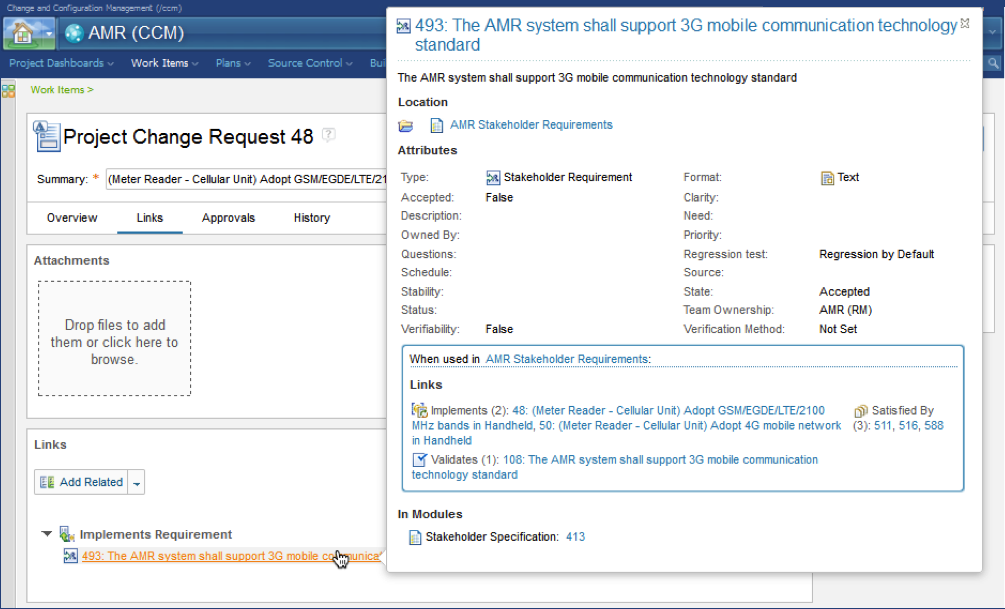
User scenarios are a key part of our design process. In the scenarios for the first release hill, we focus on how personas, like Susan a system engineer, or Tony a tester, are using work item links to browse to artifacts in the right configuration context. For example, when following a link that Tony created in a defect, Susan would browse into the release baseline context to reproduce the defect. Or for change requests, Susan would browse into a development stream to update the linked artifacts. In both cases, we pursued a design that simply switches the practitioner into the right configuration context.
In the CLM 6.0 release, we designed a simple and transparent configuration selection and navigation mechanism for these scenarios. It’s based on the assumption that administrators or project leads will create ‘releases’ associated with project timeline iterations and global configurations in the work item system. Some ‘releases’ will represent immutable release baselines. Other releases will represent streams for new development.
As project leads, self-configuring teams or practitioners start assigning work to plans. The ‘Planned For’ and ‘Found In’ fields in the work items will be set and associated with such a ‘release’. When a practitioner follows a link to the target artifact, the right configuration and artifact version will be opened. The configuration is also used when hovering over a link to get a preview of the link target artifact. With this design, teams can easily adopt new configuration management practices with very low impact on users.
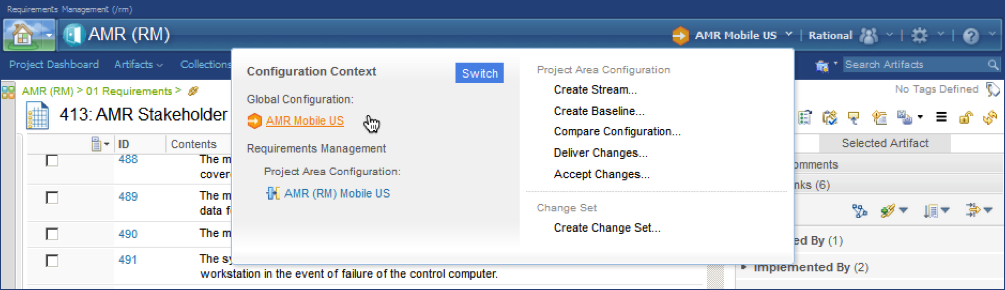
An alternate use-case for selecting a configuration is to use the Configuration Management menu on the application banner. By clicking the ‘Switch’ button a practitioner can browse and select a new configuration context. This simple design provides a consistent experience across the CLM 6.0 tools for requirements, tests, or design. The configuration context information on the application banner, found on the left side of the menu, gives practitioners a simple and accessible way to see and confirm the current configuration context. Also, the configuration management menu is designed to provide basic and advanced actions for managing configurations and change, including creating streams and baselines, managing changes by comparing configurations, and delivering changes across configurations.
Managing Global Configurations in the new Global Configurations Application
The scenarios and design for configuration leads and administrators have taken aim at a much richer configuration management user experience in the new Global Configurations application. Here administrators can create Global Configuration project areas that define global components with stream and baselines that provide consistent configuration management across requirements, tests, design, and implementation. Global configurations also provide key capabilities to manage products, product variants, and reuse. The design of the Global Configurations tool provides a hierarchal editor for global configurations with consistent new flat and clean icons and easy-to-find context actions which are also easy to use.
While the user experience is rich in configuration management administration capabilities, we also designed the tool to be easy to find and use for experienced practitioners that may need richer configuration management capabilities than provided by the tool configuration management menu. The design of the configuration management menu provides easy navigation directly to the Global Configuration editor for the current global configuration context by just clicking on the Global Configuration link in the menu. You can note this in the second image above this text.
The design of the Global Configurations tool provides great design consistency and usability. Project Area Configurations are picked and updated using consistent dialogs. The usability of the tool is improved through link navigation from the editor directly to the Project Area configuration in the context of the selected global configuration.
If you would like to see these new capabilities in action right away, you can give them a test run in the Jazz.net cloud trial area.
Mats Göthe
Senior Designer and Scenario Design Lead

Download article

View article on Jazz.net
IoT Platform Personas
Personas
Personas is a design tool to set focus and ensure the empathy of the user. It helps us deepen our understanding of the users of the IoT Platform and their usage of the platform capabilities outlined above. It ensures that the design objectives are focused on the person behind the problem.
Don’t confuse personas with roles. Personas are not Roles. A role is mostly a specific declaration of responsibility. A role description often includes
- Tasks – The tasks the role performs
- Workflows – The workflows the role is responsible to perform
- Collaborators – The collaborators that interact in or depend on the tasks or workflows
- Artifacts – The information items that are worked on or produced by the role in tasks or workflows
- Outcome – The artifacts produced and the state of the artifacts
Personas are fictional archetypes of users created to represent the different stakeholders a solution. It empathizes by understanding and capturing their business and personal contexts.
- Personas bring together the tasks, pains, needs, and priorities for key users.
- Personas describe all the attributes that affect someone’s day.
- Personas are based on user research from e.g. surveys, user interviews, focus groups, and customer support calls
Read more about Personas and how I develop personas below and in the Design Thinking section of the portfolio.
IoT Personas
When joining the IoT Platform team in 2015 I started to research and generalize the IoT personas. The objective is to get a code set of personas for IoT, extended for the platform and other solutions.
Personas is a living design document, continuously updated by research and validated by our clients and sponsor users. I find in our continuous research that the IoT personas are well representing the variability across industries and organizations adopting IoT and transforming their business.
The Personas for the IoT platform are focused on the fictitious ACME corporation, an enterprise-sized organization that is transforming its business to IoT by exploring, adapting, and running an IoT operation. The LOB organization depends on corporate IT services, has IoT operational teams, LOB analytics teams, and service teams dedicated to client operations. See the image below.
Organizational view of the IoT personas.
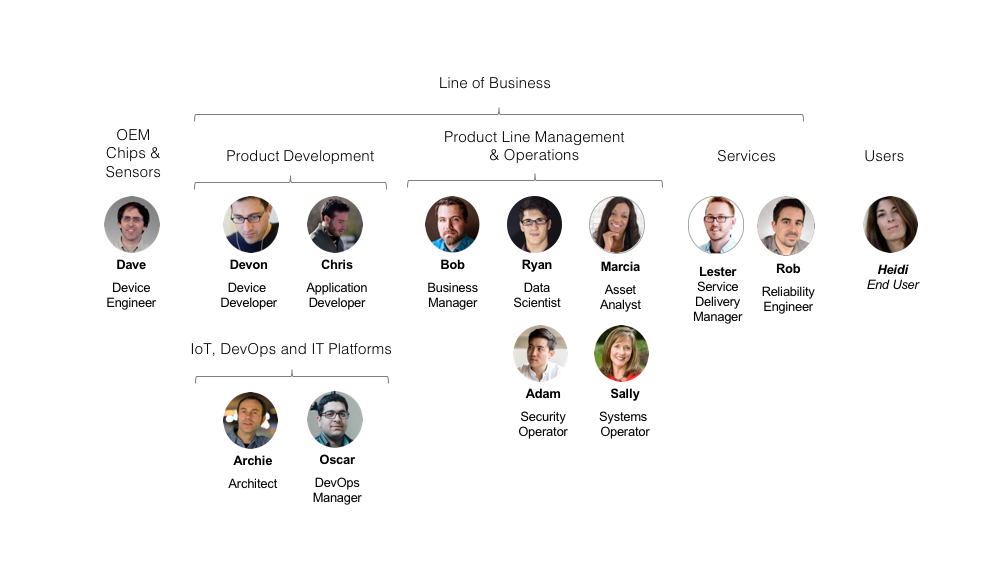
The IoT Personas are:
- Bob is a Line of Business Manager leading a business of existing and new products. He wants to understand how to leverage the data and connectivity of devices to create new streams of revenue. He will discover industry content on IBM.com and act on solution proposals from Archie. Bob is providing funding for IoT business application development.
- Archie is a Solution Architect that proposes, proves, and deploys the IoT Foundation platform to the LOB. He decides on integration strategies and architectures for the new IoTF platform, existing business systems, and devices in production.
- Oscar is a DevOps Manager that configures and operates the IoT Foundation platform, Bluemix services, and supporting IT services for LOB operations and development.
- Chris is an Application Developer that works in the LOB, in IT, or with a 3rd party. He develops IoT industry applications for the LOB. He uses DevOps capabilities to develop, deploy and fix applications that integrate IoT Foundation device data and Bluemix services.
- Dave is a Chip Engineer that develops silicon devices and sensors. He delivers chips, devices, and boards for industry and consumer products. Dave may work at an OEM that delivers chips to devices that ACME integrates into its products.
- Devon is a Device Developer that integrates HW and SW into devices and appliances. He develops and maintains device firmware that securely connects devices to IoT Foundation. Devon may work at an OEM that delivers devices that ACME integrates into its products.
- Ravi is a Systems Engineer with the chip provider integration partner, works with Devon to integrate chips and sensors into the product line.
- Sally is a LOB System Operator. She handles the day-to-day system operations on customer IoTF organizations by onboarding new users and making sure that new device types and devices are registered, are behaving, and are up to date with recent secure firmware.
- Adam is a LOB Security Analyst. He ensures security by proactively creating rules that detect threats and prevent breaches. He creates automation that acts on misbehaving devices and users. And he ensures compliance through audits.
- Ryan is a LOB Data Scientist. He knows all about the industry data delivered from devices and the algorithms that provide meaningful analytics. He implements advanced algorithms as services to be used by the LOB analysts and LOB industry applications.
- Marcia is a LOB Operations Analyst. She is responsible for the availability of specific assets in the LOB product line and uses deeper analytics provided by Analytics in the IoT Foundation platform and Ryan’s algorithmic service extensions.
- Lester is a Service Delivery Manager responsible for an SLA with a client to the LOB. He, and his team of maintenance engineers, are on or near the client site and manage equipment and use the IoT Foundation platform and LOB industry applications to monitoring, plan, and service equipment.
The ACME IoT teams get set up or engaged at various phases in the adoption of the IoT platform and the provisioning of IoT services to the clients of the LOB.
Lifecycle scenario view of the IoT personas covering Discover > Getting started > Everyday use > Manage and upgrade.

Persona details
To date, key personas in our design are
- Bob and Archie discover, play, and try IoT. Designs have been explored and delivered for ‘Try and Buy’ scenarios.
- Oscar getting started and maintaining the IoT platform. The design has been explored and delivered for ‘Getting started’ scenarios including IoT platform configuration settings of integrated services and on-boarding of new users.
- Sally for running day-to-day operations on registered and connected devices.
- Lester getting providing services to his clients based on the IoT platform, connected devices, and instrumented assets.
For each persona, we describe the Role, the Motivation, and the Pain-points. The following sections call out some of the research outcomes on the key IoT personas
Sally the System Operator
Sally is one of the most frequently used personas in the design across the platform capabilities. Our initial research in 2015 focused on the ‘Getting started’ and ‘Everyday use’ scenarios covering the steps for Sally to in getting access to the platform, configure the IoT platform for the LOB on-board the LOB IoT team, supporting the everyday scenario of boot-strapping a service delivery team delivering an IoT project at a client site.
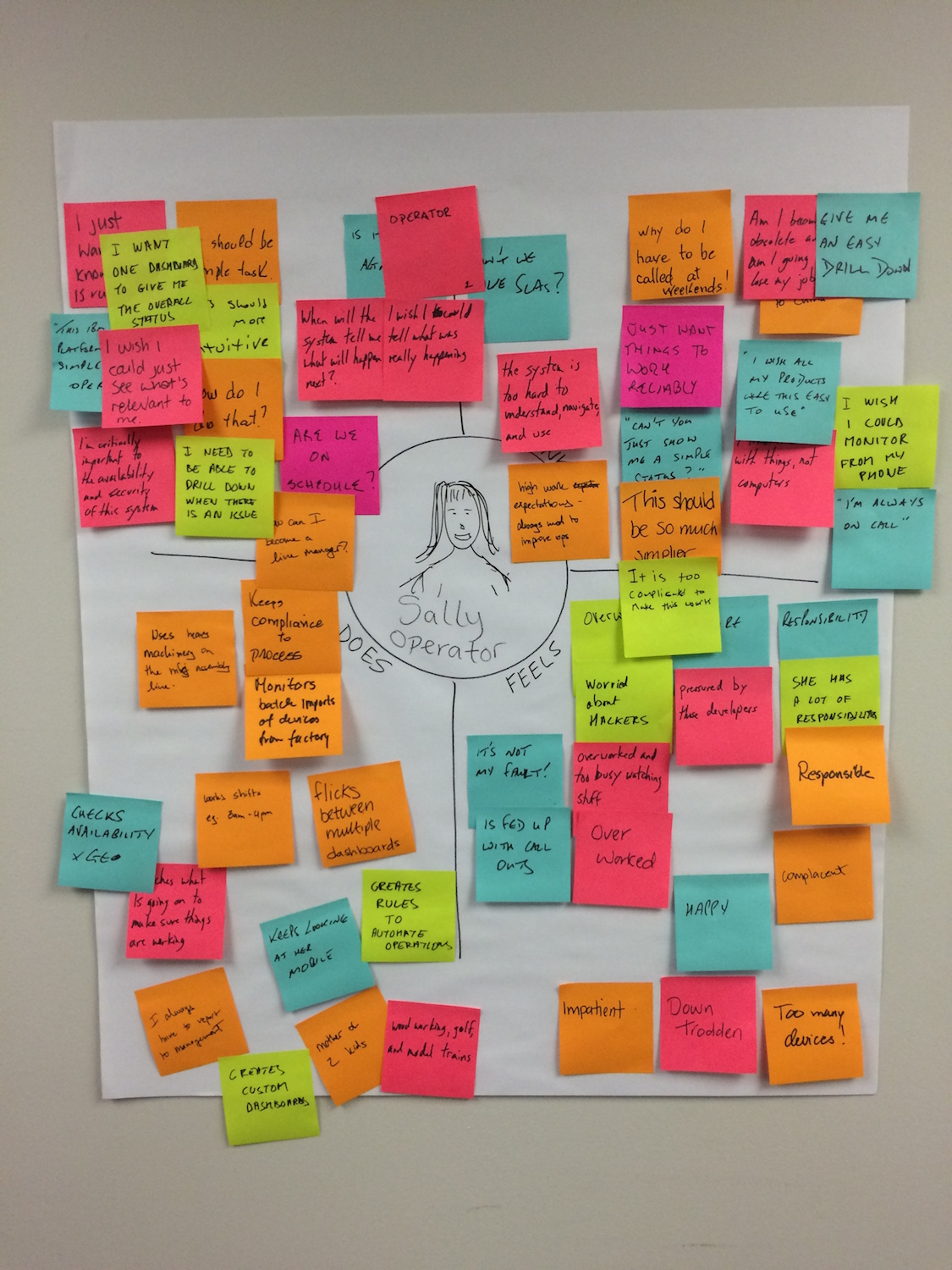
Needs statements
Sally needs a way to
- Easily identify issues – so that she – understand the priority and can act accordingly
- Automate daily tasks – so that she – can focus on long term improvements
- See all info in one place – so that she – can prioritize and assign efficiently
- Evaluate system state – so that she – can identify if issues may be imminent
- Way to assign work – so that – she can get things fixed
- Collaborate with others – so that – she can effectively resolve issues
Stakeholder Persona
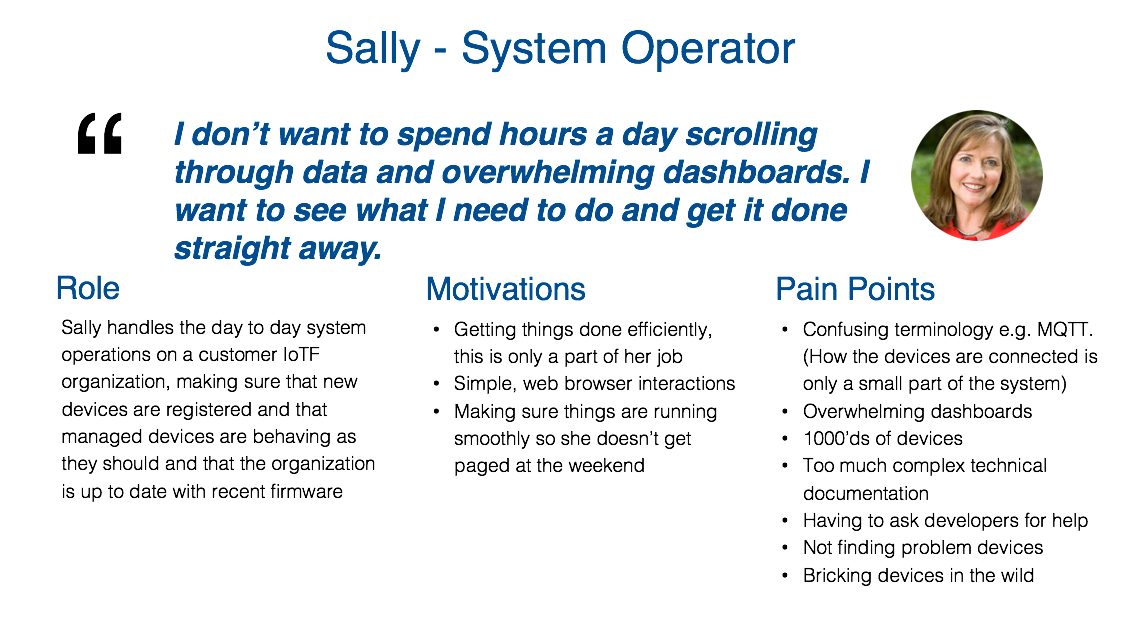
Sally’s tasks
- Deliver LOB IoT operations to contracted SLA’s
- Device management of connected devices in high quantities.
- Wants to be able to quickly identify problematic devices and take appropriate action as soon as possible, without needing to consult the documentation
- Also wants to perform, and monitor progress, of management actions (such as rebooting and updating) on devices centrally, without needing physical access to devices
- Add organizations, users, devices, data, and access
- Add devices
- Update firmware
- Monitor device errors
- Monitor system behavior
Sally’s motivations
- Getting things done efficiently, is only a part of her job
- Making sure things are running smoothly
- Not get paged at the weekend
- See status and act on issues
- Monitor from the mobile device
Sally’s frustrations
- Overworked, impatient, fed up with callouts, too busy watching stuff
- Pressured by developers
- Overwhelming dashboards
- Flickers between multiple dashboards
- 1000’ds of devices
- Not finding problem devices
- Bricking devices in the wild
- Too much complex technical documentation
- New technologies and terminologies
- Having to ask developers for help
- Worried about hackers
Storyboard
The high-level steps in the initial ‘Getting started’ and ‘Everyday use’ scenarios
- Sally is added to the platform by Oscar as a user with an Administrator role
- Sally configures the roles and permissions required by the LOB
- Sally on-boards the LOB team to the platform
- Sally defines device types and registers devices. She confirms that devices are connecting and sending data events to the IoT platform.
- Sally configures a dashboard with boards and cards to monitor device state and alerts
- Sally configures users and access permissions for Lester’s service team
Other IoT personas
Bob the Line of Business Manager
Bob is a key persona discovering and leading the organization in leveraging IoT in the line of business
- Bob understands where the market is heading and sets the product strategy within his business
- Bob is creating new streams of revenue through IoT by managing a product line of new IoT innovations and instrumentation making existing products starter
- Bob needs to understand how a new IoT product is being consumed by his users
- Bob needs to know what data to measure and how analytics on the IoT data to gain the new insights
Archie the System Architect
Archie is a key persona in discovering, playing and trying the IoT platform.
- Archie is responsible for deciding strategies on the technologies and architectures for the new IoT platform
- Archie needs to present a proposal for transforming the existing business solutions into an IoT solution
- Archie needs to present a proposal for extending the value of existing devices and data through analytics Archie needs to present a proposal for the right solution and make the right choices on system scale, security, cost, and operational efficiency for the team
Lester the Service Delivery Manager
Lester is a key persona in setting up and providing services to his clients based on the IoT platform, connected devices and instrumented assets. Lester is a part of the LOB and managing a team of engineers ensuring the delivery of an SLA to a client. He and his team is on- or near-site of the devices and equipment that are managed.
- Lester has a team of Reliability Engineers
- Lester is responsible for operations for the client services
- Lester is manages the users, resources, and access for his team
- Lester is responsible for proactively monitoring the state of equipment and plan service actions
- Lester needs to operate his team efficiently. He knows that time is money when systems are down

Meet Sally the IoT System Operator.
Sally is one of the most frequently used operator personas in the design across the platform capabilities.


Also, meet Chris is the Application Developer and Devon is the Edge Device Developer.
Chris and Devon are the most frequently used personas in the developer experience design across the platform capabilities.
 IoT Platform Developer Experience
Design research on the developer experience in the Watson IoT Platform.
Access Control Design
In 2016 I contributed to the design concepts for Access Control in the Watson IoT Platform.
What is Access Control
Operational security is key to the Watson IoT Platform and includes
- Authentication is the process of verifying that a user is who he claims he is and belongs to the selected IoTP organization. This is your typical log in system.
- Authorization is verifying that subjects, e.g. users, can only perform the actions that you want them to perform and no more.
- Access Control extends authorization by allowing further restricting access to the resources an action is executed on. Access control also includes non-resource-related restrictions, for example temporal restrictions, spatial restrictions or conditional restrictions.
The Access control design must provide configuration and management of Roles which enable controls to be defined for Users, Applications and Gateways. Configuration of Role permissions grant or restrict the ability to perform particular platform operations
User Research
User research on Access Control is impacting security scenarios for the following IoT personas
 | Sally is a System Operator
|
 | Rob is a Maintenance Engineer.
|
 | Chris is a Developer
|
 | Devon is a 3rd party developer
|
Hills
Sally the system operator can
- Authorize user permissions to resources using predefined roles
- Authorize user permissions to resources using custom roles
- Authorize user permissions to groups of resources using custom roles
Design Concepts
Terminology
The design concept defined the access control model
- Subject. An authenticated entity that requests platform access and which needs to be authorized. Examples of subjects are Users, Applications, Devices and Gateways. Subjects may be grouped and such subjects groups are also subjects.
- Action. The action that the subject wishes to perform. Most actions can be categorized as either View or Manage e.g Create, Read, Update, Delete or Execute. Operations are a further grouping of Actions on resource types covered by a given API. Permitted operations are grouped in a Role.
- Resource. The object(s) that the subject wishes to perform the action against. Resources may be associated with a Group, or Tagged. Groups and tags are used to define a resource scope.
- Permission. A permission is the selection of a role and a scope of resources that defined the permission of a subject. Subjects may be given multiple permissions.
Predefined Actions
The actions in the IoT Platform user interface and APIs, available to users, applications and devices, are grouped into sections. The sections are related to resource types and goupings of related actions. The groups are
- Devices
- Logs
- Cache
- Historian
- Organization
- Access Control
- Gateways
- Real Time Analytics
- Connector
- Risk Management
Actions under there categories are support by selecting View actions resources. Administrators can configure permissions to be
- No access – by deselecting actions in a category
- Real-only – by selecting View resource actions
- Read and Write – by selecting by selecting View actions resource actions
Predefined User Roles
The Watson IoT Platform provides predefined Roles for users with a predefined set of Actions. These one of these roles may be selected for a user.
Administrator
- As an Administrator I’m permitted to all user commands in the IoT Platform
Operator
- As an Operator I can view and manage (create, modify, remove) devices, types, data, rules, users, roles and access.
- I can not configure IoT Platform storage, authentication and mail configurations
Developer
- As a Developer I can view and manage devices, types, data and rules.
- I can not view or manage IoT Platform configurations or API keys
- I can not manage users or access
Analyst
- As an Analyst I can view and manage analytics (cloud and edge) rules, actions and alerts
- I can view types, devices, events, data, users and roles
Reader
- As a Reader I can view types, devices, events, data, rule alerts, users and roles
Predefined ApiKey Roles
The Watson IoT Platform provides predefined Roles for ApiKeys with a predefined set of Actions. These one of these roles may be selected for an API Key.
APP_Operator
- Application for Administrators that replace or extend the IoT Platform web interface.
- Can not configure IoT Platform storage, authentication and mail configurations
APP_BackendTrusted
- Applications for device provisioning, device operations, data transformation and information management
- Can view and manage devices, types and and rules. Can publish and subscribe to events and commands
APP_DataProcessor
- Applications for reading and processing data, like Analytics
- Can view and manage rules. Can view devices and types. Can subscribe to events and publish commands.
APP_Visualizer
- Applications for presenting and visualizing data
- Can view devices, types and alerts. Can subscribe to events
APP_Device
- Device simulator
Default Device
- Can publish events and subscribe to commands. Can subscribe and publish to DM topics.
NonTrusted_Gateway
- In addition to above
- Can view devices and device types.
- Can can pub/sub to Device Management topics for itself and in behalf of locally connected devices.
FullyTrusted_Gateway
- In addition to above
- Can activate devices
Predefined and Custom Roles UX Design
Users with permissions to View roles and explore the predefined roles in the Users and Application sections in the IoT Platform. The axes of the presentation can be switched so that Roles are presented Horizontally or Vertically. Users can also filter the categories of actions to be shown.
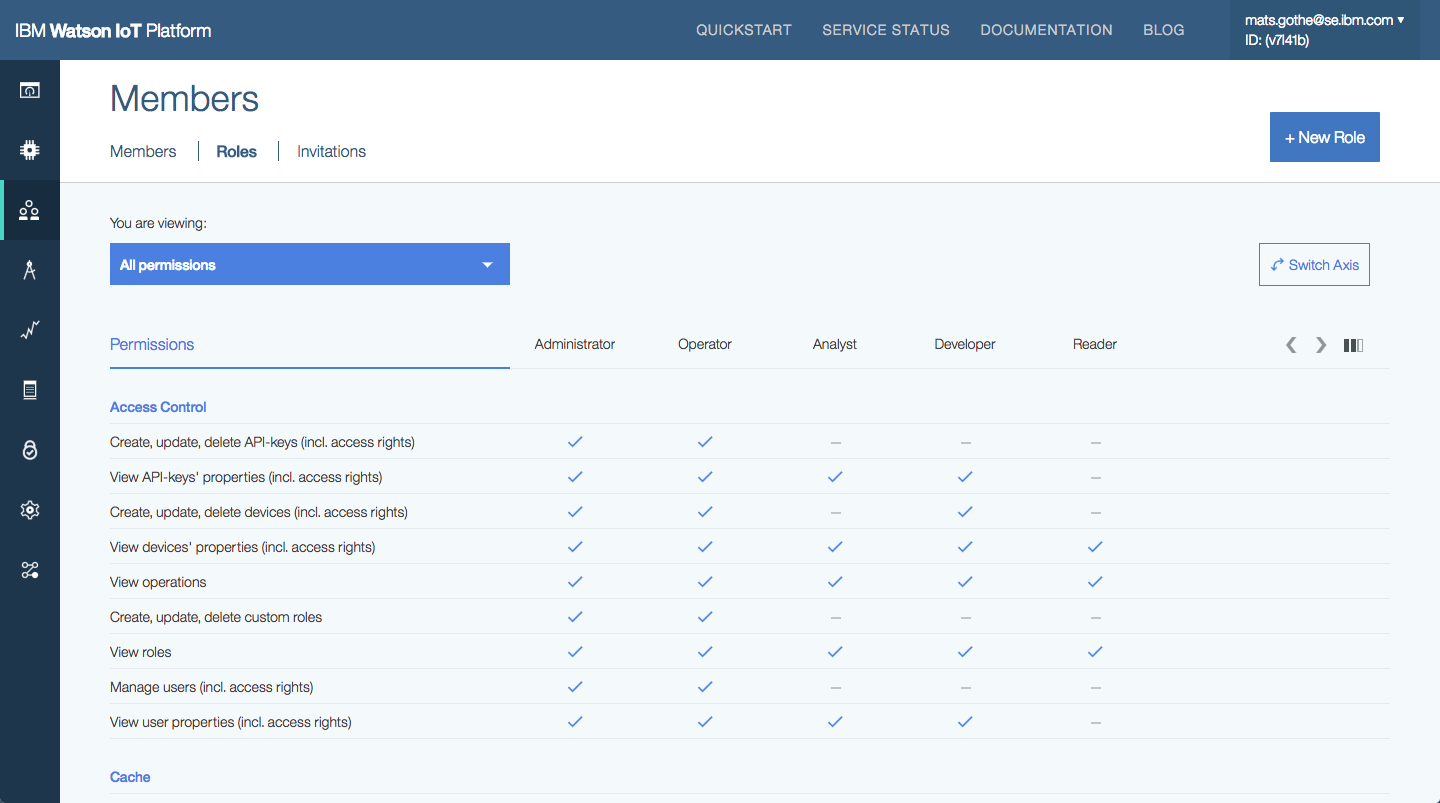
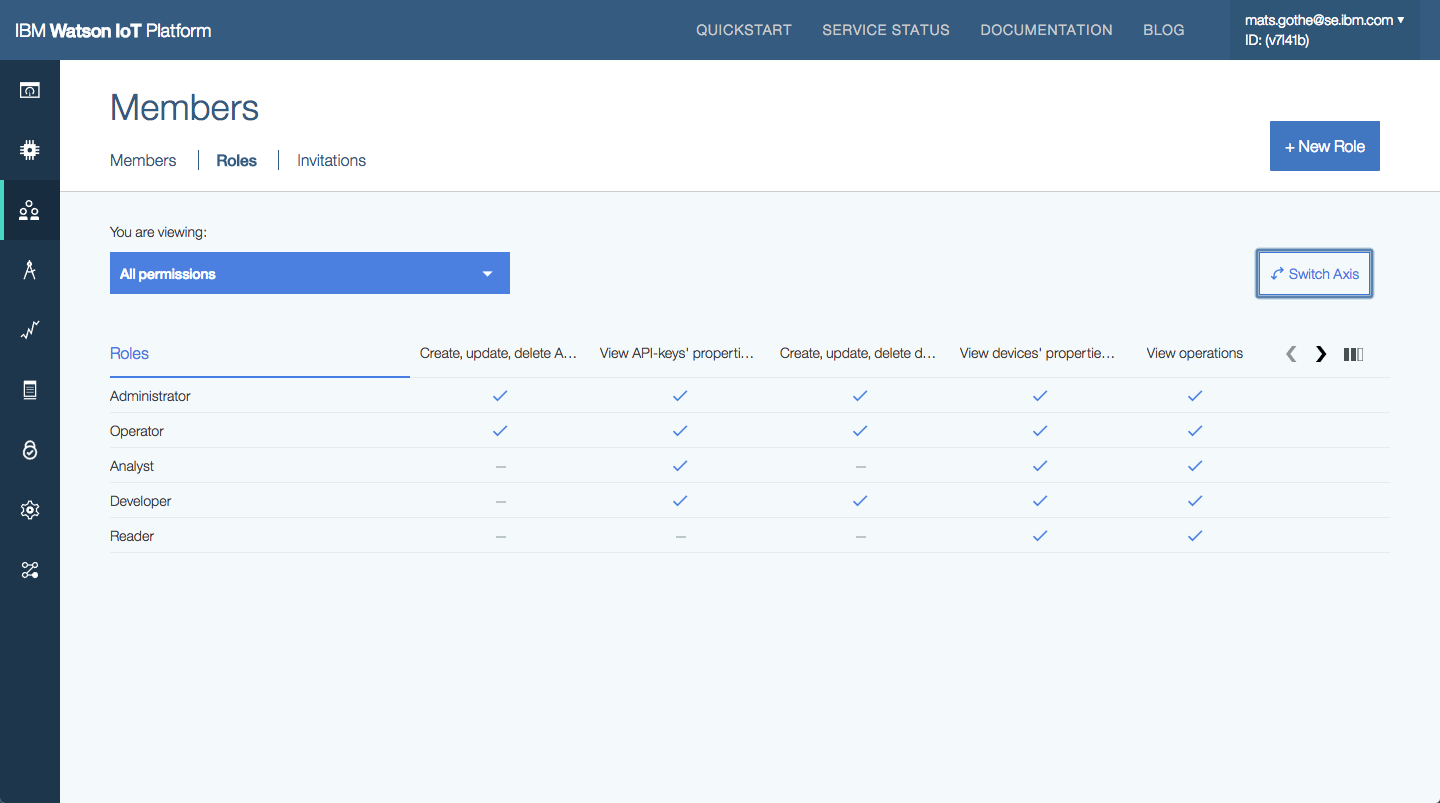
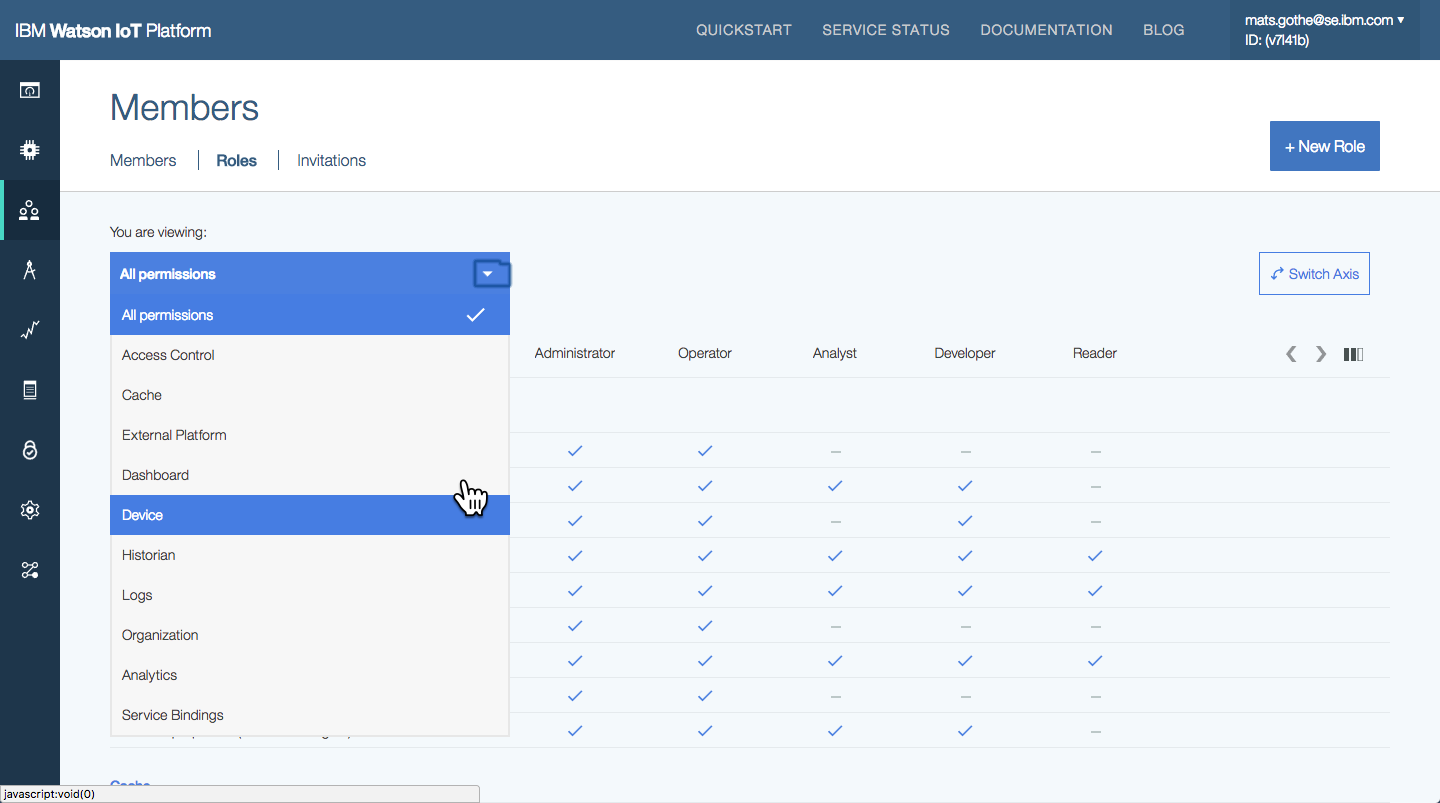
Managing user roles in the Watson IoT Platform.
Custom roles can be created by Administrators, or other authorised users. A custom role selects the actions that a user or application may perform.
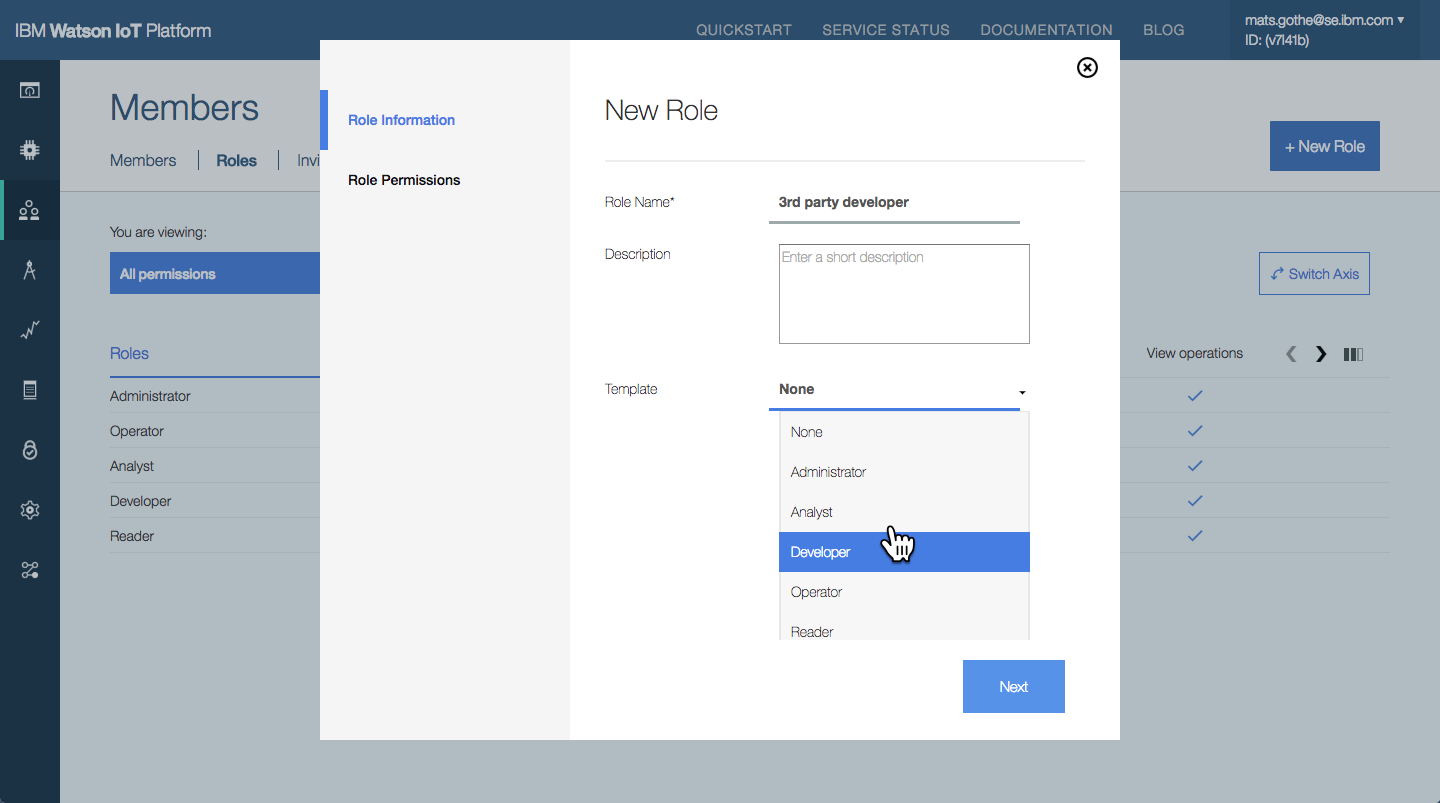
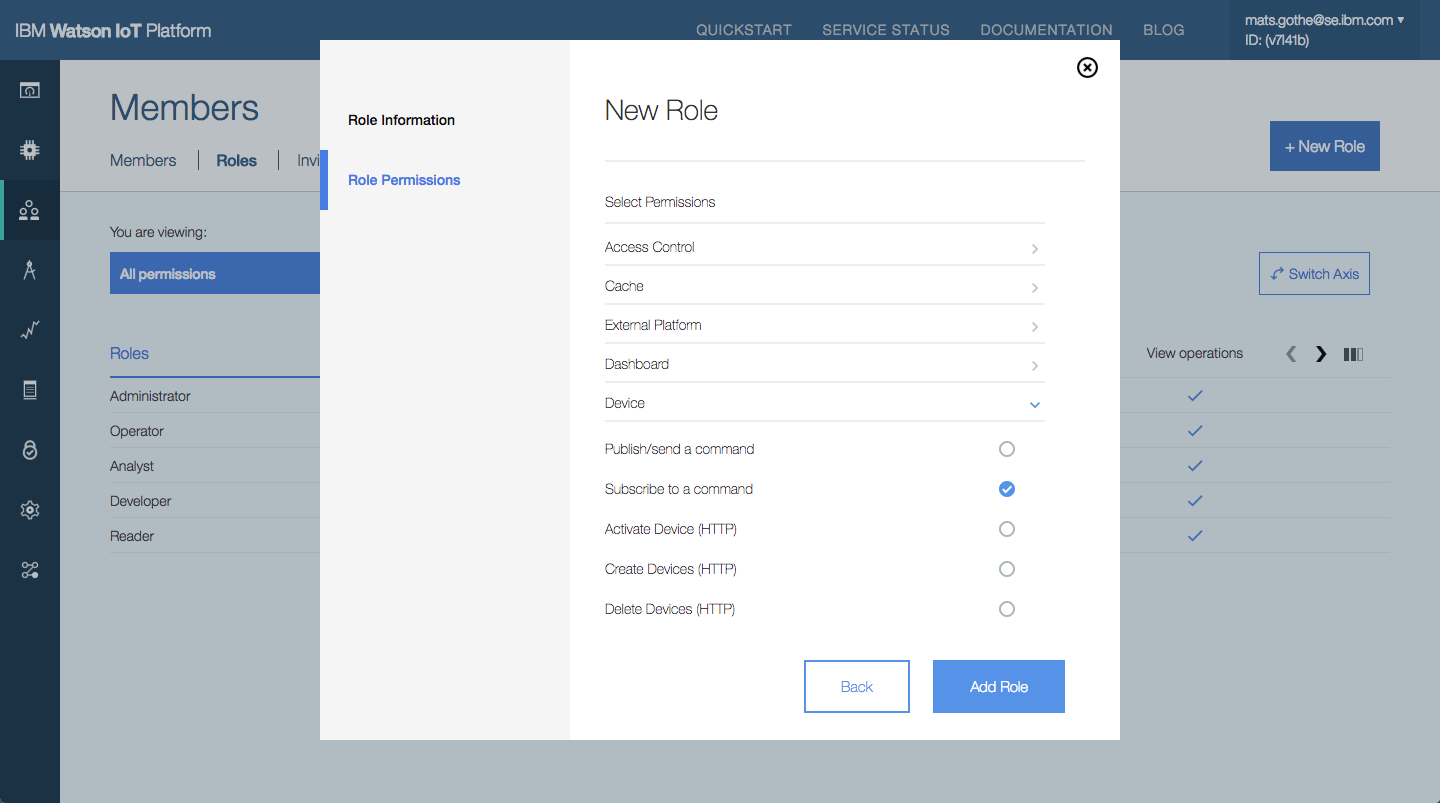
Creating a new role.
Meet Sally the IoT System Operator.
Sally is one of the most frequently used operator personas in the design across the platform capabilities.
 We need to control access control and permissions for our internal organization, and for our 3rd parties that extend our IoT services. – Watson IoT Platform sponsor.
Custom Device Management Design
In 2016 I delivered design concepts and a UX design for Custom Device Management extensions in the Watson IoT platform.
What is Custom Device Management
Device Management in the Watson IoT Platform provides capabilities for Operators to perform actions on devices connected to the IoT platform. Basic device management actions include; Download Firmware, Update Firmware, Reboot and Factory Reset.
The device management requires a device management agent, implementing the device management protocol, to be running on devices. The agent is responsible for responding to IoT platform MQTT commands that initiates a device management action.
Custom Device Management extends the basic Device Management actions and enabled client organizations to define their specific actions and have any such actions available in the list of device management actions in the IoT platform user interface.
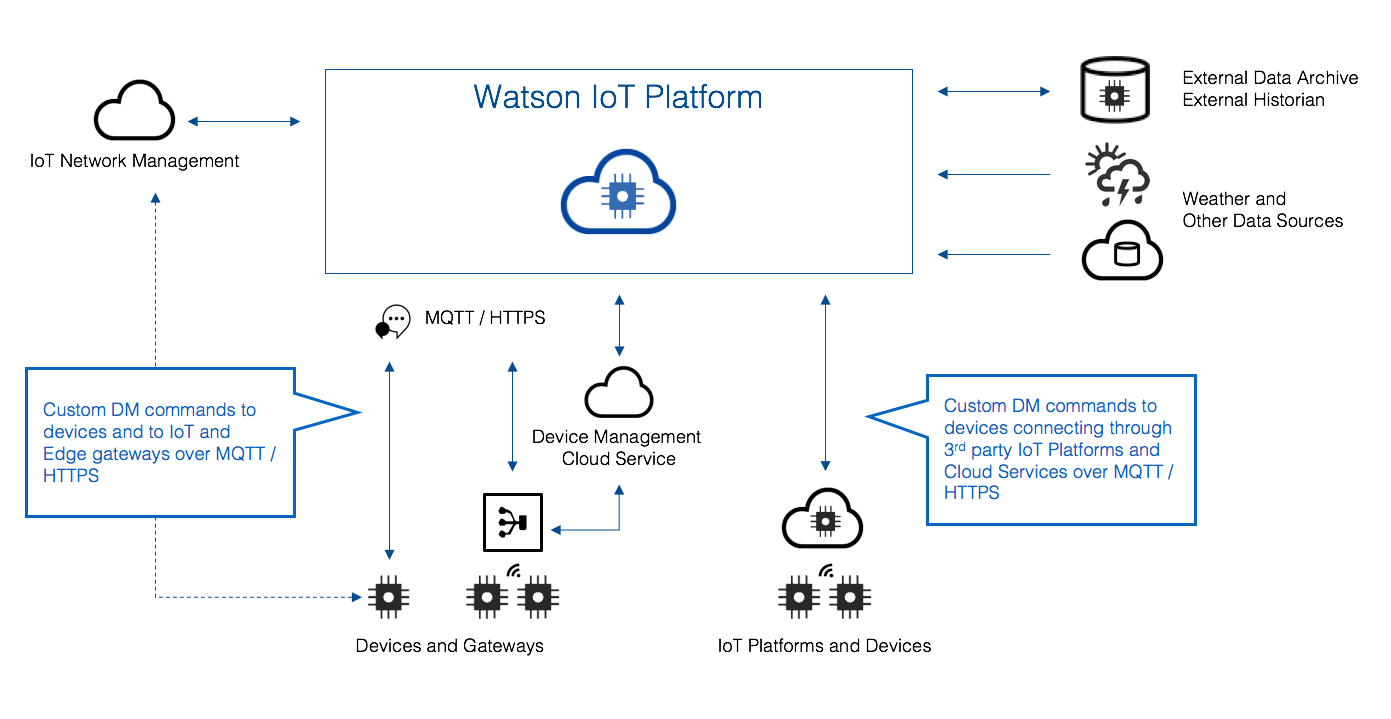
Device Management on Watson IoT Platform.
User research
In my research I found that
- Device and Gateway partners implement a rich set of device management actions on gateways, in device management services, or in external cloud platform. Users’ needs to integrated this external set of actions and make them seamlessly available as delegated actions on devices in the Watson IoT platform.
- Partners are delivering advanced device management for enterprise scale management of firmware. Client using such advanced device management services needs to make them seamlessly available, replacing any standard device management action for selected devices types.
- Custom device management actions will specific to a set of device types. In a typical deployment multiple device management action sets will be required, for multiple independent device partners and service providers.
- Custom device management actions will be downloaded as a device management extension package from a device partner product web page and installed on the IoT Platform.
- Custom device management extension packages will be versioned. Multiple device management extension package versions can run on the platform, or be replaced with a new version.
- Custom device management extension packages needs to be internationalized.
Custom Device Management Design
Design Concepts
The custom device management design is enabling
- Extending the built-in capabilities for Device Management in WIoTP
- A consistent user experience for all build-in and custom DM commands
- Supporting delegation of device management 3rd party device, gateway and platform partners
- Definition of a Custom Command Package to declare and upload commands to WIoTP
- Support version and variant management of Custom Command Packages
Hills and Use-cases
As an Operator I need to configure, manage and run 3rd party custom Device Management actions on devices and gateways managed in the IoT Platform
- As an Operator I need to configure an extension for 3rd party DM actions on a device type
- As an Operator I need to select and run a DM action
- As an Operator I need to update my 3rd party DM extension to stay in sync with new FW updates
UX Design
Install a 3rd party Device Management extension package
The System Operator will go to the 3rd party device provider web or log into the 3rd party cloud service. A device management extension package will be downloaded for a set of 3rd party device types. The System Operator will log into the IoT platform, choose Settings > Extensions and upload and enable the Device Management extension package.
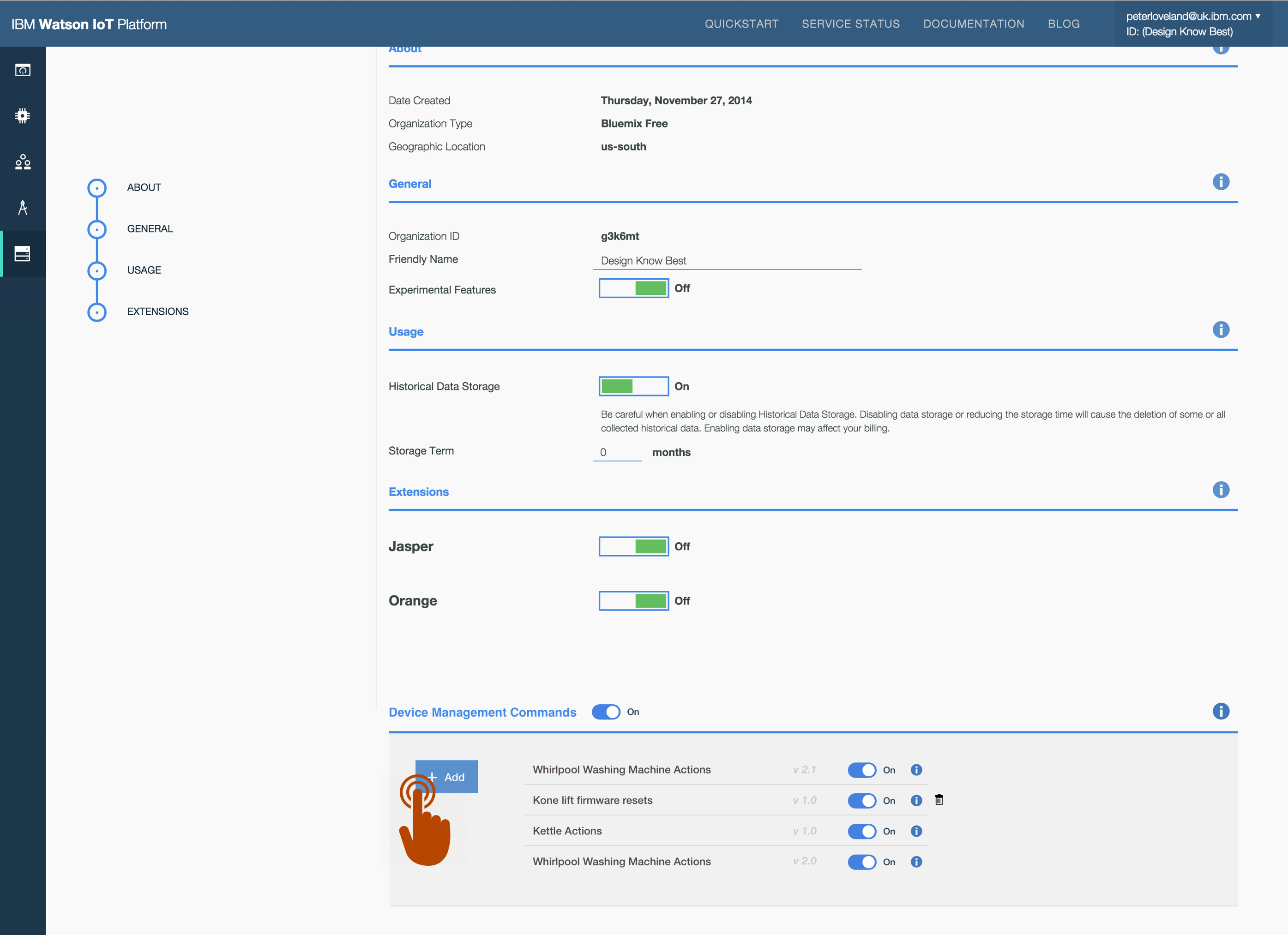
Installing a 3rd party Device Management extension package.
Run a run a 3rd party Device Management action
The System Operator logs into the IoT platform. The operator has permissions to run DM actions and opens the Devices > Actions section. The operator chooses a 3rd part DM action, selects a device / gateway type, selects devices and provides optional information for the action. The operator runs the action and monitors the progress.
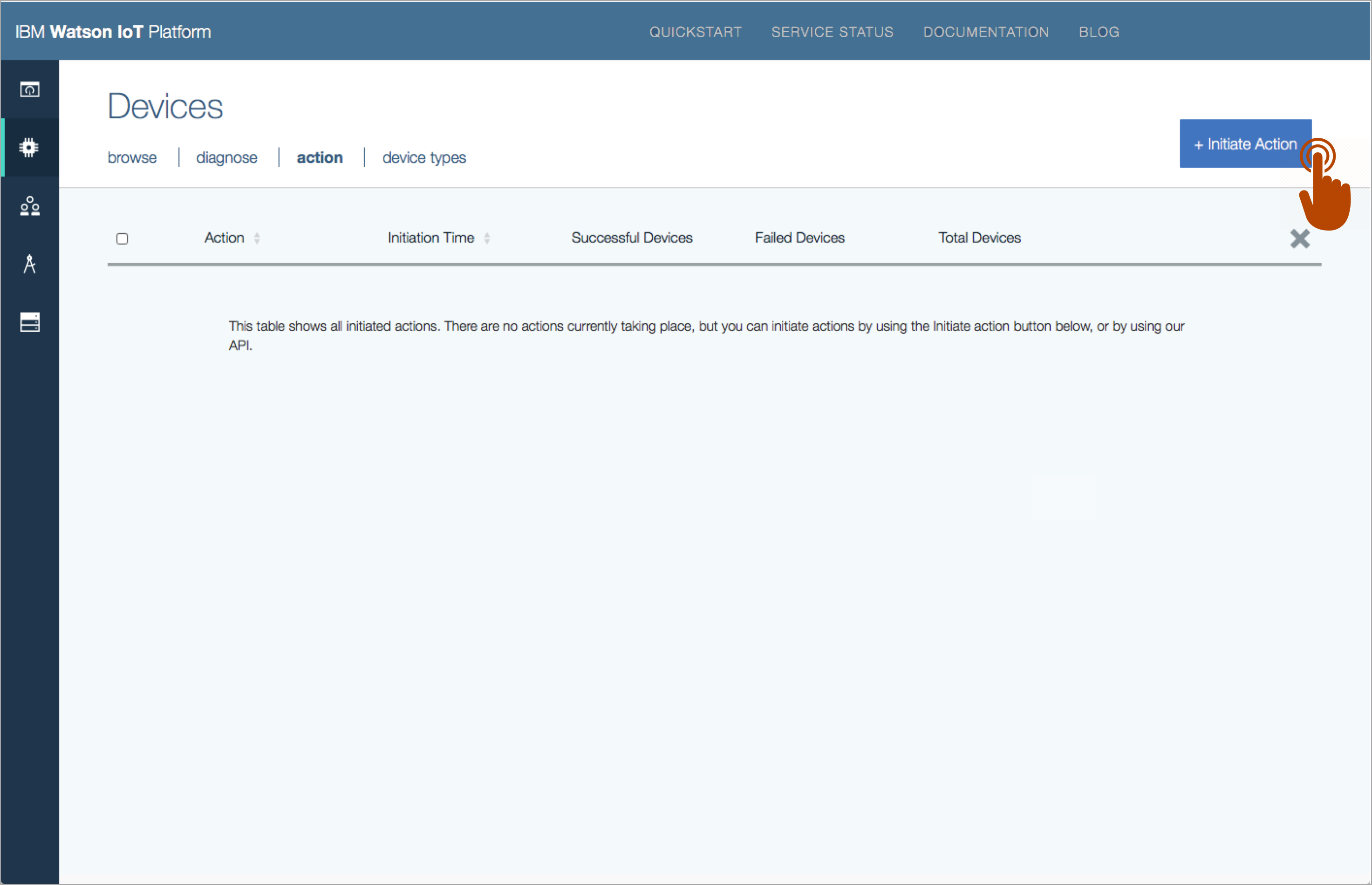
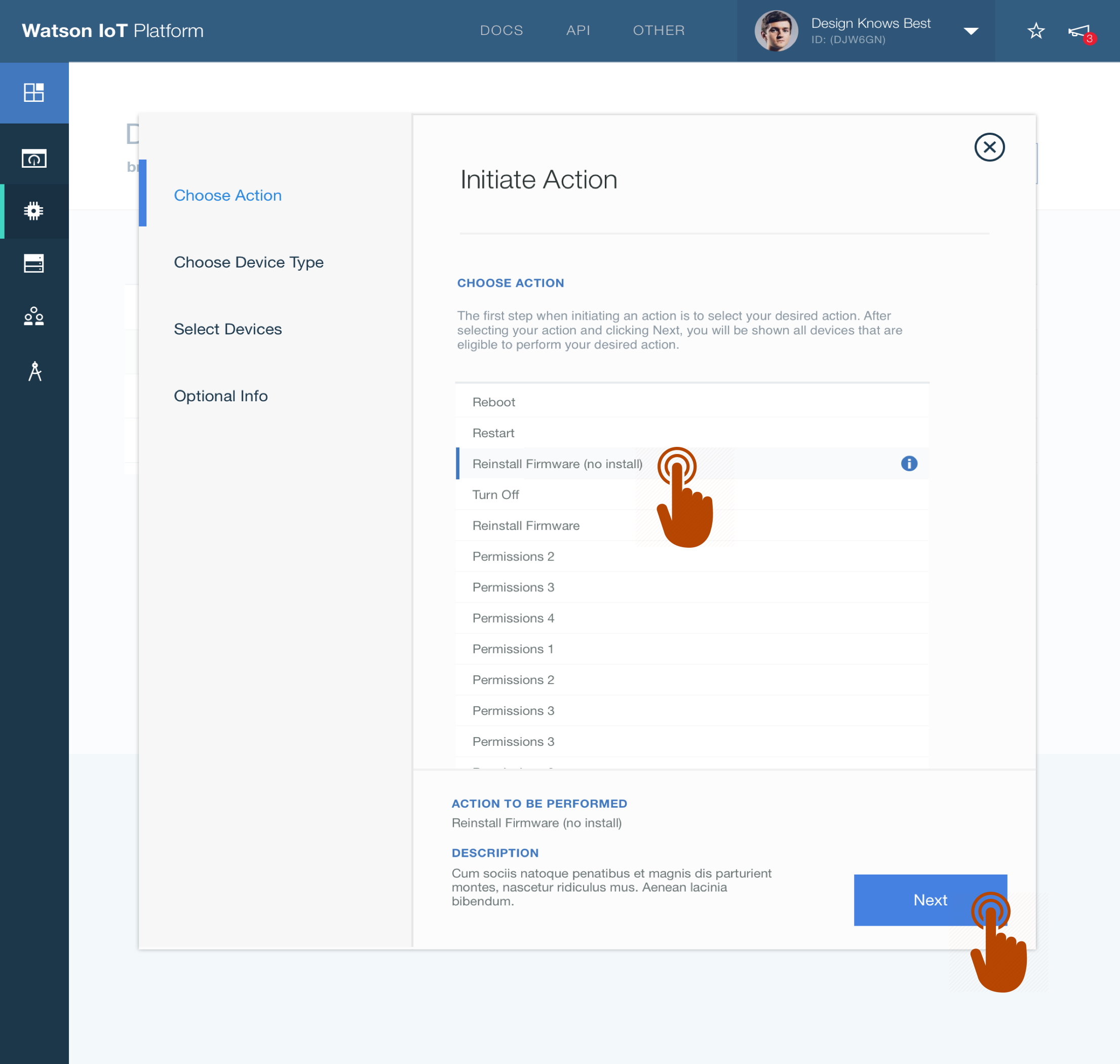
Running a run a 3rd party Device Management action.
Run a run a 3rd party Device Management action from a Device Type or Device
The System Operator may also run the 3rd part DM action directly on supported device types or devices.
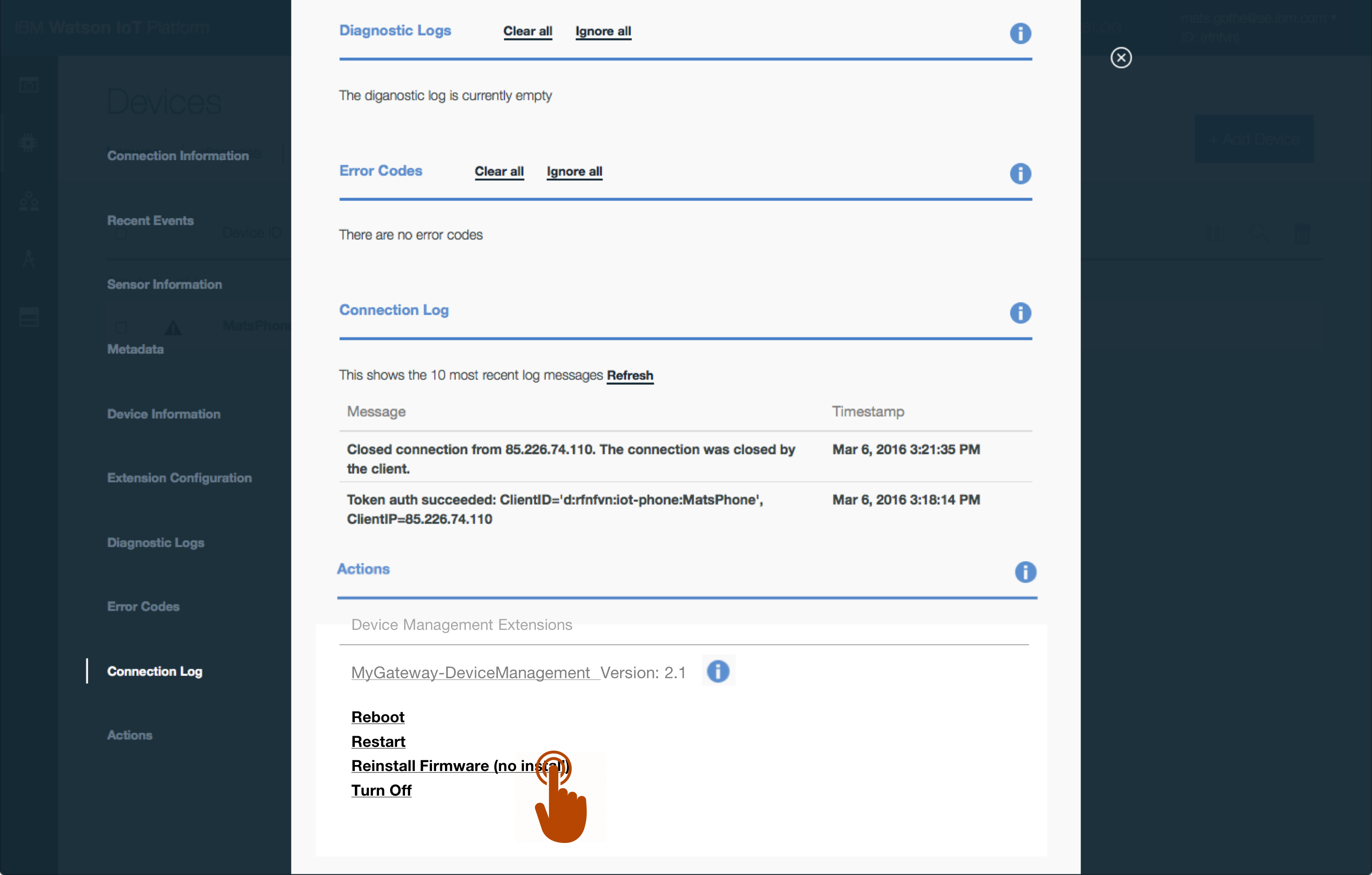
Run a run a 3rd party Device Management action from a Device Type or Device.
Update a 3rd party Device Management extension package
Operators will, as part of a FW update, go to the 3rd party web and retrieve a new Device Management extension package with updated custom commands. The operator may choose to replace the existing package, or alternatively add a new package to maintain devices with different FW version
Updating a 3rd party Device Management extension package.
Read more about Custom Device Management Actions on the Watson IoT Platform blog.
Custom Commands Extension Package Designs
The UX design in the previous section shows how to use the IoT platform user interface to upload and use Custom Commands Extension Packages.
An extension package is JSON file with a structure defined by Watson IoT Platform
- An extension package has
- A name
- A version
- A description
- A list of supported device types
- A list of custom device management commands
- A command has
- A name
- A description
- A list of parameters (string types) w/ name, description, optionally a default value
- A command specification containing the command string with parameter substitution identifiers
- A sample extension package is provided in IoTP documentation
Related Designs
The custom command design has enabled related designs in 2016
- Usage of custom device management commands in Firmware over the air (FoTA) integrations with business partners
With Custom Device Management we have full control integrating with the MQTT commands implemented in our IoT devices and gateways. – Watson IoT Platform partner.
IoT Gateway Design
In 2015 I delivered design concepts and a user experience design for gateway support in the Watson IoT Platform.
What is a Gateway
An IoT Gateway is an intermediary network device between one or more devices, the internet, and the IoT platform.
Devices comes in many forms and purposes. Some are complex assets with rich capabilities and networking functions. Others have a less to none functions to connect directly to the internet and need an IoT Gateway to translate communication of a non-IP network to an MQTT connection with the IoT platform. In other cases a gateway may act as a bridge between an external IoT platform of devices and the Watson IoT Platform.
A gateway gets involved in the identification, connection and registration of devices, and transferring the data from the devcie to the IoT Platform over the internet if the device is not IP enabled, like a Bluetooth, ZigBee or LPWAN device.
Design Vision
The vision of the design for IoT Getaways is
- A Gateway is a device. It can act as a device and a Gateway. Hence, unify the way types or devices and gateways are defined.
- A Device is a device, regardless of its networking capabilities, connection protocol, or if its directly connected to the IoT platform, or connected though a gateway.
- The design should unify the way devices and gateways are searched, listed and filtered in the IoT Platform UI.
- Devices connecting though a gateway appears as any directly connected devcie in the IoT Platform user interface. The design should use device attributes and icons to visually distinguish devices and gateways in the IoT Platform UI.
- The IoT Platform should simplify the provisioning of managed devices. IoT Gateways may be granted permissions to auto-register its managed devices.
- The IoT platform should simplify device management for managed devices. IoT Gateway should transparently manage device management operations on its managed devices.
User Research
In my research I found three types of connection patterns between a gateway and its managed devices
- Static. Devices are statically associated with one gateway.
- Nomadic. Devices are associated with a gateway for a reasonable period of time. It then stops connecting to that gateway and at some later time it starts connecting to a different gateway and then uses that exclusively for a period. An option might be given to assign new metadata when it reconnects.
- Mobile. A device that moves more rapidly between many different gateways. Metadata, like the associated gateway and location, is changed automatically.
Client report the Static type to be the dominant case, followed by the Nomadic case. The Mobile case is less frequent but may be a more prominent case as roaming volume devices become smarter and establish hotspot connections using local gateways.
Gateway Design Concepts
The IoT Gateway concept design
- An IoT Gateway a new class of device in the APIs
- A new MQTT message payload schema is defined for IoT Gateways
- A consistent UX is design all devices, regardless if connected directly to the platform or managed by a gateway
- A consistent browsing and filtering UX is designed for all devices in the existing single device list in the Devices > Browse section
- Navigation is supported in the UX across a gateway and its managed devices
- Navigation is supported in the UX from a managed device to its connected gateway
- Enhancements to the data model and the device-management protocol
- MQTT connectivity to support gateways
- API changes to support gateways
Hills
- IoT Gateways Hill 1 – Sally, a system operator, can connect a gateway to the IoTF to allow a range of (not so smart) devices to connect to the platform, be administered in the same way as other devices, and allow them to interact with other devices
- Subhill 1 – Sally can set policies which allow a gateway to publish on behalf of devices associated with the gateway
- Subhill 2 – Sally can be sure that each device has a unique identifier that ensure unique connectivity when moving or roaming through any available gateway
- Subhill 3 – Sally can initiate device management actions against a gateway to be performed against it’s associated devices
Use-Cases
As an Operator I need to
- Create a device type for a gateway and set policies
- Register a gateway and attached devices
- View, search and filter gateways
- View, search and filter attached devices
- Perform management actions on a type of devices connected through gateways
- Perform device management actions on a gateway and its attached devices
As a Device Developer I need to
- Find a IoT Recipe that provides docs, libraries and sample on developing a gateway
UX Design
Low resolution design mock-ups below as additions to the existing Devices UX design.
Create a device type for an IoT Gateway
As an Operator I need to
- Create a new device type
- Select a ‘Gateway’ role
- Enter device properties
- Enter gateway policies
- Save the new device type

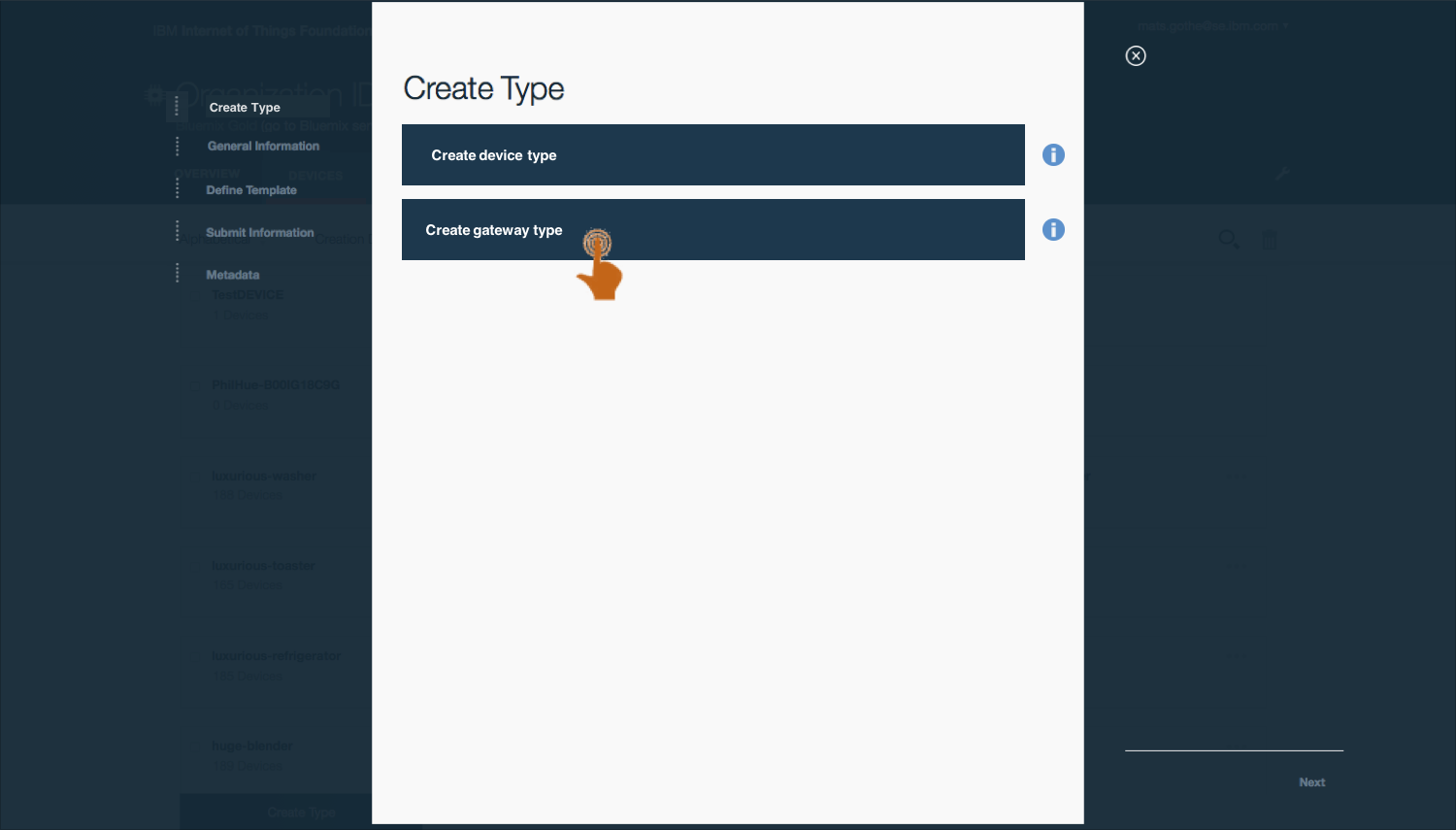
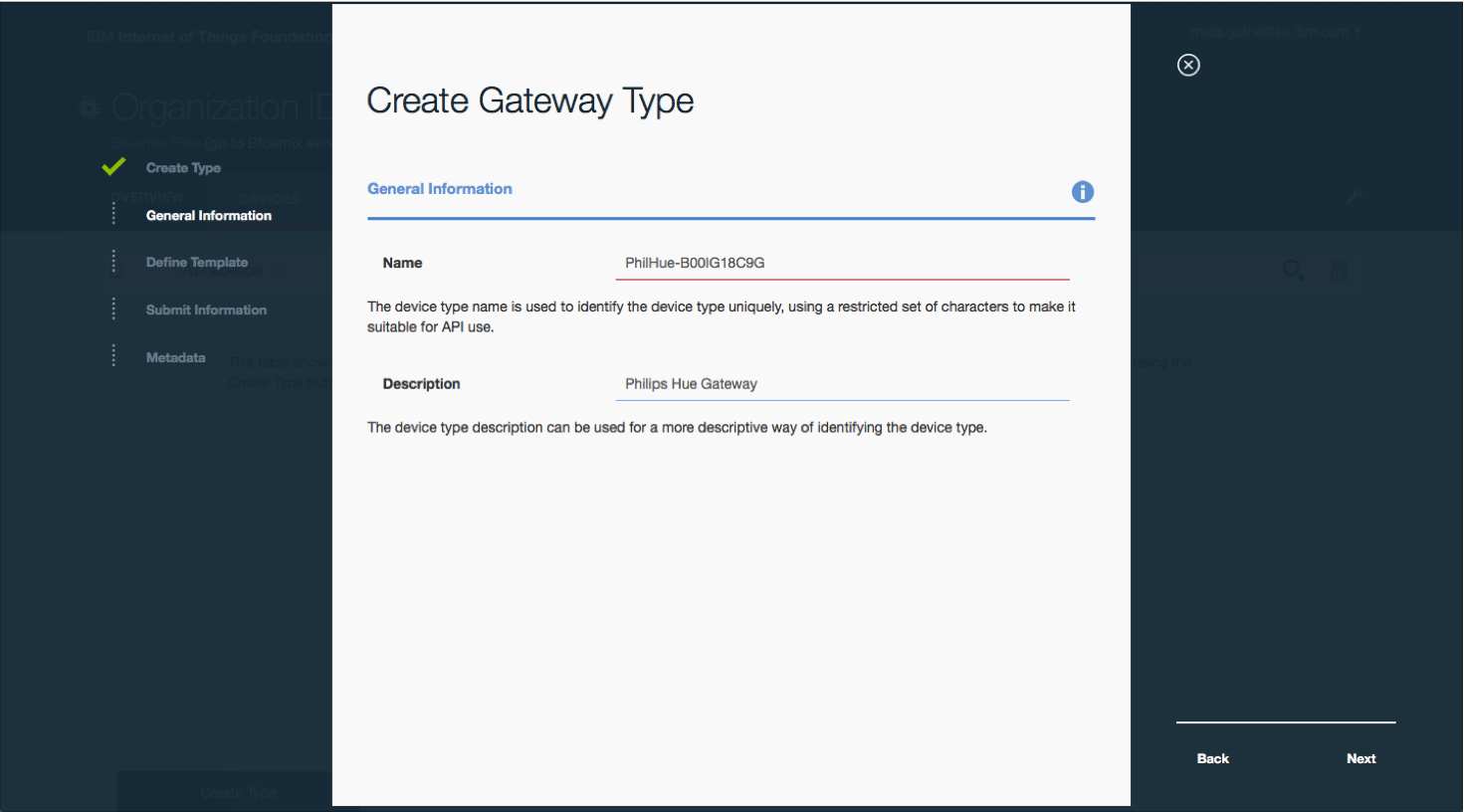
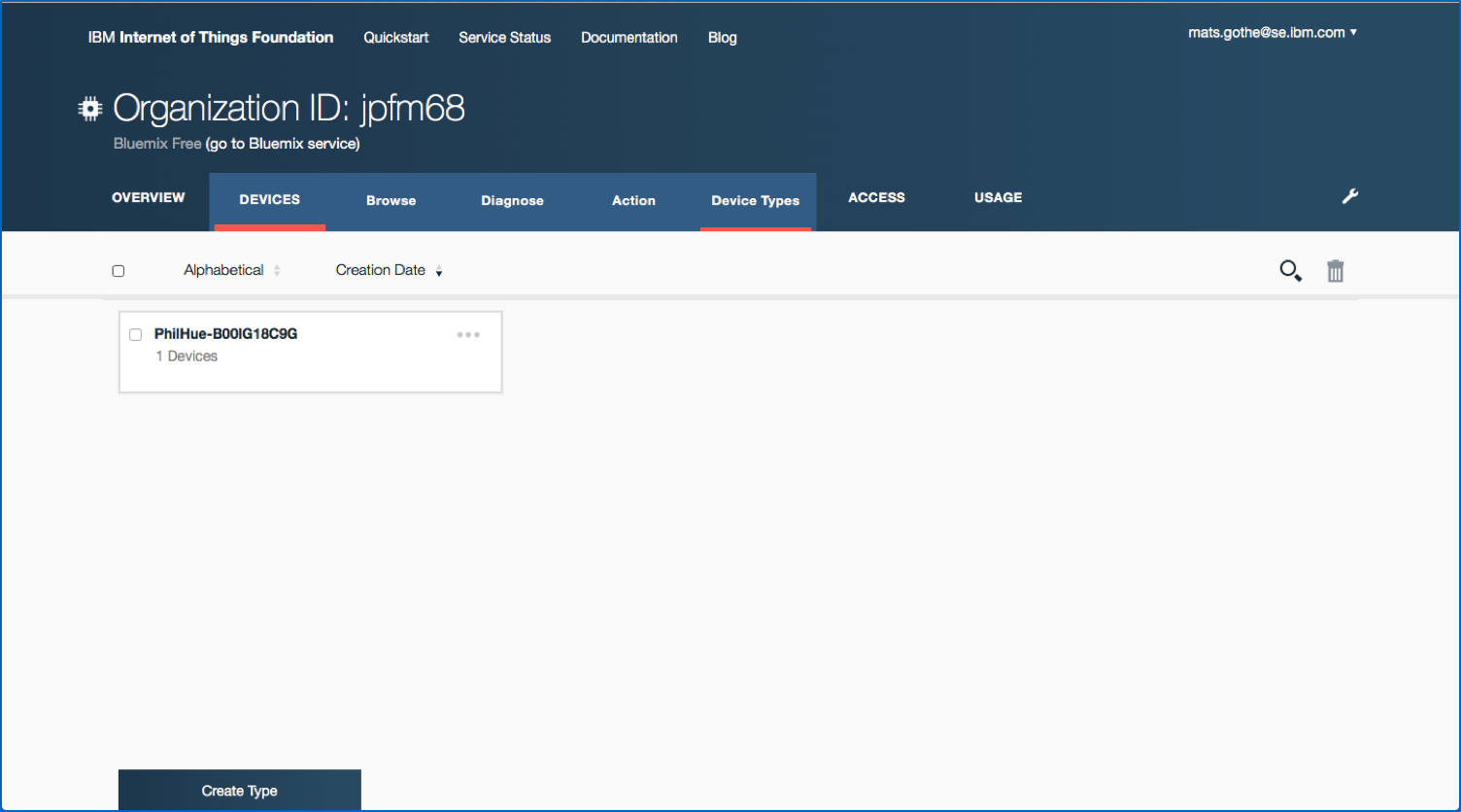

Creating a device type for an IoT Gateway
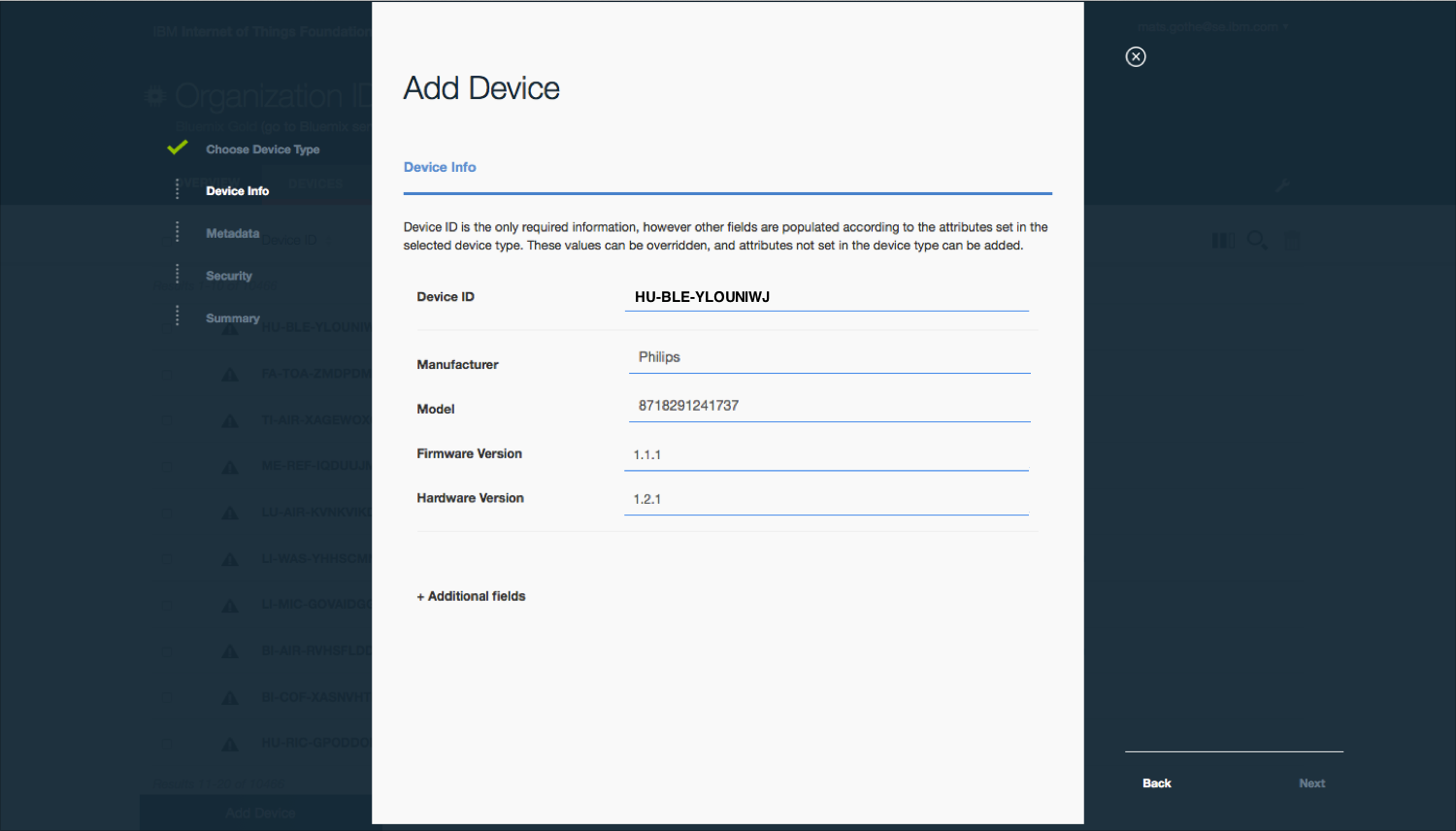
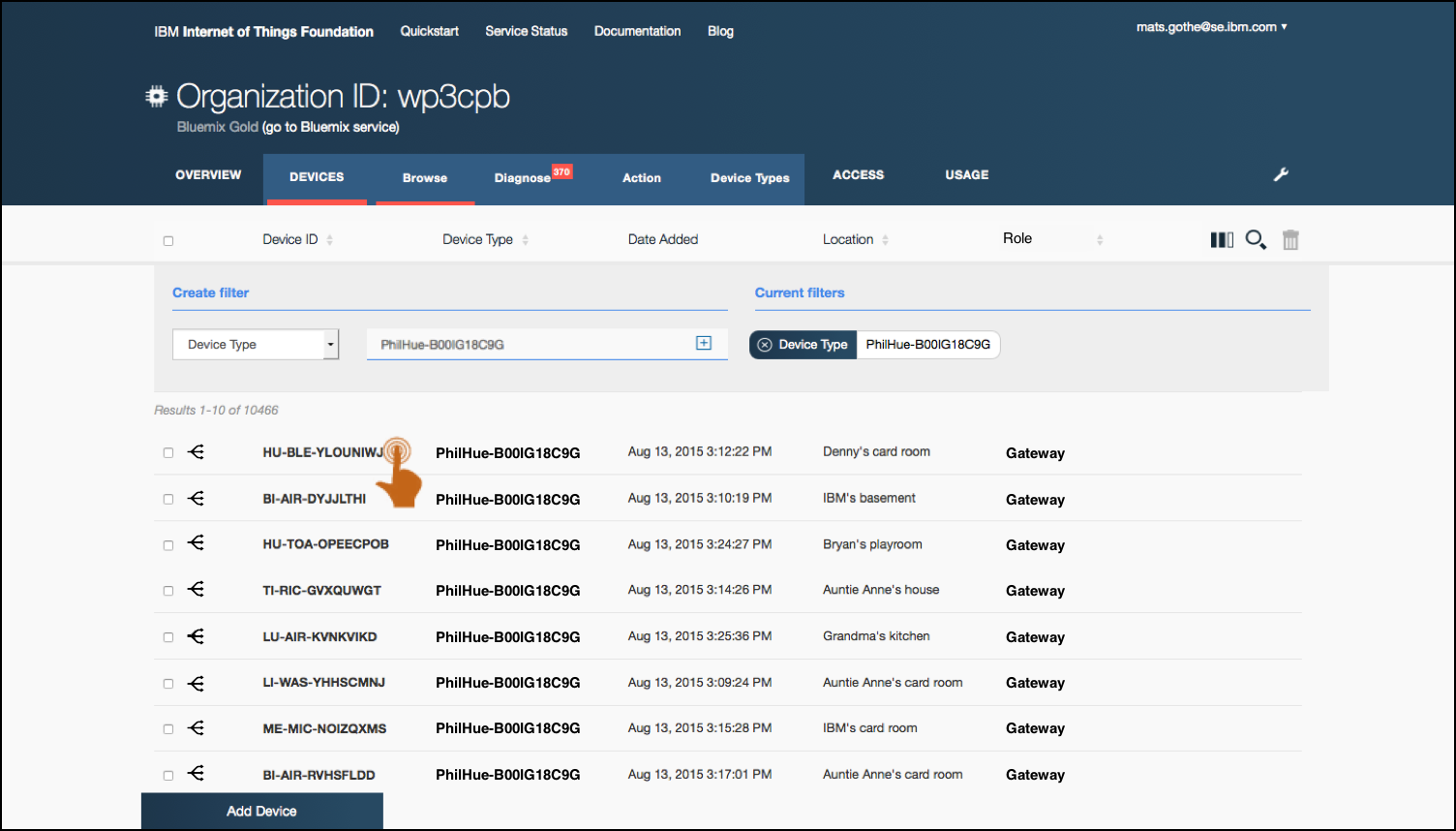
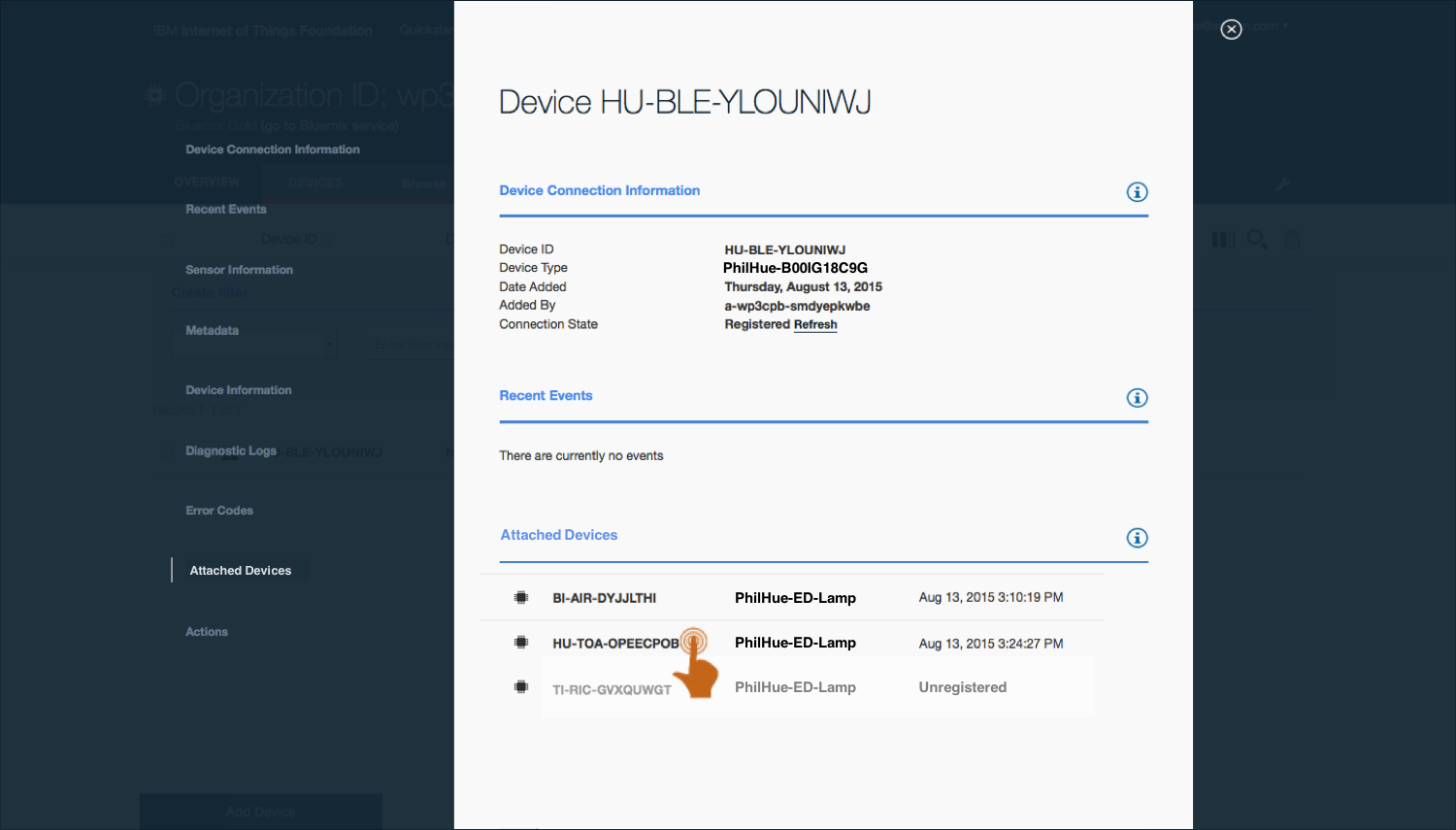
Register an IoT Gateway and attached devices
As an Operator I need to
- Create a new device using a Gateway device type
- Enter device identity properties
- (Wait for the gateway to connect and publish attached devices)
- Filter on new devices attached to a registered gateway
- Register, or confirm registration, of attached devices
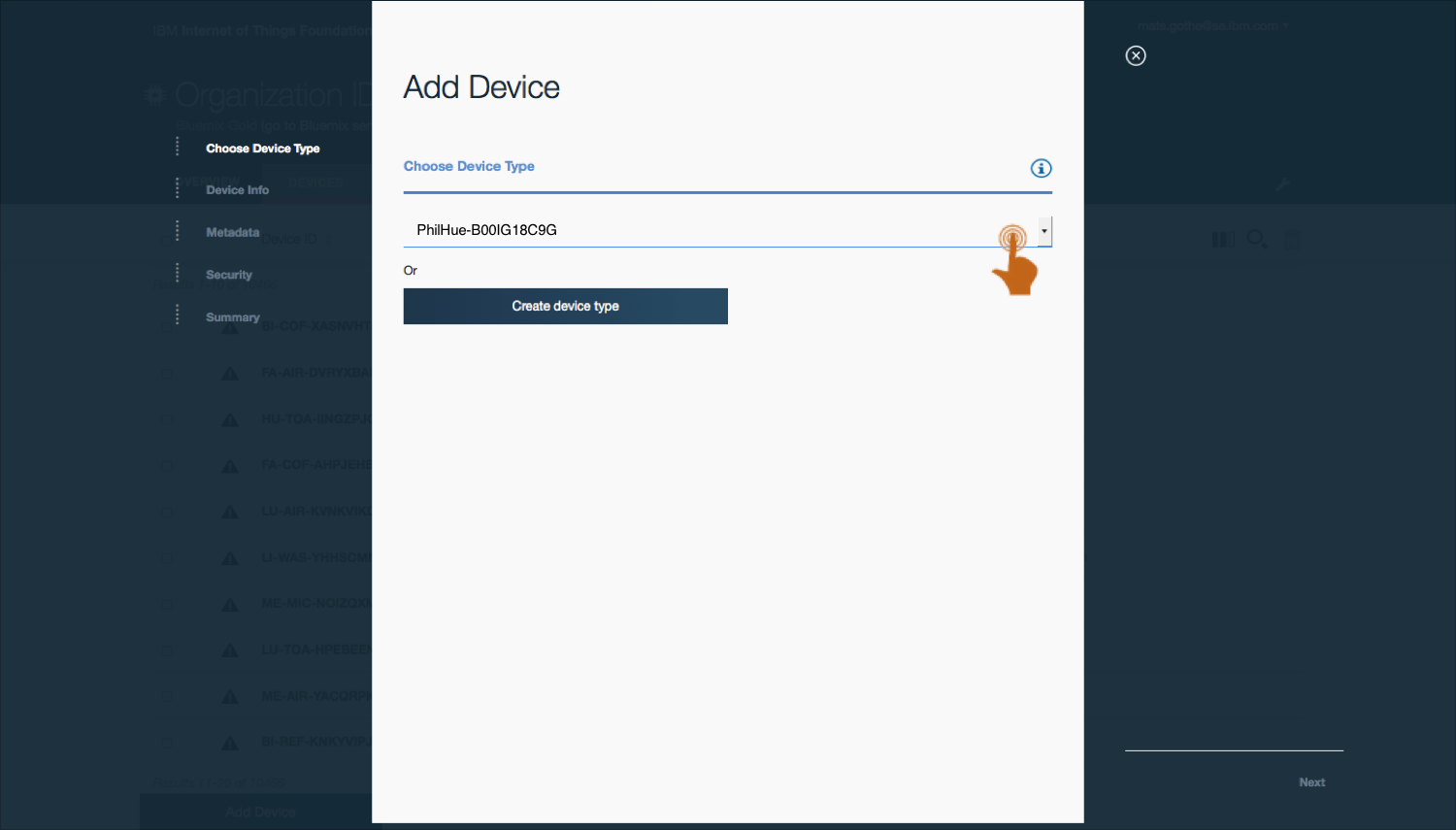

Registering an IoT Gateway with attached devices.
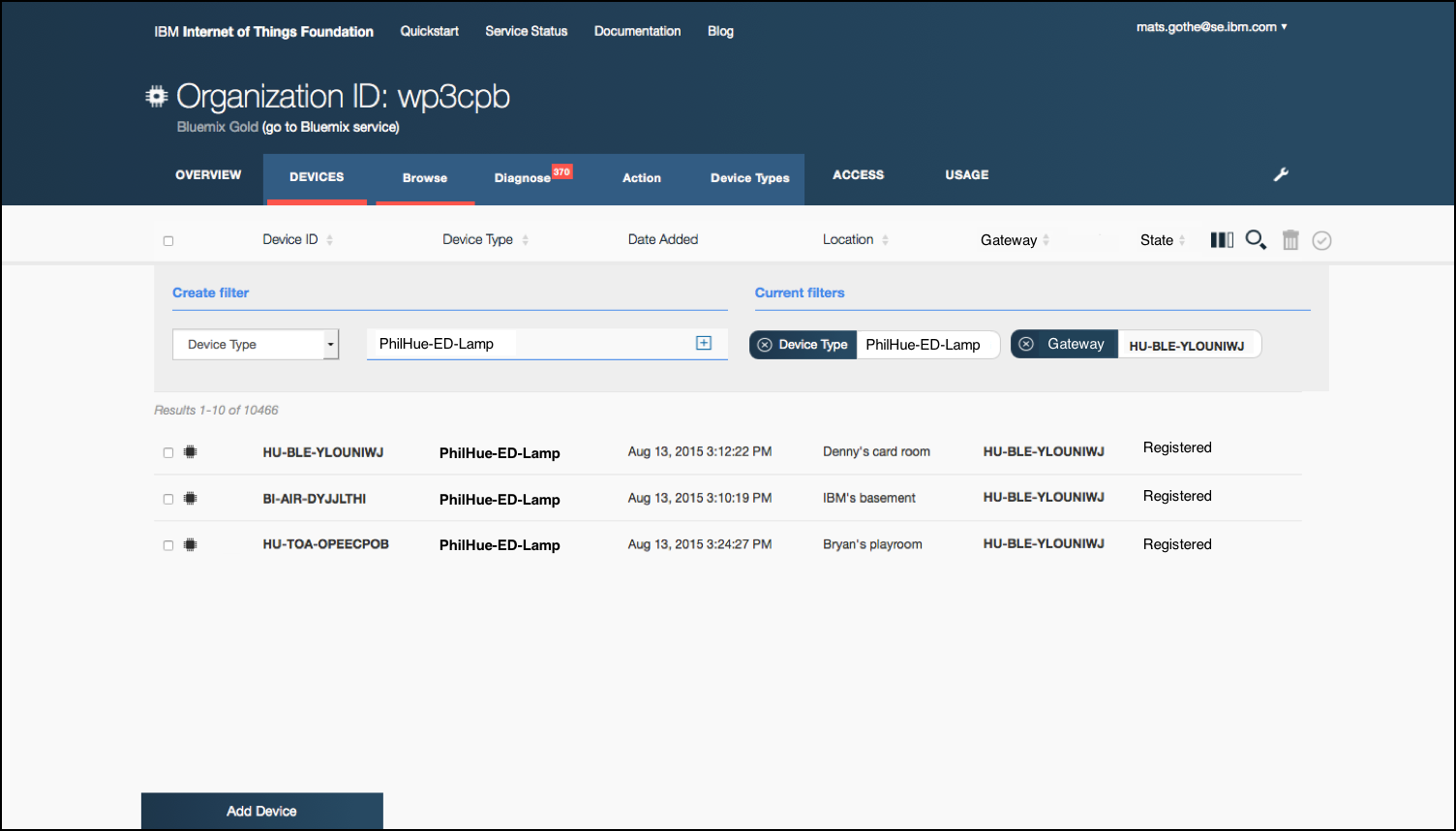
View, search and filter gateways and attached devices
As an Operator I need to
- Open dashboard
- View gateways
- Filter on gateway type or id
- View device information
and perform actions
- View devices
- Add a Gateway column
Filter on device type - View gateway information
- Add a Gateway column
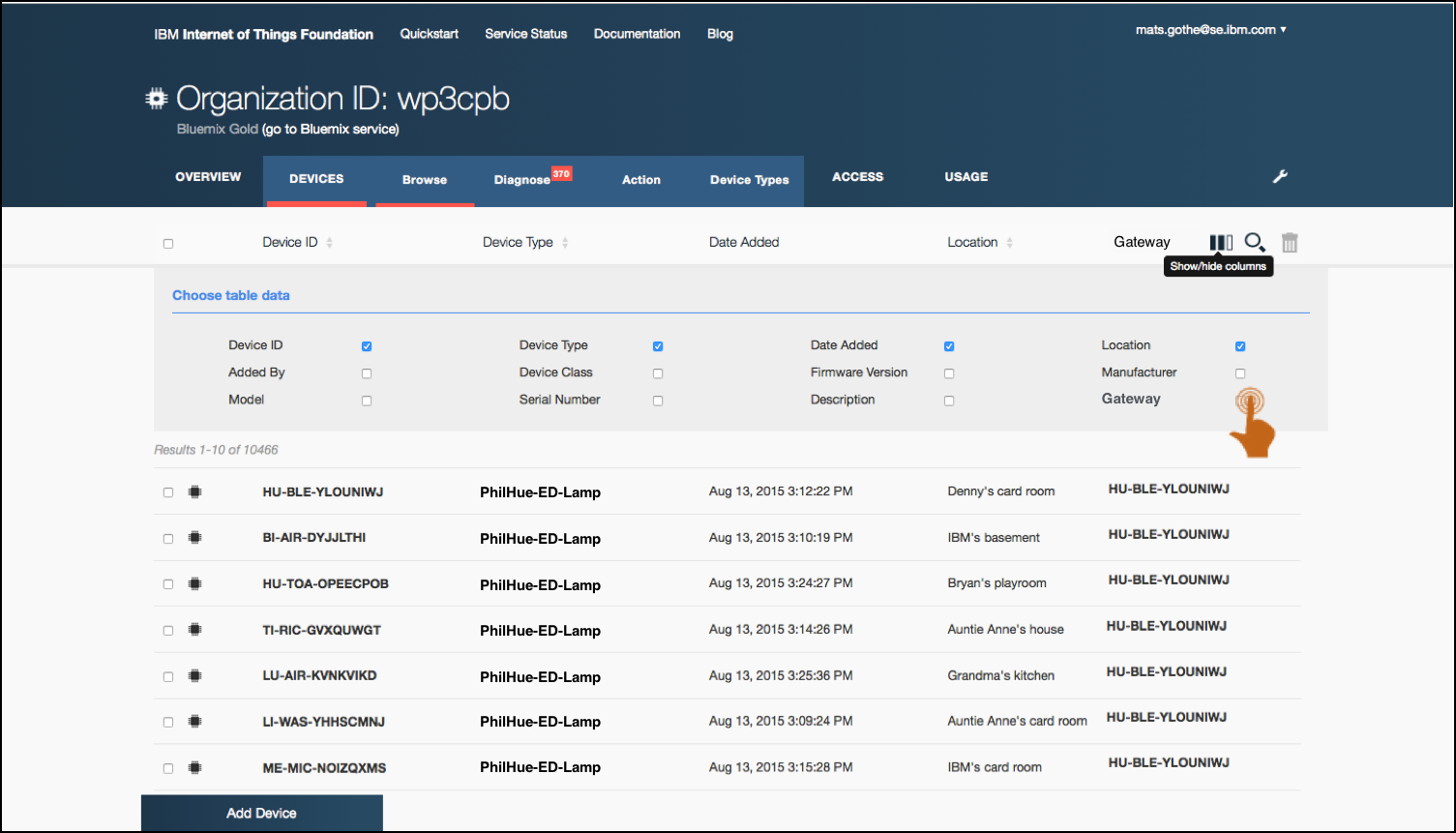
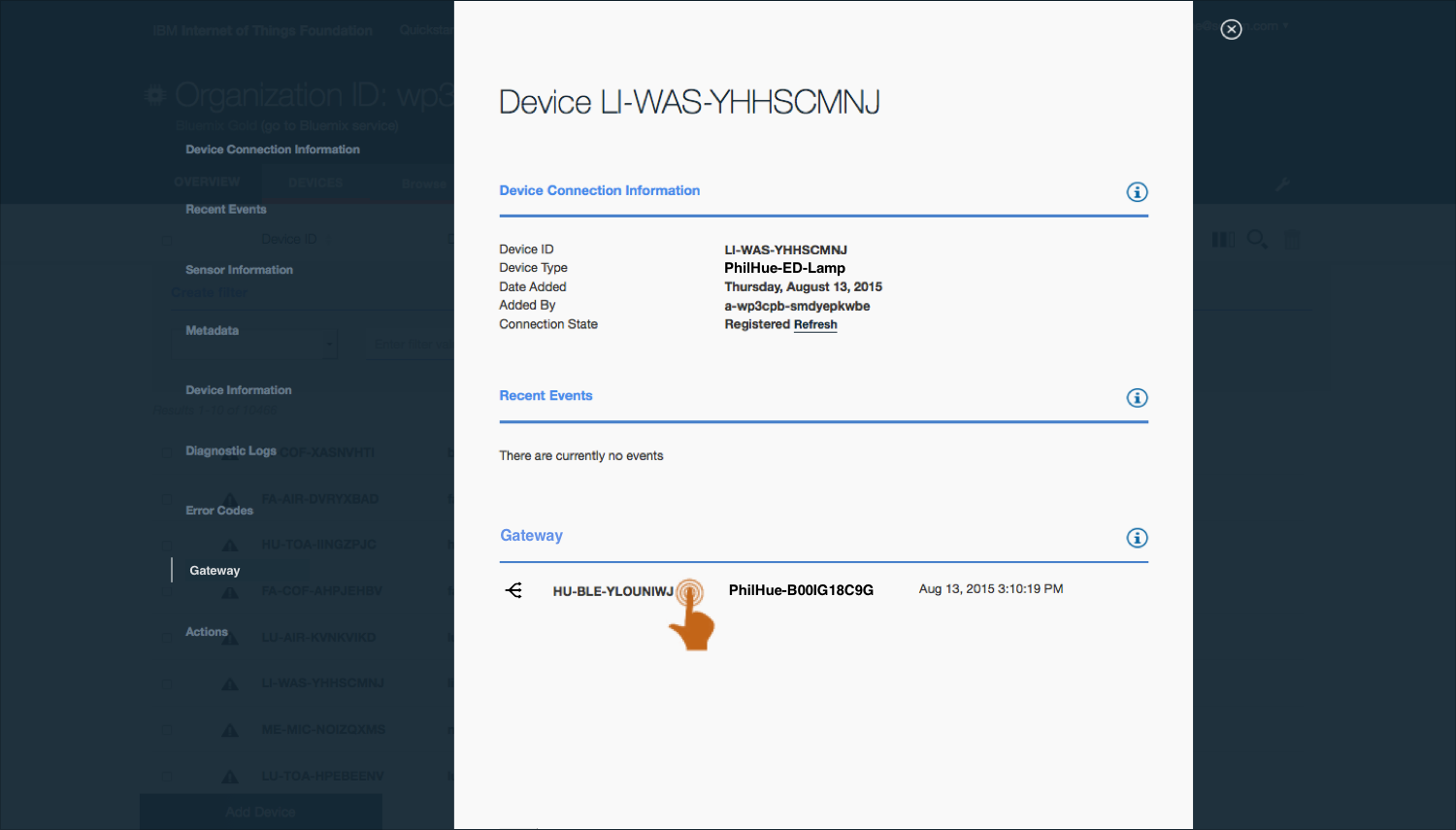
Viewing, searching and filtering gateways and attached devices.
Perform management actions on a type of devices connected through gateways
As an Operator I need to
- Open a view with gateways and devices
- Select a management action from a list of available actions
- Switch to the view to track running actions
- Monitor progress on the actions
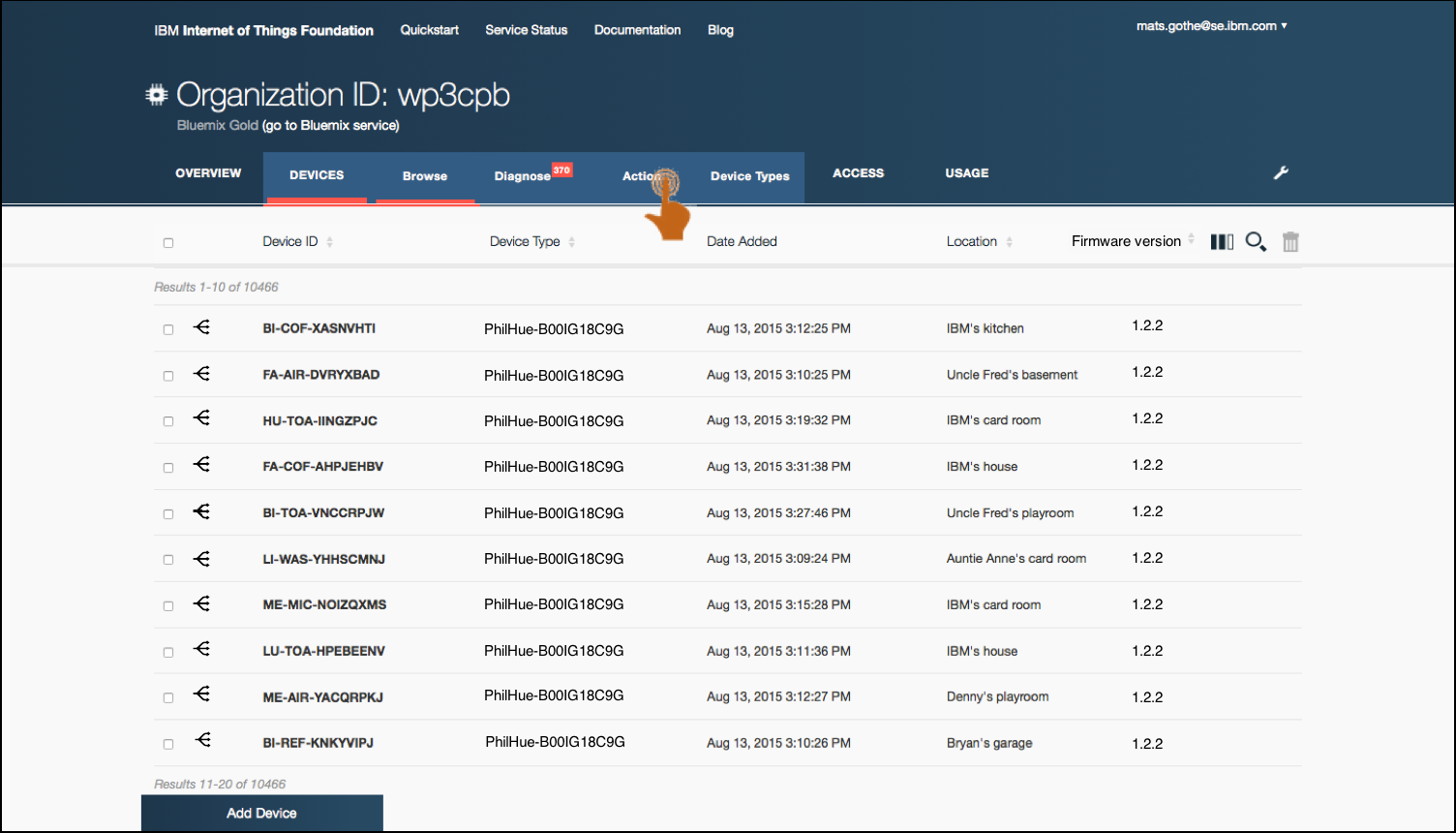
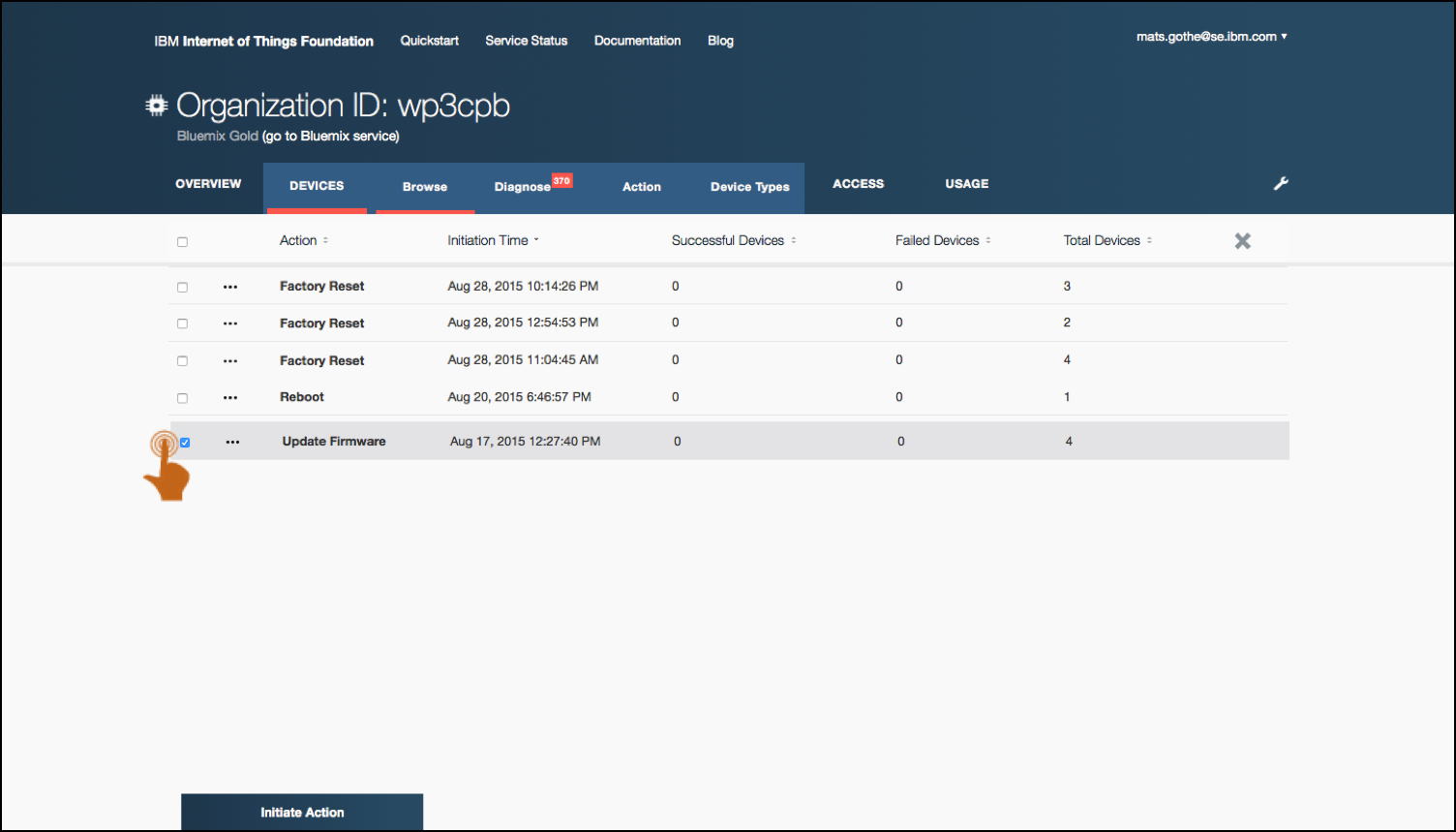
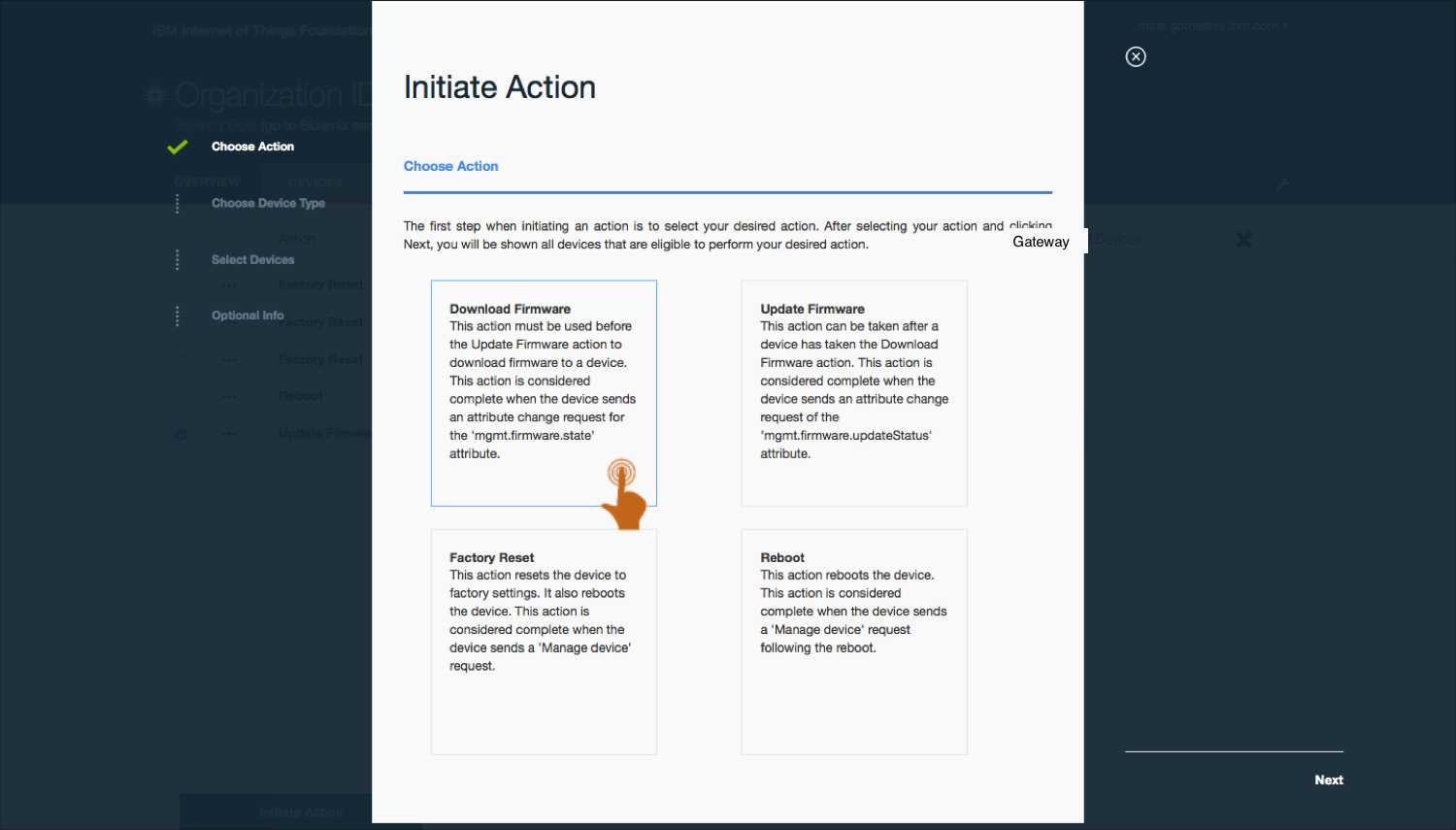
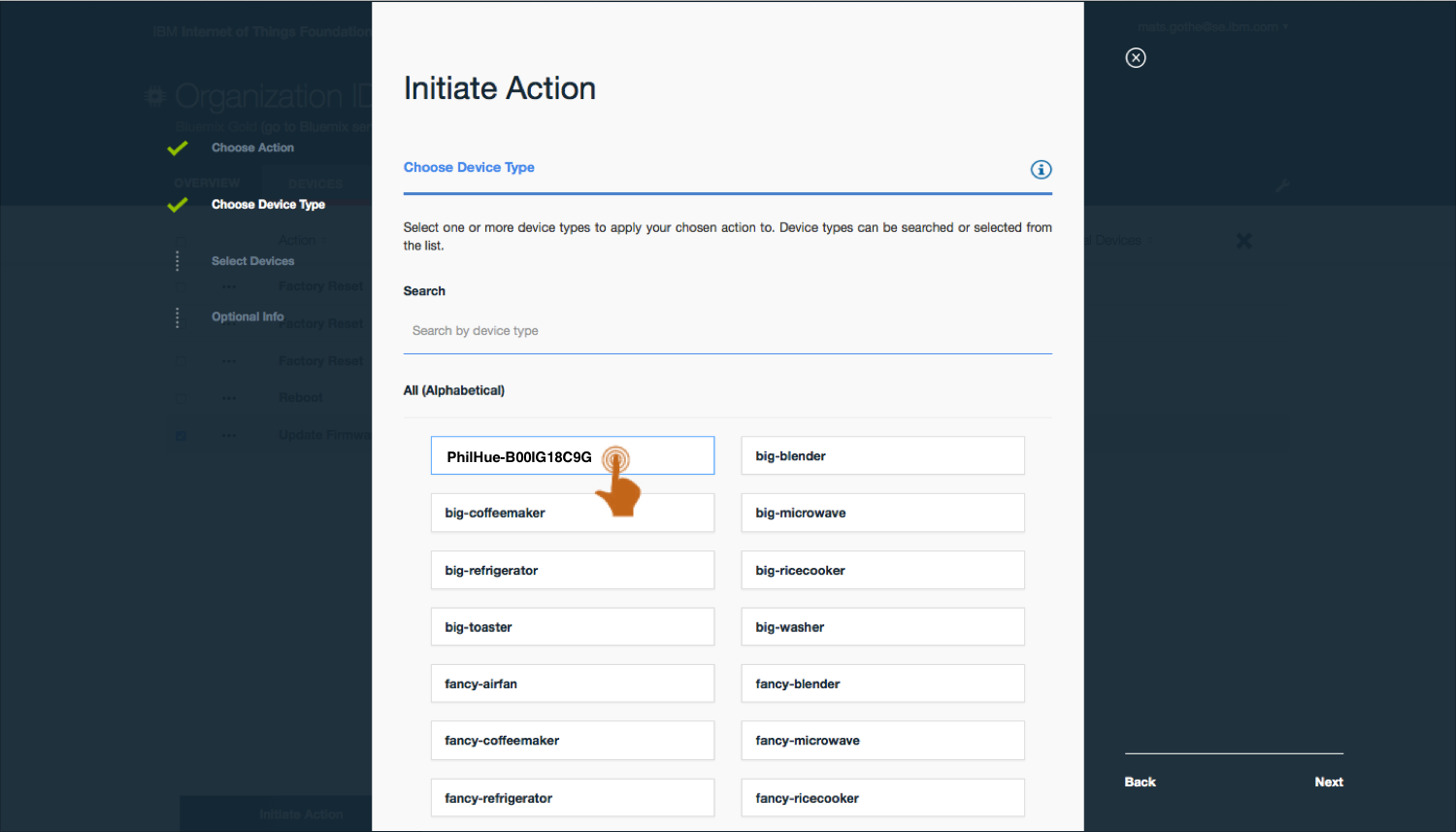
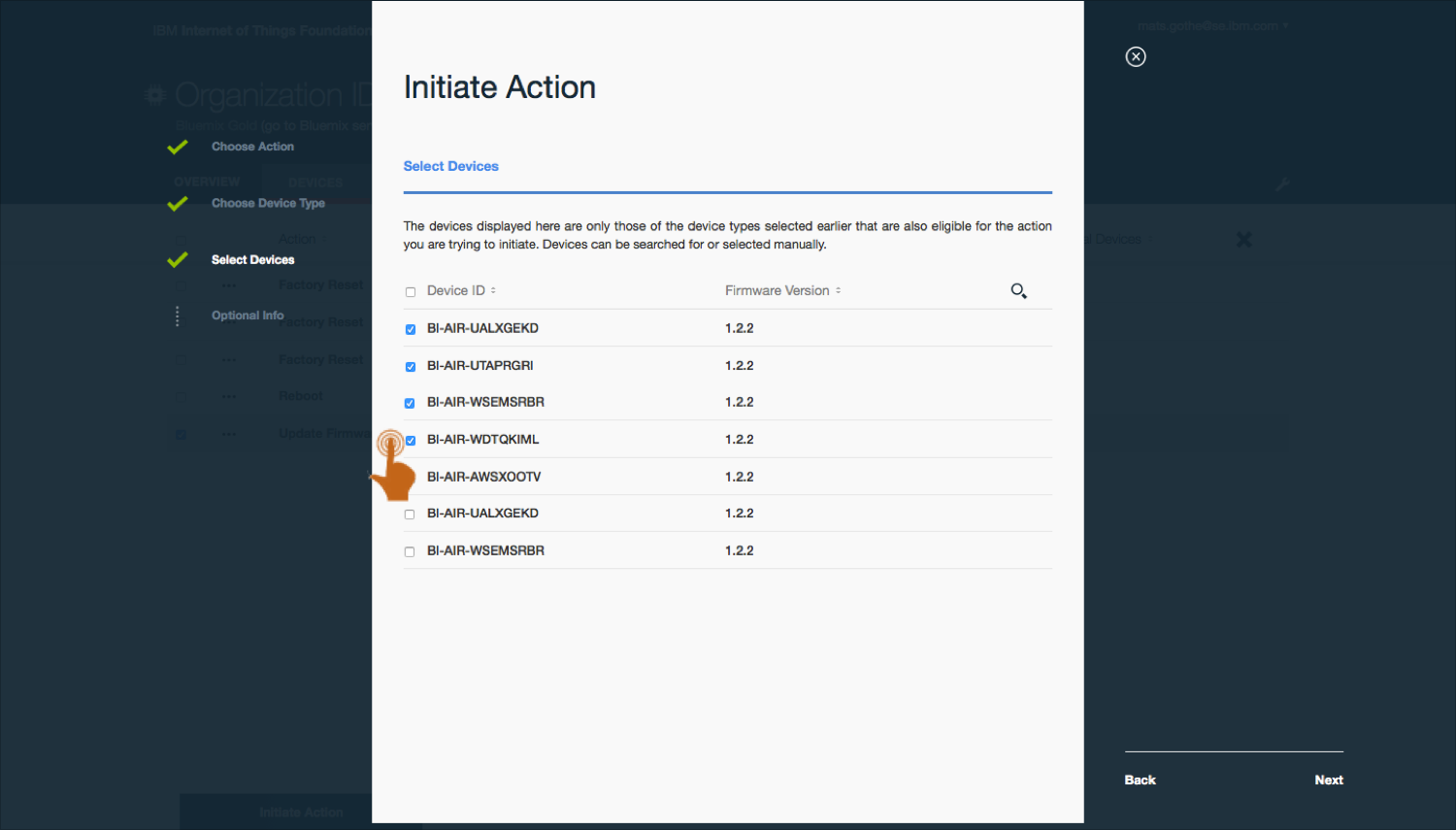
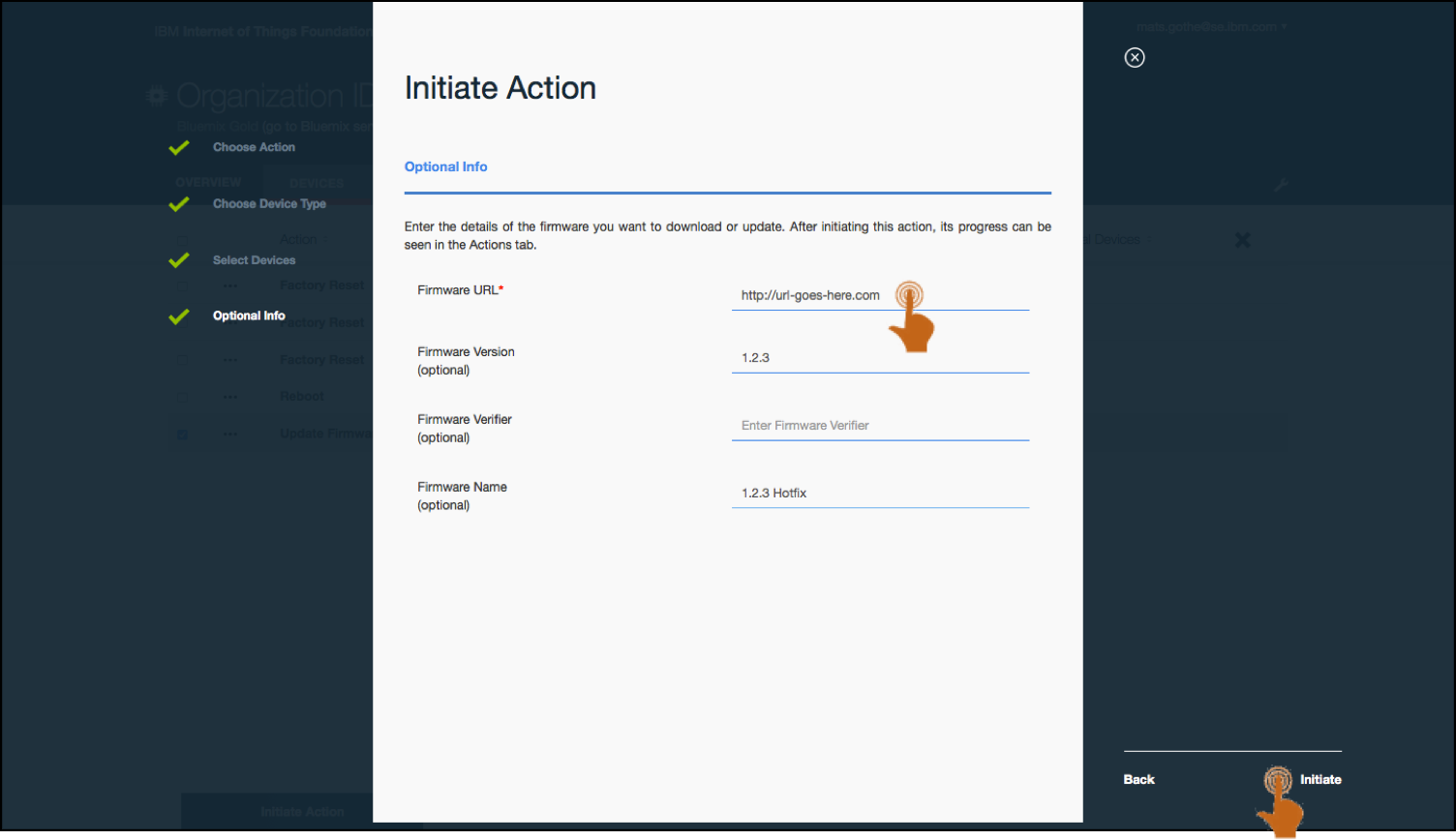

Performing management actions on a type of devices connected through gateways.
Final Production Design
Examples of UX design in the IoT Platform
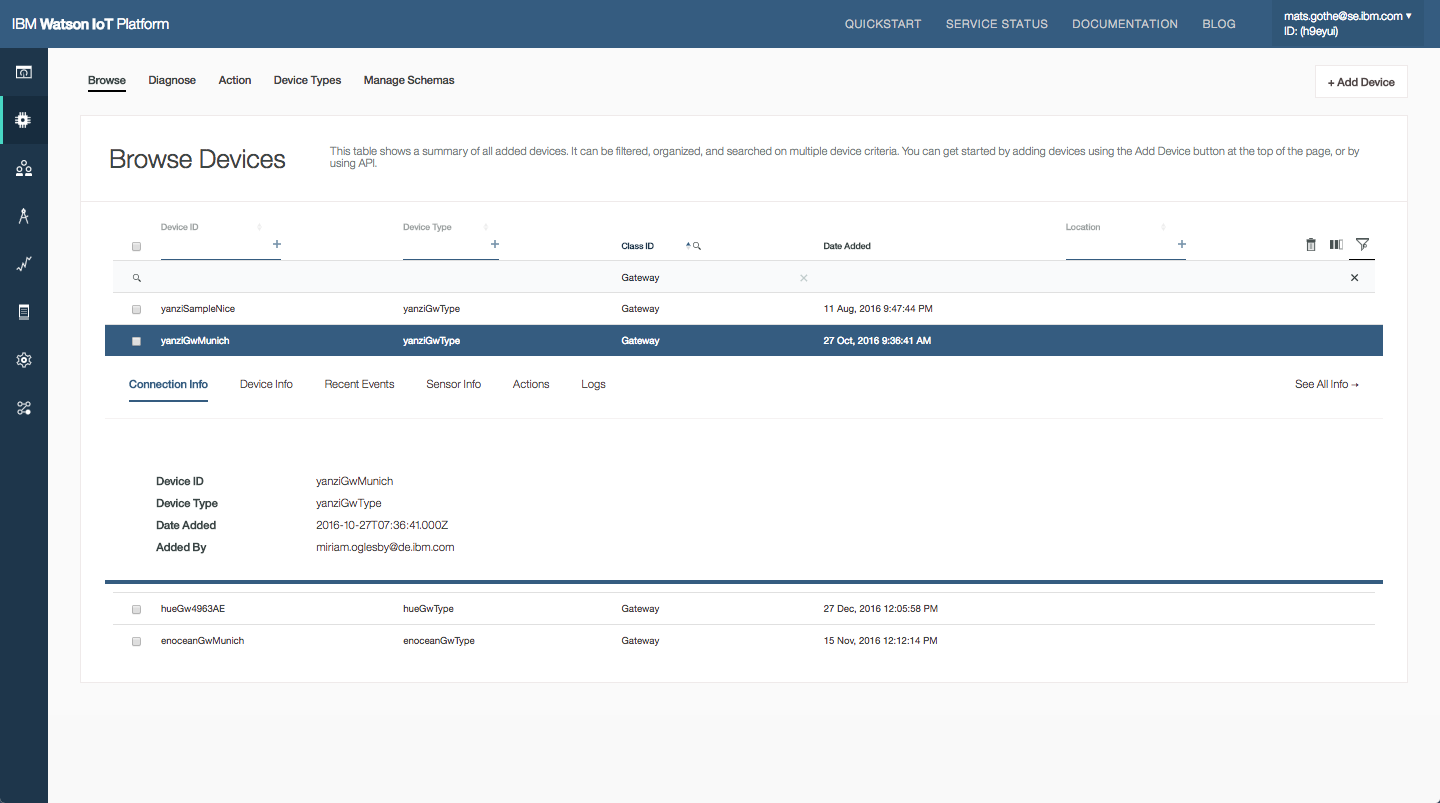
- Users can query for all devices with Class Id = Gateway. In this organisation we see 4 gateways are connected.
- Opening one of the gateways in Munich we can see all devices that are connected though that gateway.
- Opening a managed devcie we can see the gateway the devcie is connecting though.
- Filter on gateway and the devcie type to see all motion sensors connecting though the Munich Yanzi gateway.
- Another example using the Enocean gateway and its connected sensors
- Looking at the details of one of the Enocean sensors we see the device events and data sent to the IoT Platform.

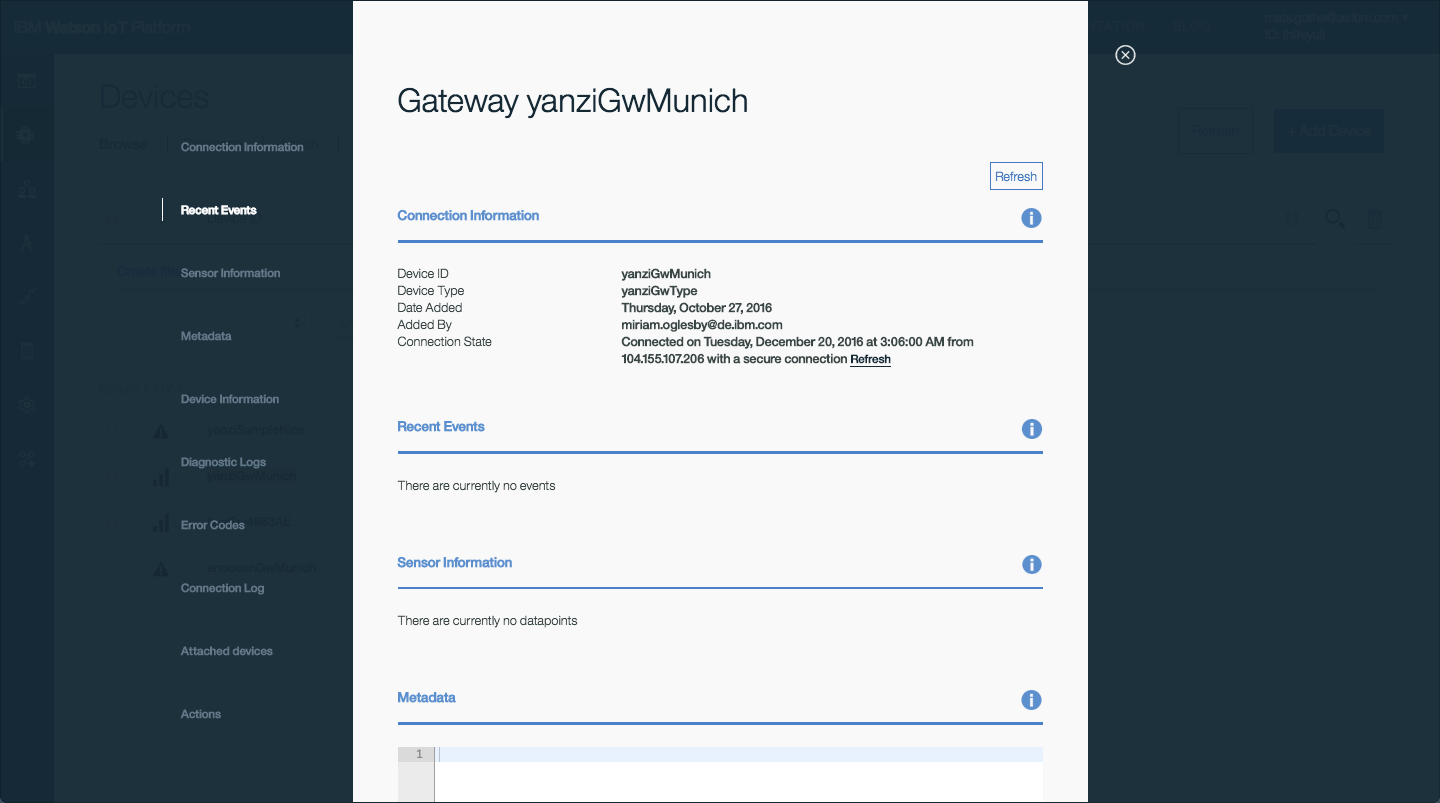
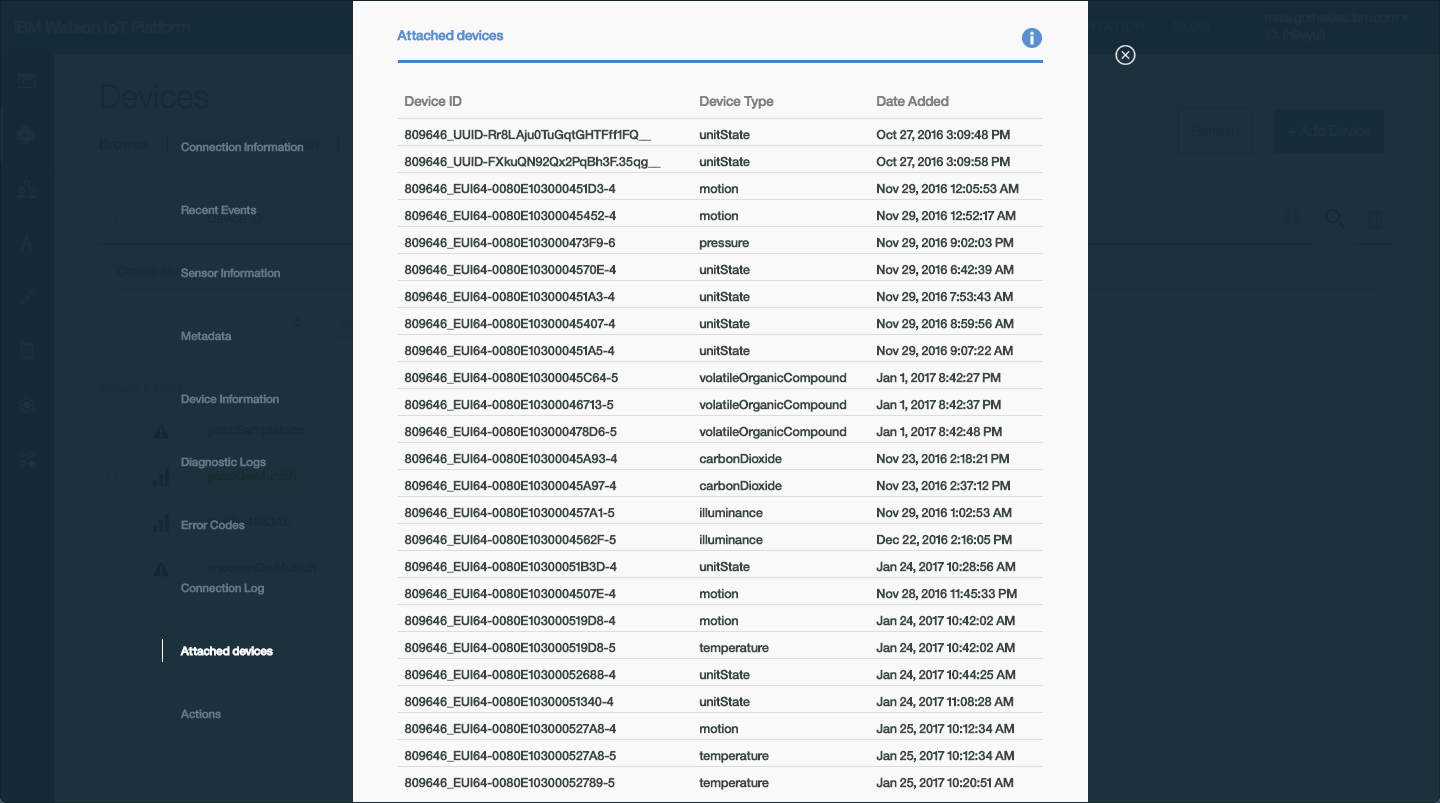
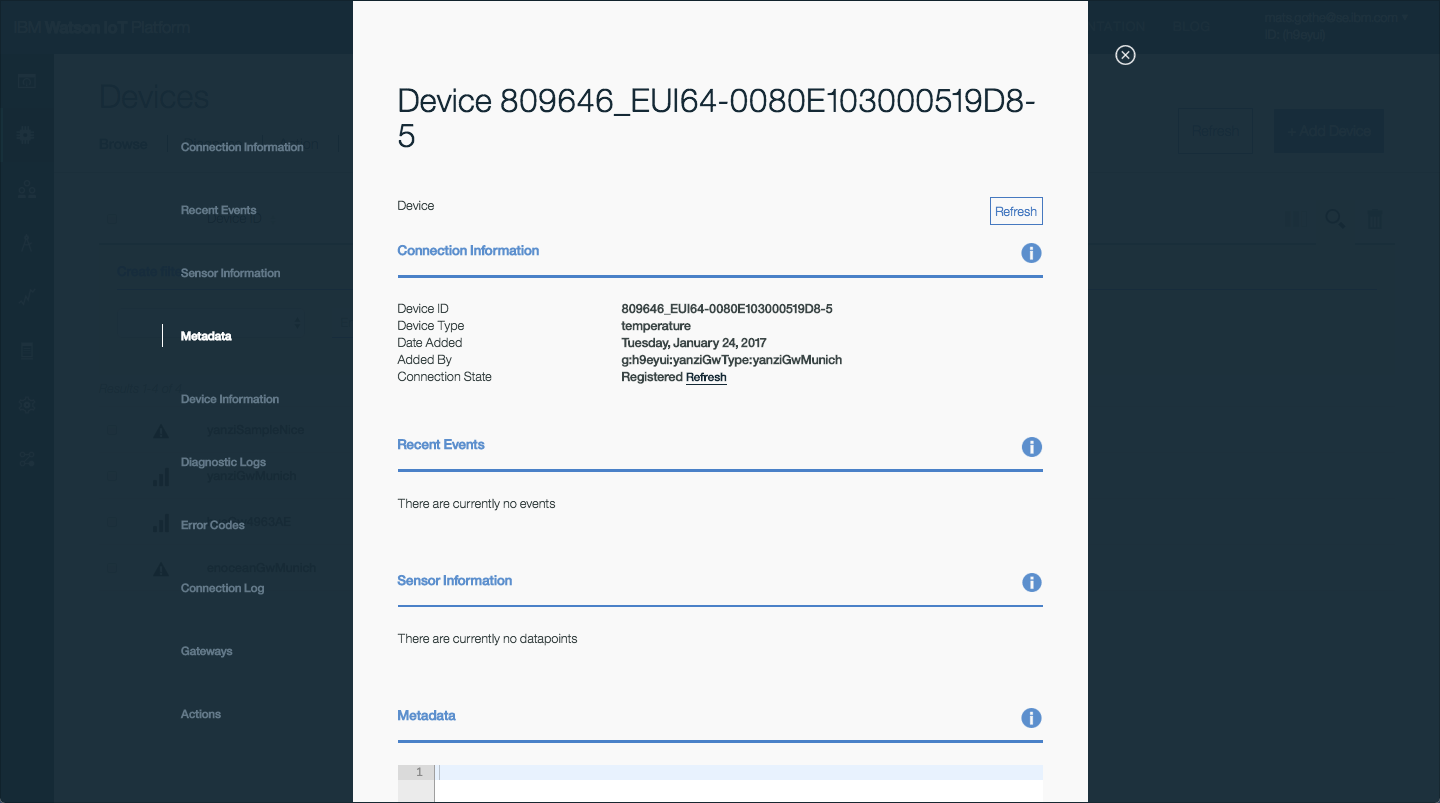
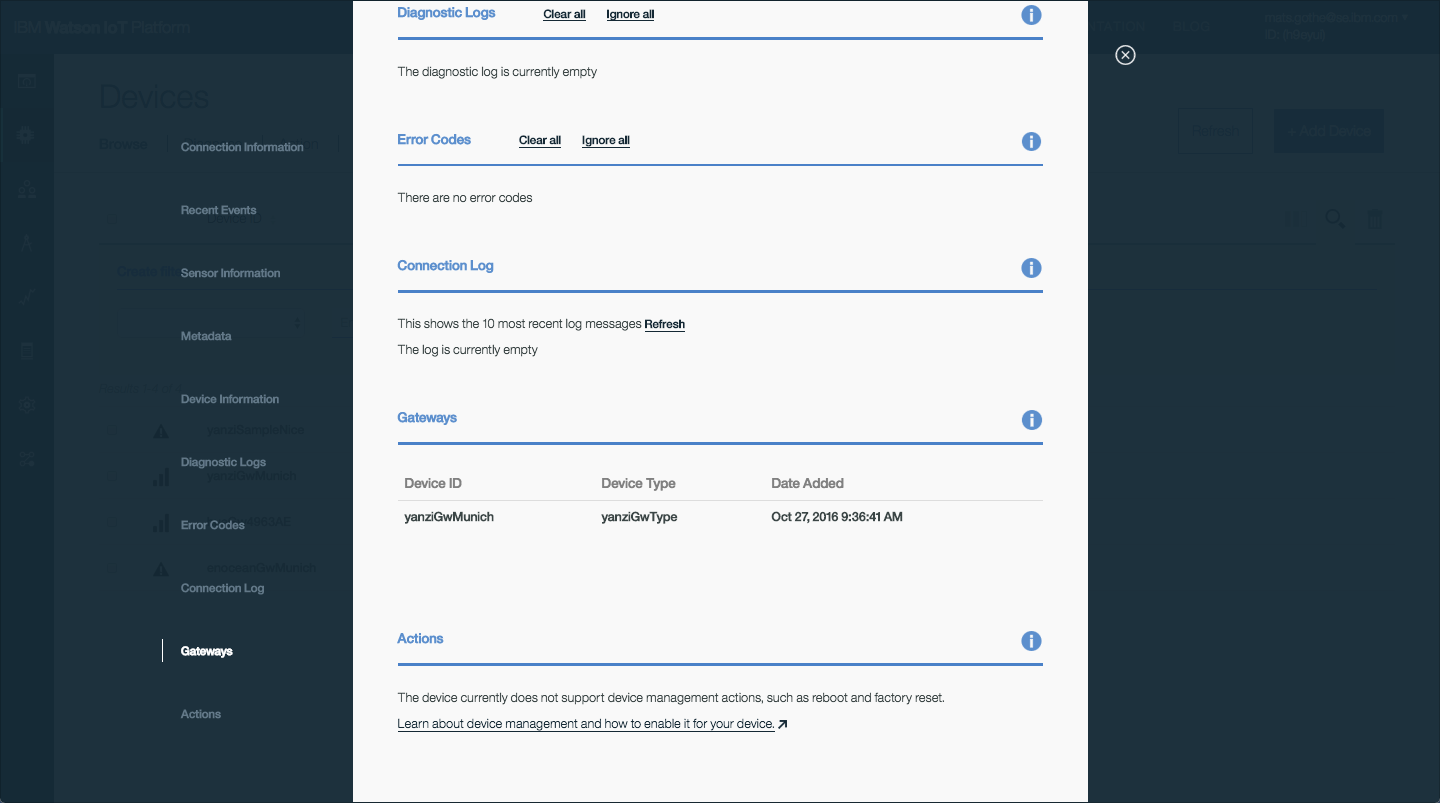

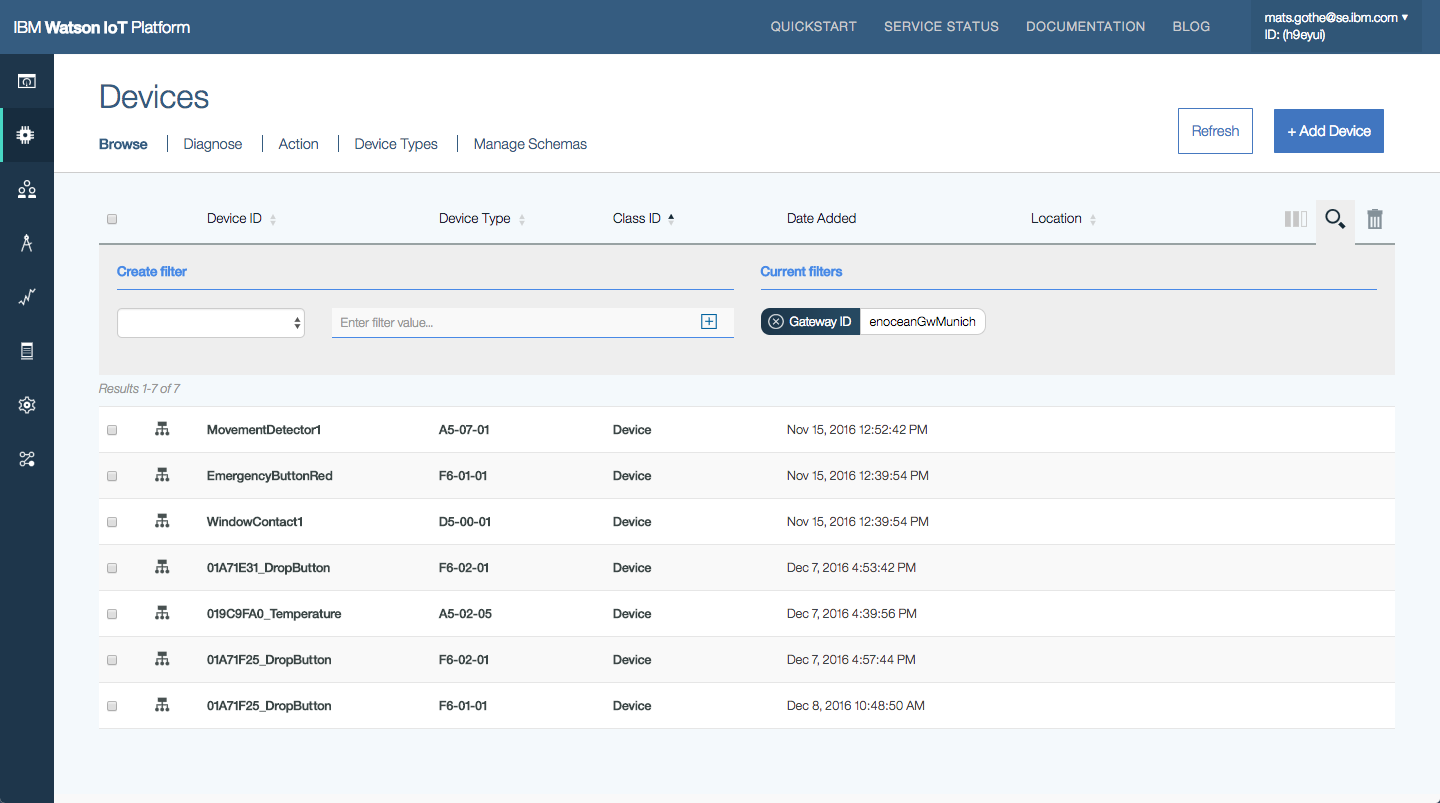
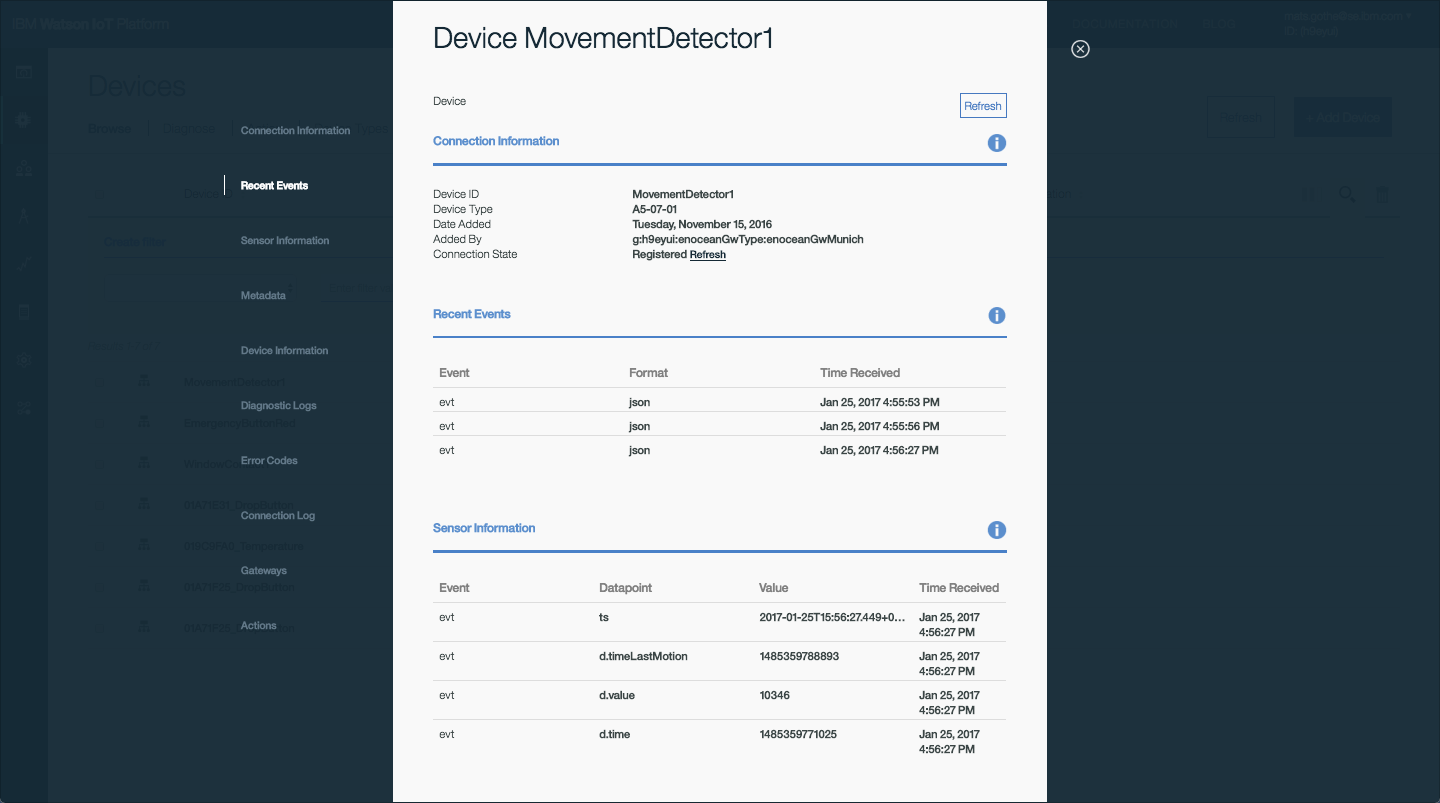
Final production design.
Performing management actions on a type of devices connected through gateways. [/su_panel]
In 2017 a new Devcie Table design is released. This new design will simplify the query / filter and user access to element information. In the screen below we are selecting all gateways by the Class ID = Gateway filter.
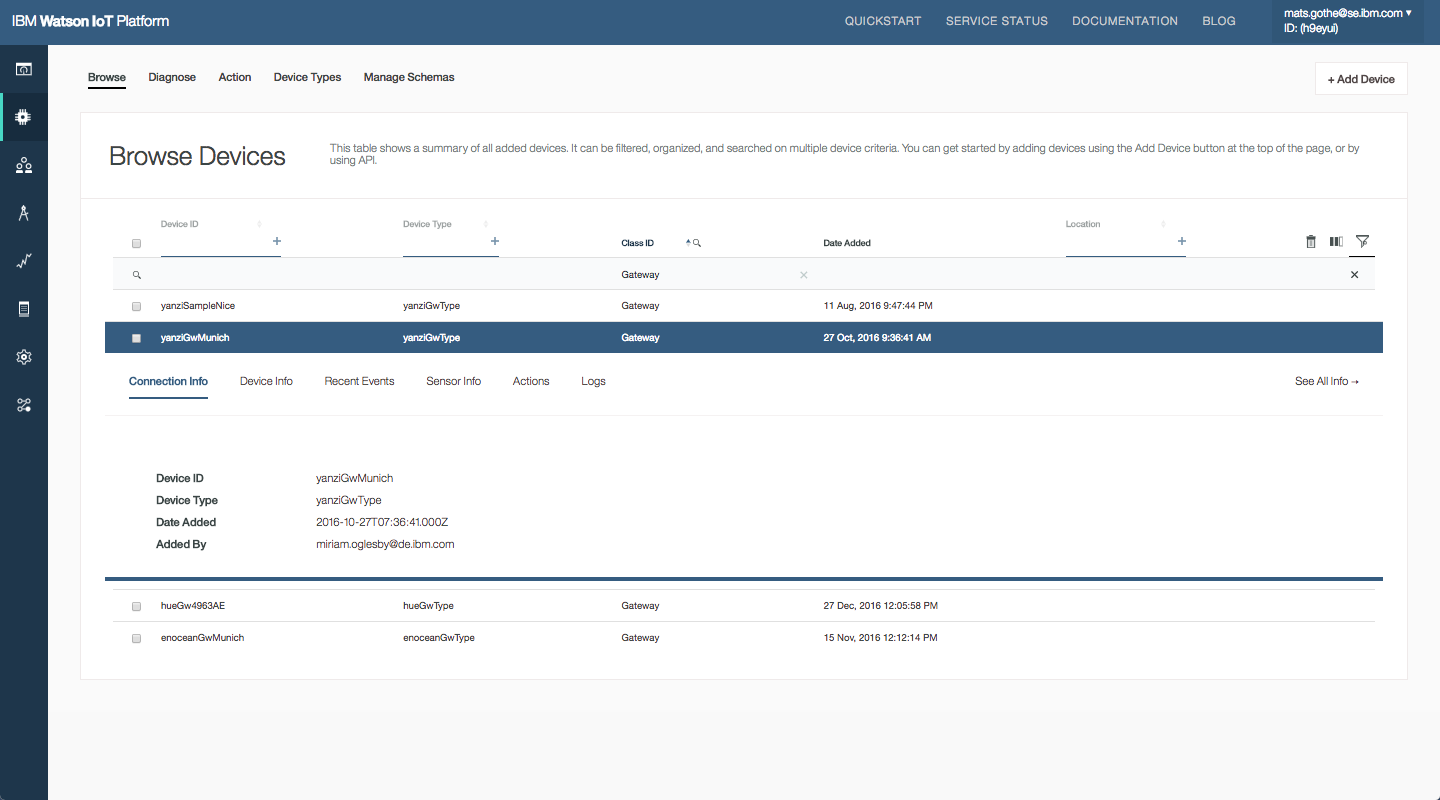
New production design for Devcie Tables in 2017.
Related Designs
The gateway design has enabled other related designs in 2016
- Edge gateways – Edge analytics is based on edge gateways to connect edge devices and run delegated edge rules. The Edge Gateways are using the gateway design to manage gateway types and instances.
- Platform of Platform – External cloud platforms are implementing the Gateway integration to register and connect devices in the external platform to the Watson IoT Platform. The external cloud platform is connected as a gateway and acting as a proxy by routing events and commend across the two platforms.
- Trusted and untrusted gateways – Improvements and restrictions by by applying resource level access control and permissions to gateways limiting capabilities for auto-registration and the devices a gateway can act on behalf of.
Most of our gateways are statically deployed. They are today deployed in lamp posts and traffic lights. There are some case where the gateway is deployed into a bus connecting over GPRS. But not as a mobile case where mobile devices are roaming across multiple gateways. – Watson IoT Platform partner.Playing Back the Watson IoT Platform Design
Playing back the Watson IoT Platform design
Abstract
The IBM Watson Internet of Things Platform delivers capabilities to create new value and new ways of working that brings together people, process and now things. In the first part of this session, we will introduce the IBM Design Thinking methodology and the platform personas and use cases explored in the IoT design. We will frame the discussion around our design objectives, also know as Hills, and play back the user experiences design using the IBM IoT Platformon Bluemix.
Download presentation
Designing the Configuration Management User Experience in CLM 6.0
We are nearing the release of Collaborative Lifecycle Management (CLM) 6.0 that will include Configuration Management (CfgM) across lifecycle projects, which we developed using IBM Design principles. One of these principles in our design thinking is the use of release hills to expresses user value, objectives and the scope of the release.
Our first hill for the 6.0 CfgM capabilities is to ensure that, ‘with minimal impact to current usage, team members can select a configuration related to their plan and be confident that they are using the right artefacts and links’. To meet this objective we designed a simple, usable and transparent user experience for practitioners to select, work and navigate in a configuration context.
Our second release hill is to ‘define configurations of a product under development consisting of requirements, tests, designs and implementation’. For this objective we designed configuration management administration in a new global configurations application.
Working with Artifacts and Links in a configuration context
User scenarios are a key part in our design process. In the scenarios for the first release hill we focus on how personas, like Susan a system engineer or Tony a tester, are using work item links to browse to artifacts in the right configuration context. For example, when following a link that Tony created in a defect, Susan would browse into the release baseline context to reproduce the defect. Or for change requests, Susan would browse into a development stream to update the linked artifacts. In both cases we pursued a design that simply switches the practitioner into the right configuration context.
In the CLM 6.0 release we designed a simple and transparent configuration selection and navigation mechanism for these scenarios. It’s based on the assumption that administrators or project leads will create ‘releases’ associated with project timeline iterations and global configurations in the work item system. Some ‘releases’ will represent immutable release baselines. Other releases will represent streams for new development.
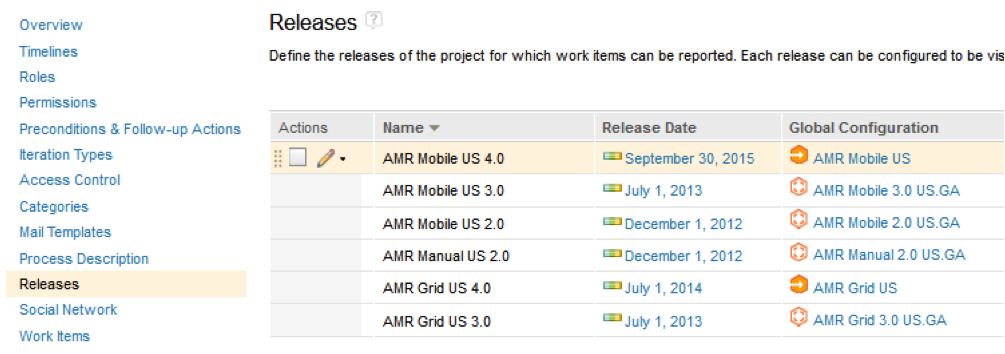
As project leads, self configuring teams or practitioners start assigning work to plans. The ‘Planned For’ and ‘Found In’ fields in the work items will be set and associated to such a ‘release’. When a practitioner follows a link to the target artifact, the right configuration and artifact version will be opened. The configuration is also used when hovering over a link to get a preview of the link target artifact. With this design, teams can easily adopt new configuration management practices with very low impact to users.

An alternate use-case for selecting a configuration is to use the Configuration Management menu on the application banner. By clicking the ‘Switch’ button a practitioner can browse and select a new configuration context. This simple design provides a consistent experience across the CLM 6.0 tools for requirements, tests or design. The configuration context information on the application banner, found on the left side of the menu, gives practitioners a simple and accessible way to see and confirm the current configuration context. Also, the configuration management menu is designed to provide basic and advanced actions for managing configurations and change, including creating streams and baselines, managing changes by comparing configurations and delivering changes across configurations.
Managing Global Configurations in the new Global Configurations application
The scenarios and design for configuration leads and administrators has taken aim at a much richer configuration management user experience in the new Global Configurations application. Here administrators can create Global Configuration project areas that define global components with stream and baselines that provide consistent configuration management across requirements, tests, design and implementation. Global configurations also provide key capabilities to manage products, product variants and reuse. The design of the Global Configurations tool provides a hierarchal editor for global configurations with consistent new flat and clean icons and easy to find context actions which are also easy to use.
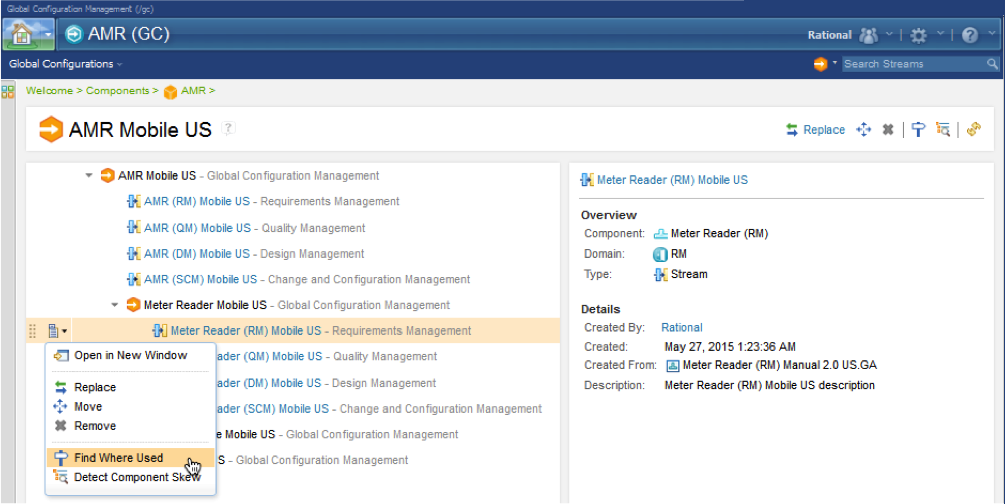
While the user experience is rich in configuration management administration capabilities, we also designed the tool to be easy to find and use for experienced practitioners that may need richer configuration management capabilities than provided by the tool configuration management menu. The design of the configuration management menu provides easy navigation directly to the Global Configuration editor for the current global configuration context by just clicking on the Global Configuration link in the menu. You can note this in the second image above this text.
The design of the Global Configurations tool provides great design consistency and usability. Project Area Configurations are picked and updated using consistent dialogs. The usability of the tool is improved through link navigation from the editor directly to the Project Area configuration in the context of the selected global configuration.
If you would like to see these new capabilities in action right away, you can give them a test run in the Jazz.net cloud trial area.
Download article
View article on Jazz.net